> For the complete documentation index, see [llms.txt](https://missiveapp.com/docs/llms.txt). Markdown versions of documentation pages are available by appending `.md` to page URLs; this page is available as [Markdown](https://missiveapp.com/docs/administration/security/exporting-your-data.md).
# Exporting your data
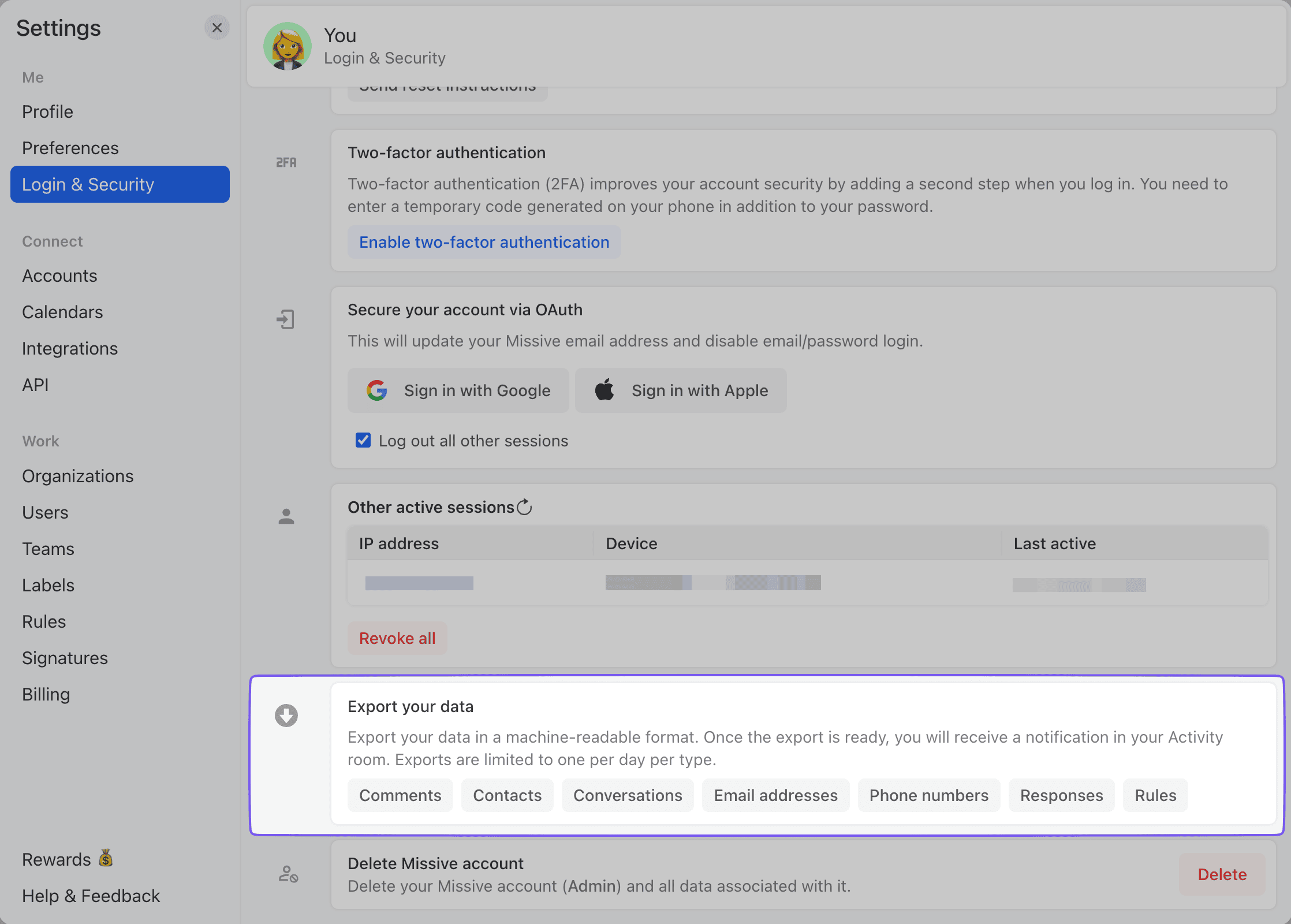
Export everything you have access to in Missive as machine-readable files: conversations, comments, contacts, responses, rules, email addresses and phone numbers.
## Requesting an export
Go to **Settings** > **Login & Security** > **Export your data** and click the type of data you want. You may be asked to confirm your password first.
When the export is ready, Missive posts a download link in a dedicated **Missive export** conversation in your inbox.
{% hint style="warning" %}
Exports are limited to one per day per type, and the download link expires after 7 days.
{% endhint %}
## What each export contains
Every export is a `.zip` file. It only includes data you have access to. Conversations in the trash are never included.
| Export | Scope | Files in the zip |
| ------------------- | --------------------------------------------------------------------------------------------- | ------------------------------------------------------------------------------------------------------------------------------------------------------------------------------- |
| **Conversations** | One export per organization you belong to, plus one for private conversations. Includes spam. | One folder per conversation with a `.json` file for the conversation and one `.json` file per message, draft, comment or post. Attachments sit next to the file they belong to. |
| **Comments** | One export per organization you belong to. | `.csv` files with one row per comment, plus a `files` folder for comment attachments. |
| **Contacts** | Every contact book you have access to. | One `.csv` file per contact book. |
| **Email addresses** | The From, To and Cc fields of every email you have access to. Excludes spam. | A single `.csv` file. |
| **Phone numbers** | The From and To fields of every SMS you have access to. Excludes spam. | A single `.csv` file. |
| **Responses** | Your personal responses, plus responses shared with each team and the whole organization. | One `.html` file per response and a `Files` folder for attachments. |
| **Rules** | Your personal rules, plus the rules of each organization you manage. | One `.csv` file for personal rules and one per organization. |
## Conversations export layout
Conversations are grouped by month, based on the date of the last message. Every file name starts with a timestamp in `YYYYMMDDHHMMSS` format, followed by a short ID.
```
2026-09/
20260914183000-a1b2c3d4/
20260914183000-conversation-a1b2c3d4.json
20260914183000-msg-e5f6a7b8.json
20260914183000-msg-e5f6a7b8-report.pdf
20260914183100-cmt-c9d0e1f2.json
20260914183200-post-d3e4f5a6.json
```
* The `conversation` file holds the subject, team, shared labels, assignees, and whether the conversation is closed or unassigned.
* Each `msg` file holds one email or SMS with its addresses, subject and body. Sent drafts show up as `msg`, unsent drafts as `draft`.
* Each `cmt` file holds one comment with its author and text.
* Each `post` file holds one post from an integration, with its text and attachments.
## Tasks in exports
Tasks have no export type of their own. Use the **Conversations** export to get all your tasks.
Every task in that export comes with its title, status (`todo`, `in_progress` or `completed`), description, due date, start and completion times, and assignees. Where you find it depends on the [type of task](/docs/core-features/tasks.md#types-of-tasks):
* A **conversation task** or a **standalone task** is a conversation, so its details are in the `task` field of the `conversation` file. Since a standalone task has no messages or comments, that file is the only one in its folder.
* A **subtask** is created from a comment, so its details are in the `task` field of that comment's `cmt` file.
A conversation or comment that is not a task has no task details.
The **Comments** export only knows about subtasks, since it is one row per comment. A subtask row has the `task`, `task_state`, `task_assignees`, `task_started`, `task_completed`, `task_due` and `task_description` columns filled in.
---
# Agent Instructions
This documentation is published with GitBook. GitBook is the documentation platform designed so that both humans and AI agents can read, navigate, and reason over technical content effectively. Learn more at gitbook.com.
## Querying This Documentation
If you need additional information that is not directly available in this page, you can query the documentation by asking a question.
Perform an HTTP GET request on the following URL with the `ask` and `goal` query parameters:
```
GET https://missiveapp.com/docs/administration/security/exporting-your-data.md?ask=&goal=
```
`ask` is the immediate question: it should be specific, self-contained, and written in natural language.
`goal` is what the user is ultimately trying to achieve, the reason they need the answer. Sharing it helps GitBook give you a better, more relevant answer. A goal is most helpful when it describes the outcome the user wants rather than restating the question. For example, with `ask=how do I create an API token`, a goal like `automate deployments from our CI pipeline` lets GitBook tailor the answer to that use case.
The response will contain a direct answer to the question and relevant excerpts and sources from the documentation.
Use this mechanism when the answer is not explicitly present in the current page, you need clarification or additional context, or you want to retrieve related documentation sections.