> For the complete documentation index, see [llms.txt](https://missiveapp.com/docs/llms.txt). Markdown versions of documentation pages are available by appending `.md` to page URLs; this page is available as [Markdown](https://missiveapp.com/docs/advanced-features/analytics/reports.md).

# Reports

Generate reports on team activity, response times, and conversation volume.

Missive offers 5 different reports. Basic analytics provide access to the Overview report only, while advanced analytics available to Business plan subscribers offer additional data points and greater granularity to monitor user and team performance.

## Overview report

The overview report provides a high-level view of your organization’s performance. It features multiple data points visualized in one or more charts to give a perfect snapshot. You can also compare similar data points in a larger chart.

<div data-with-frame="true"><img src="https://3242897856-files.gitbook.io/~/files/v0/b/gitbook-x-prod.appspot.com/o/spaces%2F1If7JwIQhfz5wGM9LiIU%2Fuploads%2FN2LjsCoU7f0TwnbLVlzC%2Fanalytics%20overview%20189c8f63087135d34874e5ffbf28bb2d8ae071031910b76a6f20a8f3ca031bd8.png?alt=media&amp;token=7d709de4-50c2-4355-bb69-5fb5084319bb" alt=""></div>

## Performance reports

### Users

The Users report is ideal for comparing the performance of your employees. All the users in your organization will be listed in a table view, allowing you to compare their Messages sent, Replies sent, Replied conversations, First reply time, Reply time, and Handle time.

<div data-with-frame="true"><img src="https://3242897856-files.gitbook.io/~/files/v0/b/gitbook-x-prod.appspot.com/o/spaces%2F1If7JwIQhfz5wGM9LiIU%2Fuploads%2FxU0bow6vycOTwaWUvd8r%2Fanalytics%20users%20ff123860bf9ad49e74e273e0f4ffebdb60cc39dad211496647e0a1426f761b45.png?alt=media&amp;token=8c4142f0-806d-4029-a0c4-d3d03fea204a" alt="You can compare each user data point to the previous period, the top row, and the average (of all users)."></div>

### Teams

The Teams report is perfect for comparing the performance and load of your teams, departments, and functions. All the teams in your organization will be listed in a table view, allowing you to compare their new conversations, messages received, messages sent, replies sent, replied conversations, first reply time, reply time, and handle time.

<div data-with-frame="true"><img src="https://3242897856-files.gitbook.io/~/files/v0/b/gitbook-x-prod.appspot.com/o/spaces%2F1If7JwIQhfz5wGM9LiIU%2Fuploads%2F5waVyWGvVcFQGf6hc46l%2Fanalytics%20teams%200fc45601a117c277afbd5d544a929a9d80aad7373c4fc7e34e47541fd6acf7e7.png?alt=media&amp;token=38824821-b466-4970-a101-3f35d3e9fdfc" alt="You can compare each team data point to the previous period, the top row, and the average (of all teams)."></div>

## Statistics reports

### Accounts

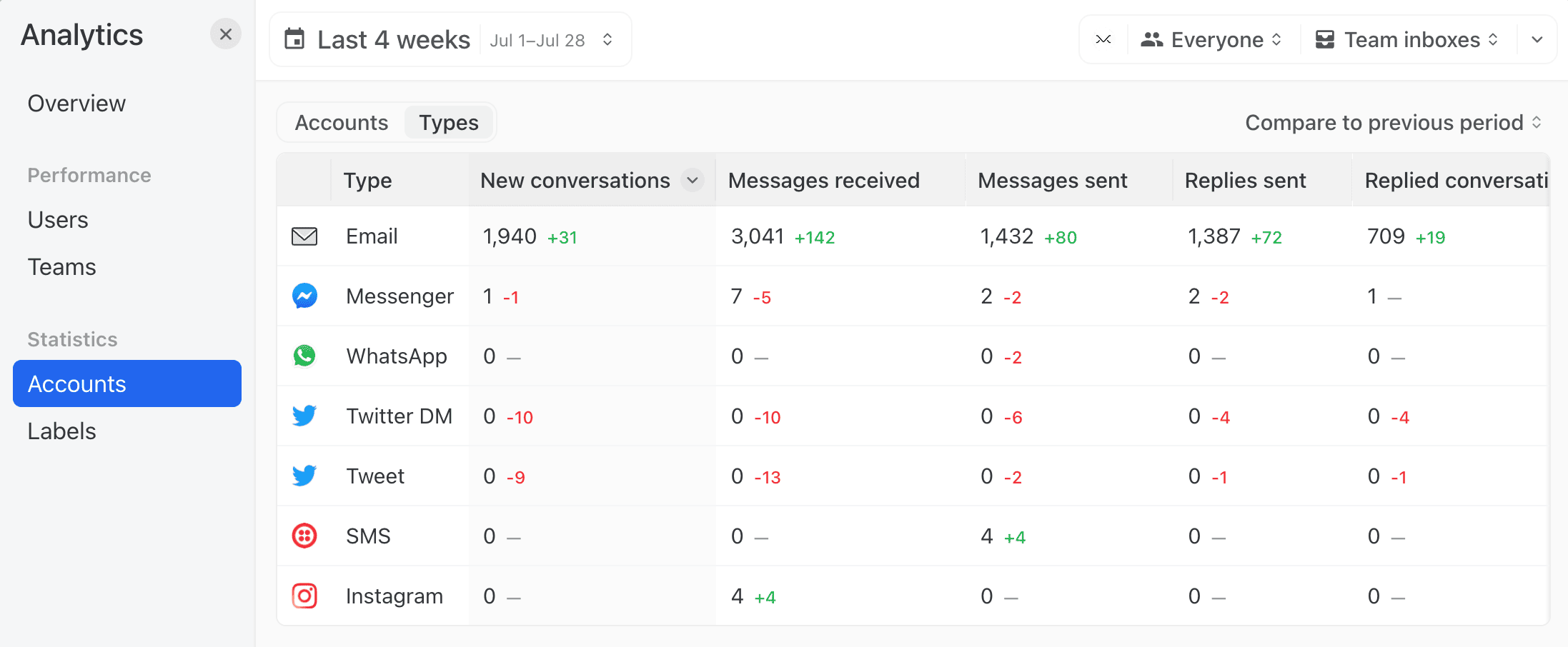
The Accounts report offers two views: by **Accounts** (each account listed individually) or by **Type of accounts** (all accounts merged by type: email, WhatsApp, SMS, etc.).

All the accounts or types will be listed in a table view, allowing for comparison of their New conversations, Messages received, Messages sent, Replies sent, Replied conversations, First reply time, Reply time, and Handle time.

<div data-with-frame="true"><img src="https://3242897856-files.gitbook.io/~/files/v0/b/gitbook-x-prod.appspot.com/o/spaces%2F1If7JwIQhfz5wGM9LiIU%2Fuploads%2FH4oA4B8nO86Ncl4uTSam%2Faccounts%20analytics%2088638f3aec0359b1db5e58ca49680539e1f9ec148e54c4917c83778930b6a32c.png?alt=media&amp;token=7d0777c3-ce78-4f3c-8bc0-eadf143c6495" alt="You can compare each team data point to the previous period, the top row, and the average (of all accounts)."></div>

### Labels

All the labels of your organization will be listed in a table view, allowing you to compare various metrics such as: Applied, Removed, Duration, New conversations, Messages received, Messages sent, Replies sent, Replied conversations, First reply time, Reply time, and Handle time.
<div data-with-frame="true"><img src="https://3242897856-files.gitbook.io/~/files/v0/b/gitbook-x-prod.appspot.com/o/spaces%2F1If7JwIQhfz5wGM9LiIU%2Fuploads%2FKeLTDc0EIheHqrUPUIkS%2Fanalytics%20labels%209bd1d52af2952740512e93ff29e1b1a670f278e14dbd69f9e9d64aa0f21713e0.png?alt=media&amp;token=0d795bf3-f6c0-4f2b-a41f-7dc15d8d28ad" alt="You can compare each label data point to the previous period, the top row, and the average (of all labels)."></div>

## Time series charts

In the Users, Teams, Accounts, and Labels tables, you can click any metric value to expand a time series chart for that row. The chart plots the metric over the selected date range and compares it against whichever comparison mode is active — previous period, top row, or average.

Click the metric again to collapse the chart.


---

# Agent Instructions
This documentation is published with GitBook. GitBook is the documentation platform designed so that both humans and AI agents can read, navigate, and reason over technical content effectively. Learn more at gitbook.com.

## Querying This Documentation
If you need additional information that is not directly available in this page, you can query the documentation by asking a question.

Perform an HTTP GET request on the following URL with the `ask` and `goal` query parameters:

```
GET https://missiveapp.com/docs/advanced-features/analytics/reports.md?ask=<question>&goal=<user_goal>
```

`ask` is the immediate question: it should be specific, self-contained, and written in natural language.
`goal` is what the user is ultimately trying to achieve, the reason they need the answer. Sharing it helps GitBook give you a better, more relevant answer. A goal is most helpful when it describes the outcome the user wants rather than restating the question. For example, with `ask=how do I create an API token`, a goal like `automate deployments from our CI pipeline` lets GitBook tailor the answer to that use case.

The response will contain a direct answer to the question and relevant excerpts and sources from the documentation.

Use this mechanism when the answer is not explicitly present in the current page, you need clarification or additional context, or you want to retrieve related documentation sections.
