> For the complete documentation index, see [llms.txt](https://missiveapp.com/docs/llms.txt). Markdown versions of documentation pages are available by appending `.md` to page URLs; this page is available as [Markdown](https://missiveapp.com/docs/advanced-features/integrations/faq.md).
# Integrations FAQ
Common questions about integrations in Missive.
### General
Is there a limit on how many integrations I can connect?
Yes. Each user and each organization can connect up to **100 integrations** each.
You can connect more than one integration of the same type. For example, you can connect multiple Shopify stores or multiple Zoom accounts as separate integrations.
Is there a sandbox environment for testing API and webhook integrations?
Missive doesn't offer a dedicated sandbox environment.
To test integrations without affecting your production data, create a separate organization for testing. It needs its own paid subscription: billing is per organization, and the 30-day trial follows you rather than the organization, so a second one doesn't come with a trial.
A one-month subscription on the Productive plan is usually enough to build and test an integration before you point it at your live data.
Is there a limit on how many API tokens I can create?
Yes. Each user can have up to **10 active API tokens**.
Manage your tokens in **Settings** > **API**.
Do you support integration with [specific tool]?
Check the [list of available integrations](/docs/advanced-features/integrations.md#available-integrations) to see if the tool you need is supported.
If the integration you need isn't available:
* **Build a custom integration** using the [REST API, webhooks, or UI/iFrame framework](/docs/advanced-features/integrations/build-your-own.md)
* **Hire a developer** from the [Missive Partners directory](https://missiveapp.com/partners) to build it for you
* **Request the feature** at [feedback.missiveapp.com](https://feedback.missiveapp.com/) to help prioritize future integrations
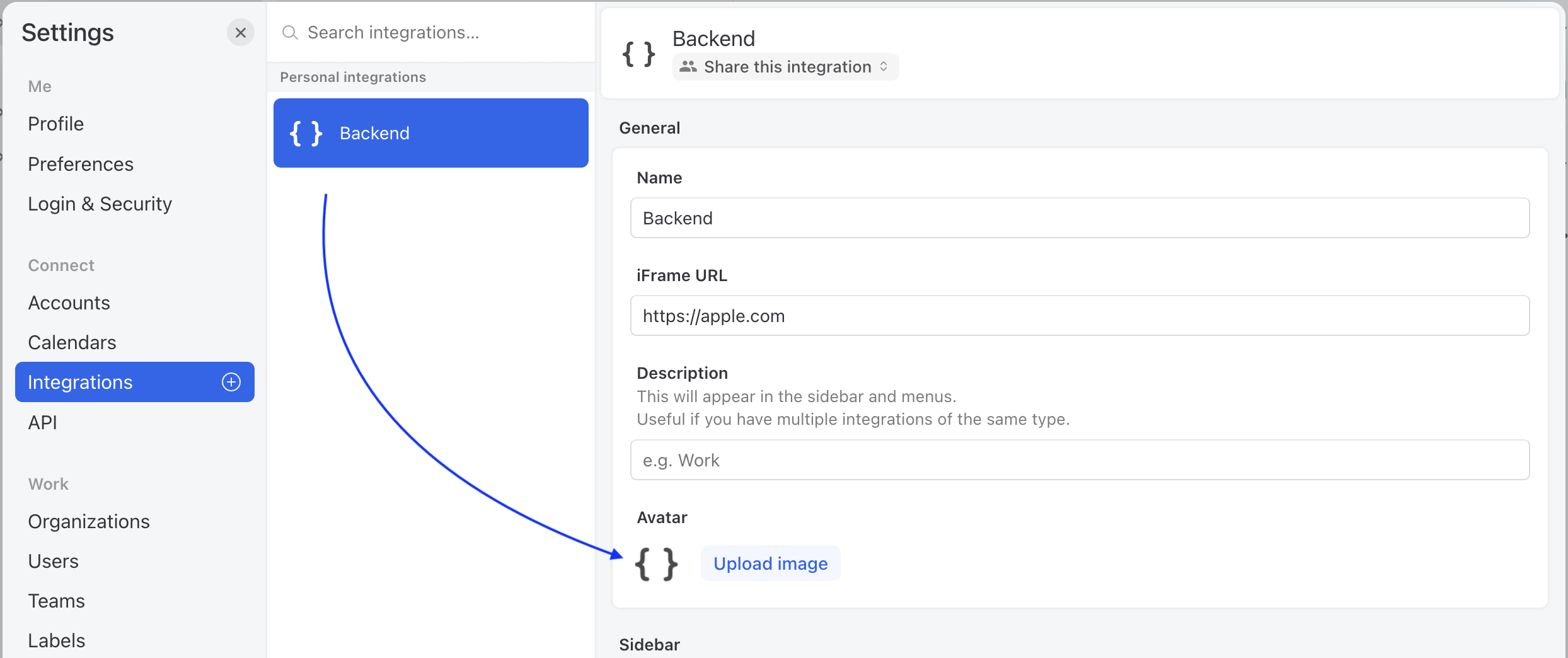
Can I set custom integration icons?
You can change any integration (both custom and built-in) icon by clicking the icon/button in the Integrations settings.
Do you offer an integration with WhatsApp?
Yes! Here is how to [add a WhatsApp account](/docs/core-features/connected-accounts/other-channels/whatsapp.md) to Missive.
Why is Adobe Acrobat Send Mail not working?
Adobe Acrobat's email integration only supports Apple Mail and Outlook on Mac. It doesn't work with Missive, Thunderbird, or other email apps.
Save PDFs as files, then attach them to your Missive drafts.
### AI (OpenAI, Anthropic, Gemini)
For AI-related questions, see the [AI FAQ](/docs/ai/using-ai/faq.md).
### Zapier
What triggers and actions are available?
The [Zapier integration](https://zapier.com/apps/missive/integrations) offers:
**Triggers:**
* (Instant) New Message (Email, SMS, etc.)
* (Instant) New Comment
* New Contact Book
* New Contact Group
* New Contact
**Actions:**
* Create Post
* Create/Send Draft
* Create Contact
* Update Contact
**Searches:**
* Find a Contact
* Find or Create Contact
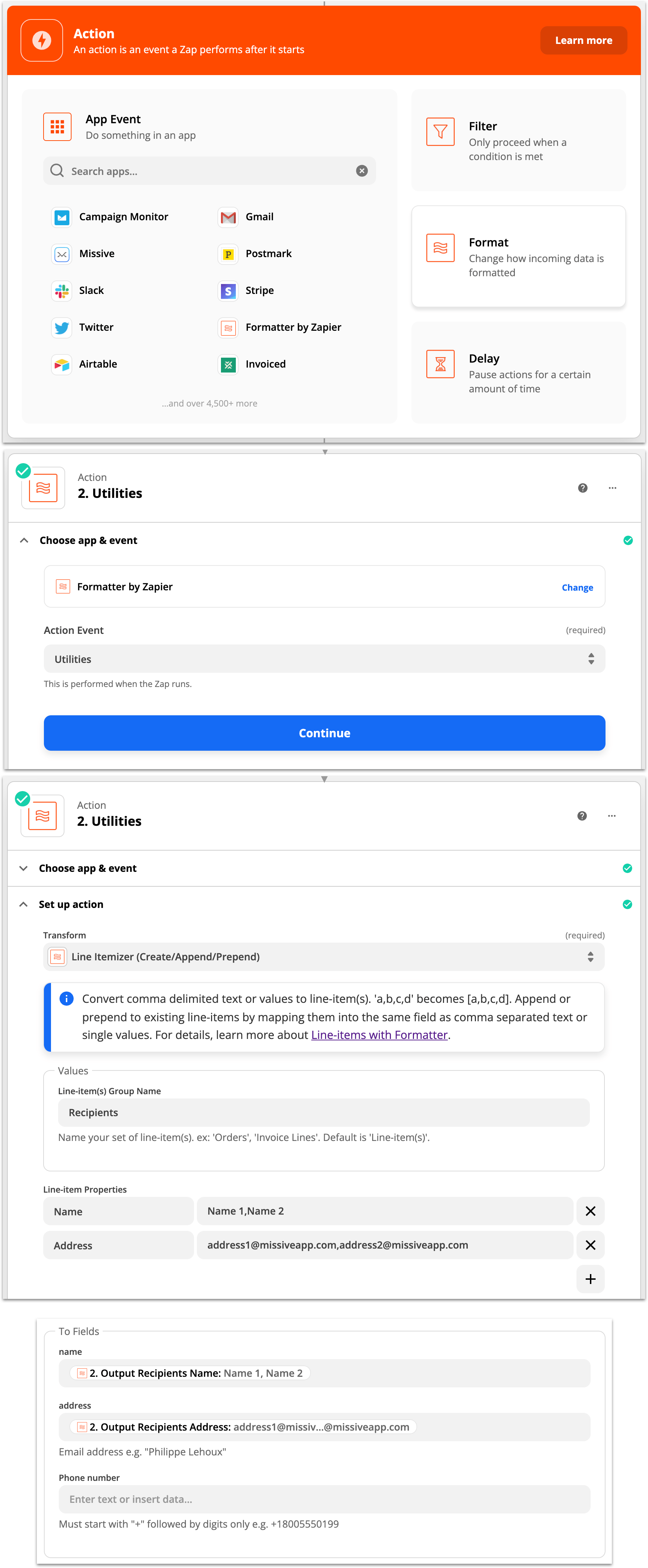
How to insert multiple To/Cc addresses in Create Draft?
Convert your input into line items. See [Zapier's documentation](https://zapier.com/help/create/format/create-line-items-in-zaps).
1. Before the Create Draft action, insert a **Format > Utilities** step.
2. Select the **Line Itemizer** transform and set Line-item Properties with your addresses as a comma-separated list.
3. Insert this Output result in the Create Draft action.
How to get message body or attachments from webhooks?
The webhook trigger only provides message metadata, not the full body or attachments. Add an API request step to fetch the complete message:
1. Your webhook trigger gives you the Message ID
2. Add a new action: **API Request (Beta)**
3. Configure:
* Method: `GET`
* URL: `https://public.missiveapp.com/v1/messages/` + the Message ID from step 1
* Header: `Authorization` = `Bearer YOUR_API_TOKEN`
4. Test the step - the response includes the full message body and attachments
**For bulk operations:** To retrieve multiple messages efficiently and avoid rate limits, pass comma-separated message IDs in a single request: `https://public.missiveapp.com/v1/messages/id1,id2,id3`
Find your API token in **Settings** > **API**. See the [API documentation](https://docs.missiveapp.com/rest-api/) for details.
How to schedule recurring emails (weekly, monthly)?
Use the **Schedule by Zapier** trigger with Missive's **Create/Send Draft** action:
1. Create a new Zap
2. **Trigger**: Use "Schedule by Zapier" - choose frequency (daily, weekly, monthly) and set the day/time
3. **Action**: Select Missive > **Create/Send Draft**
4. Configure the email content in the action step
5. Test and activate the Zap
The email will be sent automatically on your schedule. You can choose to create a draft for review or send immediately.
Alternatively, use [Make](https://missiveapp.com/integrations/make) for similar automation.
### HubSpot
Does the integration auto-forward emails to HubSpot?
No. The HubSpot integration in Missive does not automatically forward emails to HubSpot.
To send all emails to HubSpot, create an outgoing email rule that adds your HubSpot forwarding address in BCC:
1. Go to **Rules** > **Outgoing**
2. Add condition: **From** in contact book "Important customers"
3. Add action: **Add recipient(s)** with your HubSpot BCC address
### Pipedrive
How to sync Pipedrive contacts to Missive?
Sync Pipedrive contacts to Google Contacts, then Google Contacts to Missive:
1. In Pipedrive: **Settings** > **Personal preferences** > **Contact Sync**
2. Add your Google Contacts account
3. In Missive: Connect Google Contacts via **Settings** > **Integrations**
See [Pipedrive's Google Contacts guide](https://www.pipedrive.com/en/blog/google-contacts).
How to link an email to a Pipedrive deal?
Click the Pipedrive quick action on your email context menu to manually link it.
To automate this, create a rule that forwards emails using your Pipedrive [SmartBCC](https://support.pipedrive.com/en/article/email-sync-smart-bcc) address. Pipedrive will automatically link the email to the relevant deal.
### Dialpad
Why doesn't Google login work for the Dialpad integration?
Google login for the Dialpad desktop app integration doesn't work with Missive. This is a Dialpad limitation.
**Solutions:**
1. Use username/password login in Dialpad instead
2. Use Missive in the browser
Why are internal SMS messages missing?
Messages sent to internal phone numbers use Dialpad's internal chat feature, which Missive can't access. Only external SMS messages appear in Missive.
To alert senders about this, create an outgoing rule that notifies them when messages won't appear in Missive.
Why are call transcripts missing on some Dialpad numbers?
Numbers connected before Missive added transcript support in mid-2025 never receive them, because the list of call events Missive requests from Dialpad is set when the number is connected and never updated.
Fix it per number in **Settings** > **Accounts**: select the number and, in the **Synchronization** section, turn **Call logs** off, then back on. Transcripts appear on calls made after that. See [Dialpad](/docs/core-features/connected-accounts/other-channels/voice/dialpad.md#transcripts-missing-on-some-numbers).
### Asana
Why can't I see all my Asana tasks?
The integration shows tasks related to the current conversation, not all your Asana tasks. It's designed to provide context, not replace the Asana UI.
Tasks created directly in Asana won't appear in Missive. However, tasks created from Missive will be visible in both places.
### Todoist
Why can't I see all my Todoist tasks?
The integration shows tasks related to the current email, not all your Todoist tasks. It's designed to provide context, not replace the Todoist app.
### Shopify
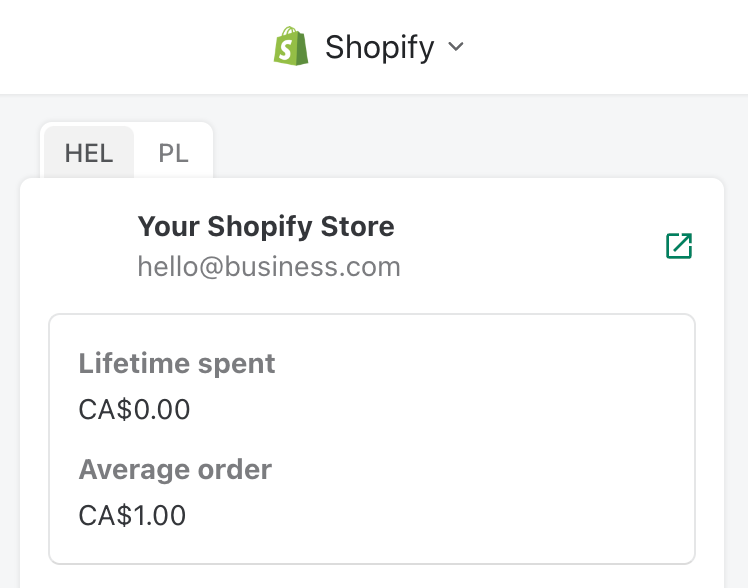
Why is my own store showing in the integration view?
Your email is associated with a Shopify customer in your store.
To fix this, edit the customer profile in Shopify and change the email to one different from your Missive email.
### Google Drive and Dropbox
How do Google Drive and Dropbox integrations work with email attachments?
Google Drive and Dropbox integrations let you add files to emails as **URL links**, not as traditional email attachments.
When you click **Add file** in the draft composer and select **Add file from Google Drive** or **Add file from Dropbox**, the file is inserted as a shareable link. Recipients receive a URL to access the file from your cloud storage, not the file itself as an attachment.
This approach:
* Avoids email attachment size limits (typically 25MB)
* Lets you share large files easily
* Keeps files in your cloud storage with your existing permissions
If you need to attach the actual file to an email (not a link), download the file from Google Drive or Dropbox first, then attach it using the standard **Add file** option in the composer.
### Others
Do you have a Notion integration?
No. [Upvote this feature request](https://feedback.missiveapp.com/feature-requests/p/integration-with-notion).
Do you have a Telegram integration?
No. [Upvote this feature request](https://feedback.missiveapp.com/feature-requests/p/telegram).
Can I use Antidote Corrector with Missive?
Only in the browser with the Antidote browser plugin installed. Antidote doesn't work with Missive's desktop or mobile apps.
Do you have an Evernote integration?
No. [Upvote this feature request](https://feedback.missiveapp.com/feature-requests/p/evernote-integration).
Do you have a WeChat integration?
No. [Upvote this feature request](https://feedback.missiveapp.com/feature-requests/p/wechat-integration).
---
# Agent Instructions
This documentation is published with GitBook. GitBook is the documentation platform designed so that both humans and AI agents can read, navigate, and reason over technical content effectively. Learn more at gitbook.com.
## Querying This Documentation
If you need additional information that is not directly available in this page, you can query the documentation by asking a question.
Perform an HTTP GET request on the following URL with the `ask` and `goal` query parameters:
```
GET https://missiveapp.com/docs/advanced-features/integrations/faq.md?ask=&goal=
```
`ask` is the immediate question: it should be specific, self-contained, and written in natural language.
`goal` is what the user is ultimately trying to achieve, the reason they need the answer. Sharing it helps GitBook give you a better, more relevant answer. A goal is most helpful when it describes the outcome the user wants rather than restating the question. For example, with `ask=how do I create an API token`, a goal like `automate deployments from our CI pipeline` lets GitBook tailor the answer to that use case.
The response will contain a direct answer to the question and relevant excerpts and sources from the documentation.
Use this mechanism when the answer is not explicitly present in the current page, you need clarification or additional context, or you want to retrieve related documentation sections.