> For the complete documentation index, see [llms.txt](https://missiveapp.com/docs/llms.txt). Markdown versions of documentation pages are available by appending `.md` to page URLs; this page is available as [Markdown](https://missiveapp.com/docs/core-features/connected-accounts/other-channels/social/faq.md).
# Social FAQ
Common questions about Instagram and Messenger integration with Missive.
Can I import my personal Facebook messages?
No. Facebook only allows third-party apps to manage messages sent to Facebook Pages. Personal messages aren't accessible. You connect your personal Facebook account only to access the list of Pages you manage.
How do I connect a Facebook Page?
1. Go to **Settings** > **Accounts** > **Add account**
2. Select **Messenger Business**
3. Connect your personal Facebook account
4. Select the Page you want to import
No past history is imported. Only new messages after connecting will appear.
Looking to delete a Messenger account? See [How do I disconnect a social account?](#how-do-i-disconnect-a-social-account)
How do I connect an Instagram account?
1. Go to **Settings** > **Accounts** > **Add account**
2. Select **Instagram Business**
3. Connect your personal Facebook account
4. Select the Instagram account you manage
No past message history is imported. Only new messages after connecting will appear.
Looking to delete an Instagram account? See [How do I disconnect a social account?](#how-do-i-disconnect-a-social-account)
Why do I need a Facebook Page for Instagram?
Meta manages Instagram business integrations through Facebook. Even if you only want Instagram DMs, you need a Facebook Page connected to your Instagram Business account.
Can I connect my personal Instagram account?
No. Only Instagram Business or Creator accounts are supported. Convert your personal account to a professional account in Instagram settings.
Why don't my messages appear in Missive?
No past history is imported. Only new messages after connecting appear.
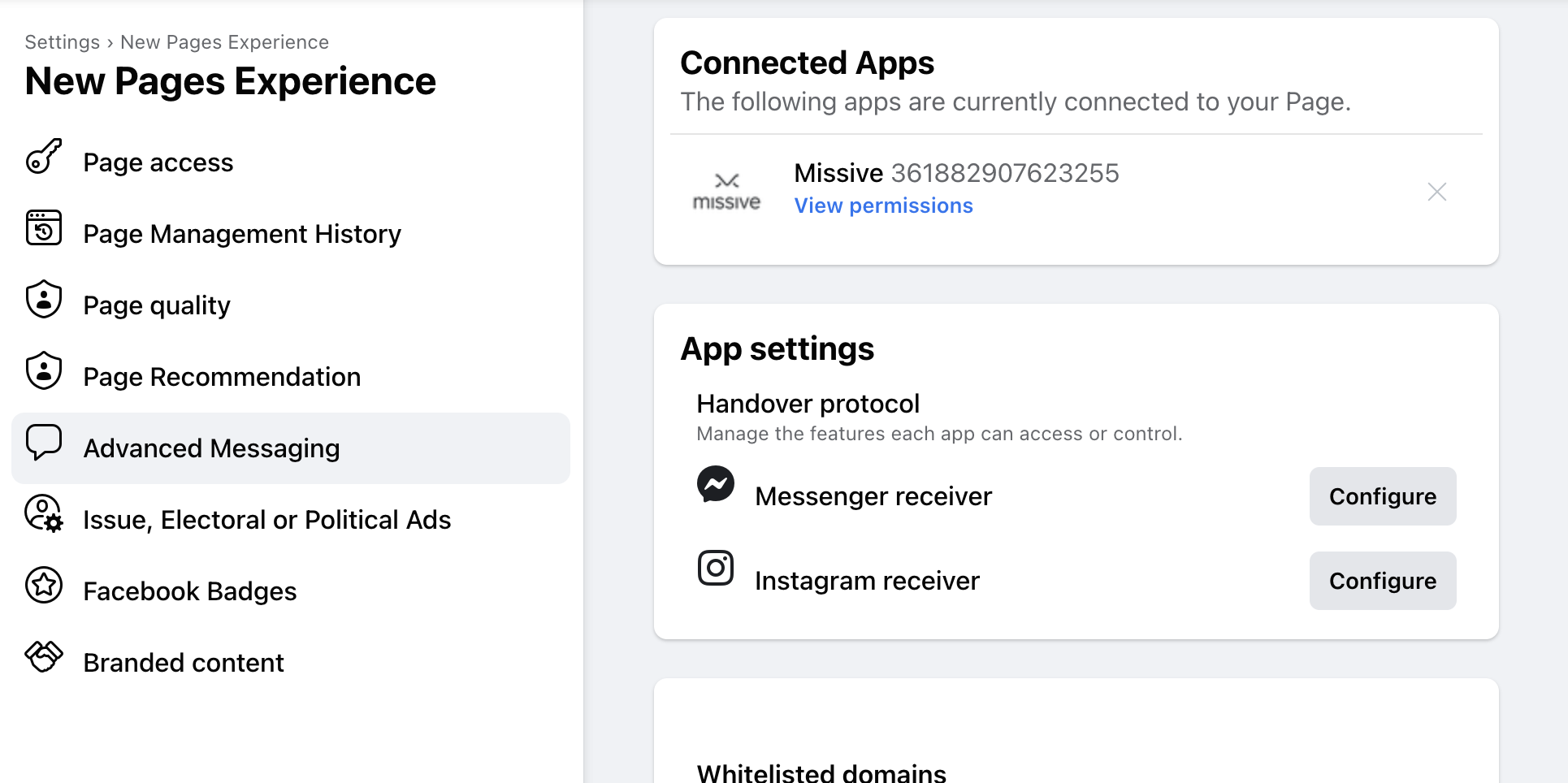
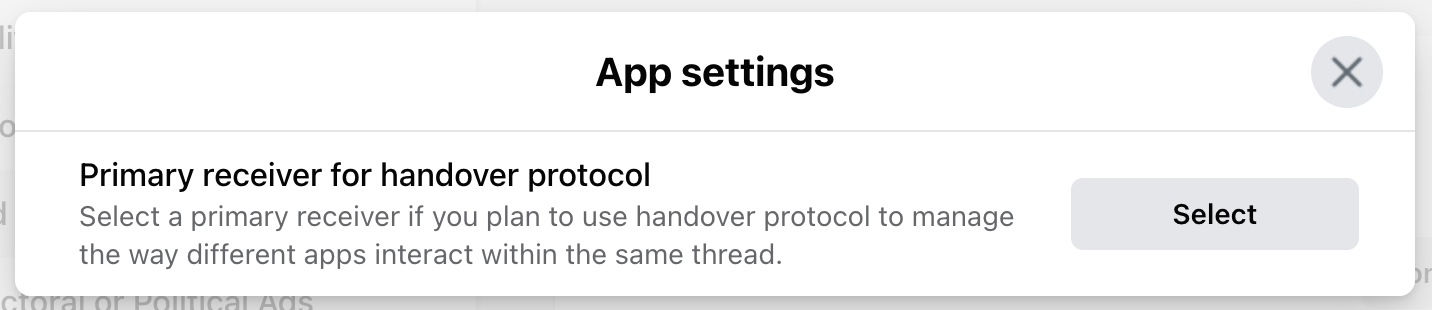
If new messages still don't appear, your inbox may be configured as a "Secondary Receiver" (often due to a chatbot). To fix:
1. Open [facebook.com](https://www.facebook.com/)
2. Click your Facebook Page on the left
3. Click **Settings** > **Advanced Messaging**
4. Click **Configure** next to **Messenger receiver** or **Instagram receiver**
5. Change options until they all show **Select**
If issues persist, revoke Missive from Facebook **Business integrations** settings and reconnect.
For Instagram, enable "Allow Access to Messages" in the Instagram mobile app.
What's the 7-day messaging window?
Facebook and Instagram limit third-party apps like Missive to sending replies within 7 days of the customer's last message. After this window closes, Missive can't send replies until the customer messages again.
If you need to reply after the window has closed, you can do so directly on Facebook, Messenger, Instagram, or Meta Business Manager.
This is a Meta policy, not a Missive limitation.
Can I send the first message to a customer?
No. On Messenger and Instagram, businesses can only respond to customers who message first. You cannot initiate conversations.
How do I block someone on Messenger?
Ban them from your Facebook Page:
1. Log in to your Facebook Page
2. Go to Inbox
3. Select the contact
4. Click the 3-dot menu
5. Click **Ban from page**
Banned people can't post, comment, or send messages. They won't be notified.
What does "Unsupported message - View on Instagram" mean?
The Instagram API doesn't provide all message types. Some messages show this placeholder because Instagram sends it instead of the actual content.
This is an Instagram limitation, not Missive.
Do reactions and emoji responses work?
Yes. Emoji reactions to messages are supported and appear in Missive.
Can I share a Messenger conversation with my team?
Yes. After connecting, open **Settings** > **Accounts**, select the account, and click **Share this account**. You can also share individual conversations using Missive's standard sharing features.
What permissions does Missive need?
Missive requests permissions to:
* Read messages sent to your Page/Instagram
* Send messages on behalf of your Page/Instagram
* Access basic Page/account information
These are the minimum permissions required to receive and reply to messages.
Can I connect multiple Pages or Instagram accounts?
Yes. Repeat the connection process for each Page or Instagram account. Each appears as a separate account in Missive.
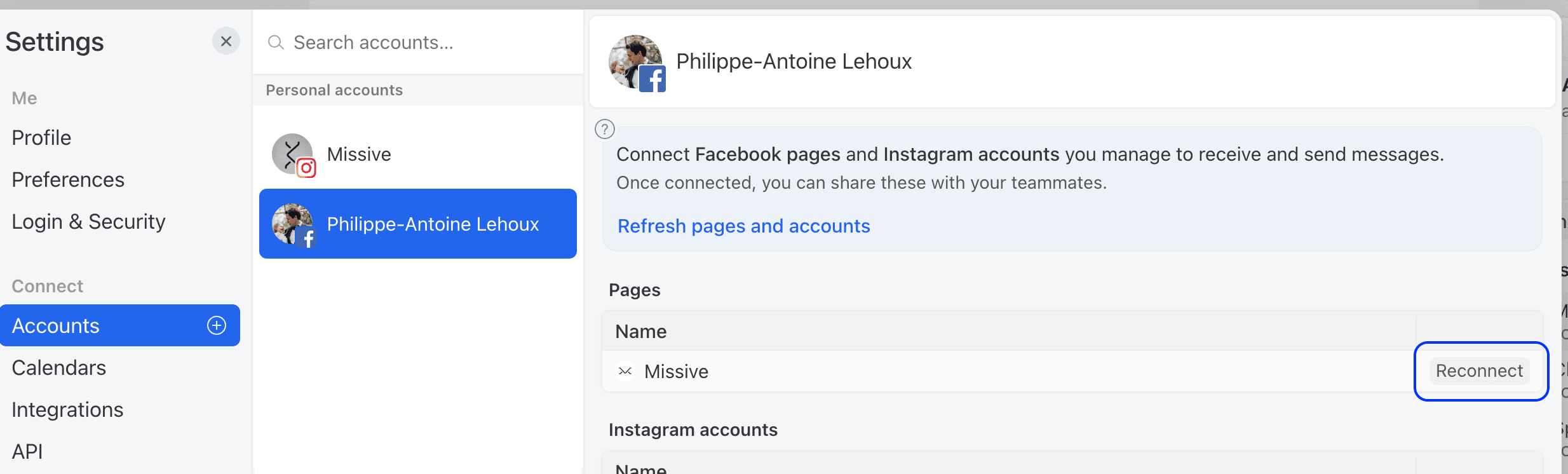
Use the **Add account** flow each time, not the **Reconnect** button. Reconnect only refreshes the permissions of the Page that's already connected, so nothing changes when you're trying to add a new one.
When Meta prompts you, make sure to tick the additional Page(s) you want. By default Meta often pre-selects only the previously connected Page, so you have to explicitly enable the new ones.
New Pages don't appear when I try to add another account
If Meta keeps redirecting you back to Missive without showing the new Pages, Facebook is usually reusing your previous app authorization instead of prompting fresh. Try these in order:
1. Revoke Missive from Facebook's **Business Integrations** settings (**Settings & Privacy** > **Settings** > **Business Integrations**), then run **Settings** > **Accounts** > **Add account** > **Messenger Business** again. Meta should now prompt you with the full list of Pages to tick.
2. Click **Refresh pages and accounts** on the existing Messenger account in **Settings** > **Accounts**.
3. Try the flow from a different browser or your phone. A cached Meta session on desktop can block the prompt where mobile gets through.
Also confirm the Pages are Business Pages and that your Facebook user has the **Admin** role on them. Editor access isn't enough to add a Page.
How do I disconnect a social account?
1. Go to **Settings** > **Accounts**
2. Select the Facebook account you want to remove
3. Before deleting, you may need to delete the connected Pages and Instagram accounts first. If required, this will be shown in the account settings.
4. In the Delete account section, click **Delete**
Also remove Missive from your Facebook Business Integrations or Instagram Apps and Websites settings.
Why is my account showing as disconnected?
Facebook/Instagram tokens can expire or be revoked if:
* You changed your Facebook password
* You removed Missive's access in Facebook settings
* Facebook's security systems flagged unusual activity
Reconnect the account in **Settings** > **Accounts**.
---
# Agent Instructions
This documentation is published with GitBook. GitBook is the documentation platform designed so that both humans and AI agents can read, navigate, and reason over technical content effectively. Learn more at gitbook.com.
## Querying This Documentation
If you need additional information that is not directly available in this page, you can query the documentation by asking a question.
Perform an HTTP GET request on the following URL with the `ask` and `goal` query parameters:
```
GET https://missiveapp.com/docs/core-features/connected-accounts/other-channels/social/faq.md?ask=&goal=
```
`ask` is the immediate question: it should be specific, self-contained, and written in natural language.
`goal` is what the user is ultimately trying to achieve, the reason they need the answer. Sharing it helps GitBook give you a better, more relevant answer. A goal is most helpful when it describes the outcome the user wants rather than restating the question. For example, with `ask=how do I create an API token`, a goal like `automate deployments from our CI pipeline` lets GitBook tailor the answer to that use case.
The response will contain a direct answer to the question and relevant excerpts and sources from the documentation.
Use this mechanism when the answer is not explicitly present in the current page, you need clarification or additional context, or you want to retrieve related documentation sections.