> For the complete documentation index, see [llms.txt](https://missiveapp.com/docs/llms.txt). Markdown versions of documentation pages are available by appending `.md` to page URLs; this page is available as [Markdown](https://missiveapp.com/docs/guides/de/advanced-features/rules/examples/automation.md).
# Automatisierung
Regelbeispiele: automatisch antworten, automatisch archivieren, geplante Aktionen.
Regeln, die ohne menschliches Eingreifen Aktionen ausführen.
## Warnhinweise für besondere Kunden hinzufügen
**Regeltyp:** Eingehende Nachricht
Unterhaltungen mit Kunden kennzeichnen, die besondere Behandlung benötigen.
| Komponente | Wert |
| ---------- | --------------------------------------------------------------------------------- |
| Bedingung | **Von** endet auf „acme.com“ |
| Aktion | **Notiz hinzufügen** → „ACME erfordert Hintergrundüberprüfungen für alle Fahrer.“ |
Die Notizen sind nur für Ihr Team sichtbar, nicht für den Kunden.
## VIP-Anweisungen anzeigen
**Regeltyp:** Eingehende Nachricht
Bearbeitungshinweise anzeigen, wenn sich ein VIP bei Ihnen meldet.
| Komponente | Wert |
| ---------- | ---------------------------------------------------------------------------------------------------------- |
| Bedingung | **Von** ist in der Kontaktgruppe „VIP“ |
| Aktion | **Notiz hinzufügen** → „Prioritätskunde. Bei ungelöstem Problem innerhalb von 1 Stunde sofort eskalieren.“ |
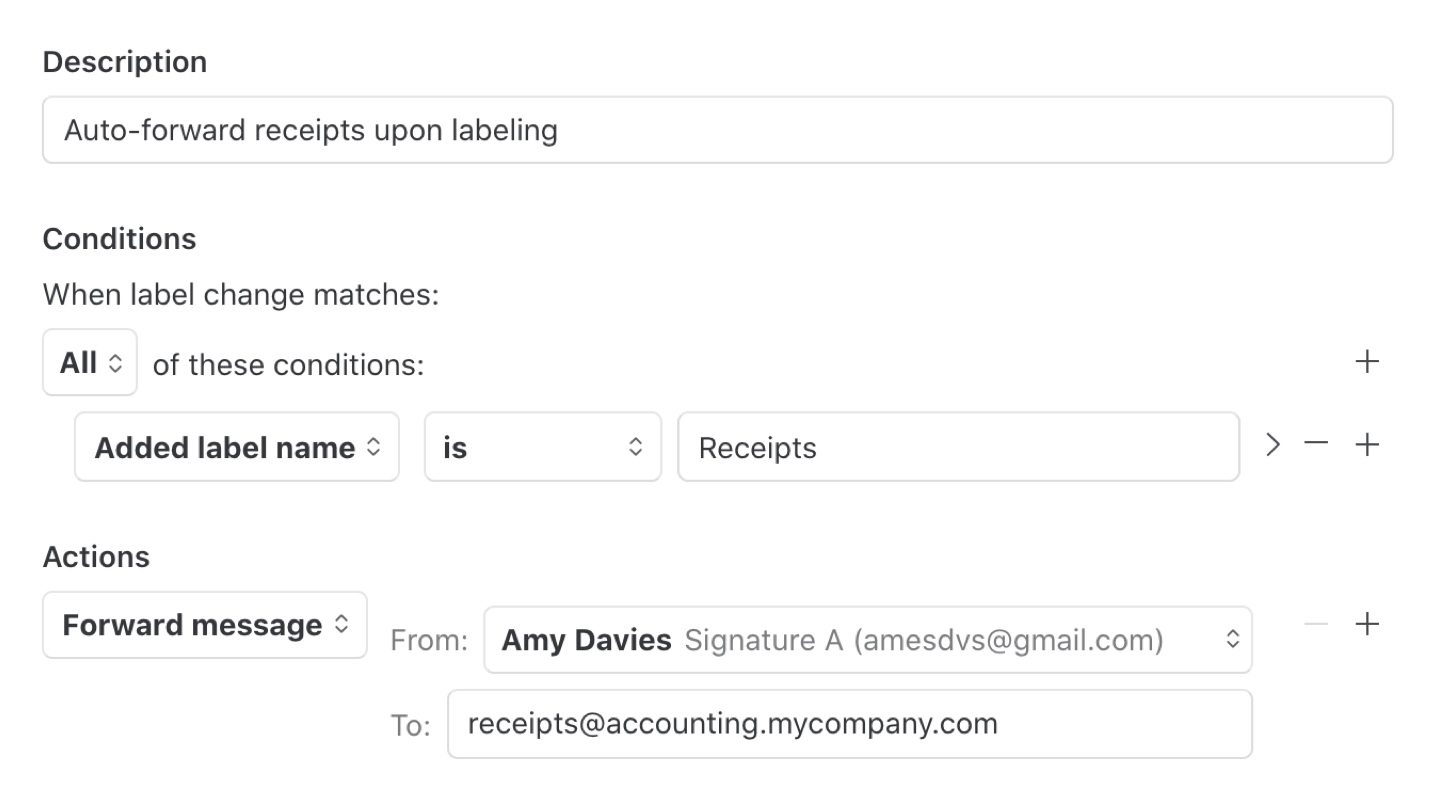
## Belege an die Buchhaltung weiterleiten
**Regeltyp:** Nutzeraktionen → Label-Änderung
Wenn jemand eine E-Mail als Beleg markiert, leiten Sie sie an das Buchhaltungssystem weiter.
| Komponente | Wert |
| ---------- | ------------------------------------------------ |
| Bedingung | **Name des hinzugefügten Labels** ist „Beleg“ |
| Aktion | **Weiterleiten an** → |
## Webhook an CRM
**Regeltyp:** Eingehende Nachricht
Übermitteln Sie Unterhaltungsdaten an Ihr CRM oder andere Systeme.
| Komponente | Wert |
| ---------- | ---------------------------------------------------------- |
| Bedingung | **Von** ist in Kontakten |
| Aktion | **Webhook senden** → |
Der webhook payload enthält die Unterhaltungs-ID, den Nachrichteninhalt, Absenderinformationen und alle Labels.
## KI-gestützte automatische Kategorisierung
**Regeltyp:** Eingehende Nachricht
Lassen Sie KI eingehende Nachrichten lesen und das richtige Label anwenden.
| Komponente | Wert |
| ---------- | ---------------------------------------------------------------------------------------------- |
| Bedingung | **E-Mail-Konto** ist |
| Aktion | **Labels mit KI hinzufügen** → „Kategorisieren: Abrechnung, Technik, Vertrieb, Feedback, Spam“ |
Kombinieren Sie dies mit Weiterleitungsregeln: Eine zweite Regel, die durch Label-Änderungen ausgelöst wird, kann kategorisierte Unterhaltungen an das richtige Team verschieben.
***
Haben Sie eine Regelvorlage zum Teilen? [Senden Sie sie uns](mailto:info@missiveapp.com?subject=Missive%20Rule%20Proposal).
---
# Agent Instructions
This documentation is published with GitBook. GitBook is the documentation platform designed so that both humans and AI agents can read, navigate, and reason over technical content effectively. Learn more at gitbook.com.
## Querying This Documentation
If you need additional information that is not directly available in this page, you can query the documentation by asking a question.
Perform an HTTP GET request on the following URL with the `ask` and `goal` query parameters:
```
GET https://missiveapp.com/docs/guides/de/advanced-features/rules/examples/automation.md?ask=&goal=
```
`ask` is the immediate question: it should be specific, self-contained, and written in natural language.
`goal` is what the user is ultimately trying to achieve, the reason they need the answer. Sharing it helps GitBook give you a better, more relevant answer. A goal is most helpful when it describes the outcome the user wants rather than restating the question. For example, with `ask=how do I create an API token`, a goal like `automate deployments from our CI pipeline` lets GitBook tailor the answer to that use case.
The response will contain a direct answer to the question and relevant excerpts and sources from the documentation.
Use this mechanism when the answer is not explicitly present in the current page, you need clarification or additional context, or you want to retrieve related documentation sections.