Blog →
The 12 best help desk software for small business in 2026

Blog →

by
Eva Tang
October 26, 2023
· Updated on
October 8, 2026
The best help desk software for a small business is the one that matches how your customers already reach you and how your team actually works. If most support comes in by email and your team shares the inbox, a collaborative email client like Missive or an email-first help desk like Help Scout is usually enough. If you need formal tickets, SLAs, and a self-service help center, look at Freshdesk, Zoho Desk, or Zendesk. Below we compare 12 options with current pricing and the trade-offs for each.
When you run a small business, every customer conversation matters, but you don’t have a big support team to handle them. Requests pile up across email, chat, and social messages, and it gets hard to know who’s answering what.
A help desk fixes that by putting every request in one place, assigning an owner, and tracking it until it’s resolved. Some tools on this list are built only for support (like Freshdesk). Others are flexible email tools that handle support and double as your daily inbox (like Missive). Not sure which model fits? Our ticketing system vs. shared inbox comparison breaks it down.
Prices below are the lowest paid tier per user per month on annual billing unless noted. Monthly billing usually costs more; spot-check current tiers before buying.
| Tool | Best for | Free plan or trial | Paid plans from |
|---|---|---|---|
| Missive | Teams that support customers from a shared email inbox | 30-day free trial | $14/user |
| Help Scout | Email-first support with a knowledge base | Free plan (up to 5 users) | $25/user |
| Freshdesk | Affordable ticketing with room to grow | 14-day trial | $19/agent |
| Zoho Desk | Tight budgets and Zoho users | Free plan (up to 3 users) | $7/user |
| Zendesk | Teams that expect to scale support fast | 14-day trial | $19/agent |
| HubSpot Service Hub | Teams already using HubSpot CRM | Free tools | $20/seat |
| Front | Larger teams that want a shared inbox with deep workflows | 14-day trial | $25/seat |
| Hiver | Teams that want to stay in Gmail | Free trial | $25/user |
| Gmelius | Gmail-only teams that want shared labels and boards | 7-day trial | $25/user |
| Helpwise | Budget shared inbox for email, SMS, and WhatsApp | Free trial | $12/user |
| Tidio | Live chat and AI chatbots for online stores | Free plan | $24.17/month |
| Helply (formerly Groove) | AI-first support without per-seat fees | Free trial | $49/month |
We looked at each tool the way a small team would: how fast you can set it up, how much the plan you’ll actually need costs (not just the entry tier), which channels it supports, how it assigns and tracks conversations, and how well it connects to the tools you already use, like your CRM.
Best for: small teams that handle support from a shared email inbox and want to collaborate on replies without a ticketing system.
Missive isn’t a typical help desk, and that’s the point. It’s a collaborative email client where your team shares inboxes, chats internally right below each customer email, drafts replies together, and assigns conversations to a person, several people, or a whole team.
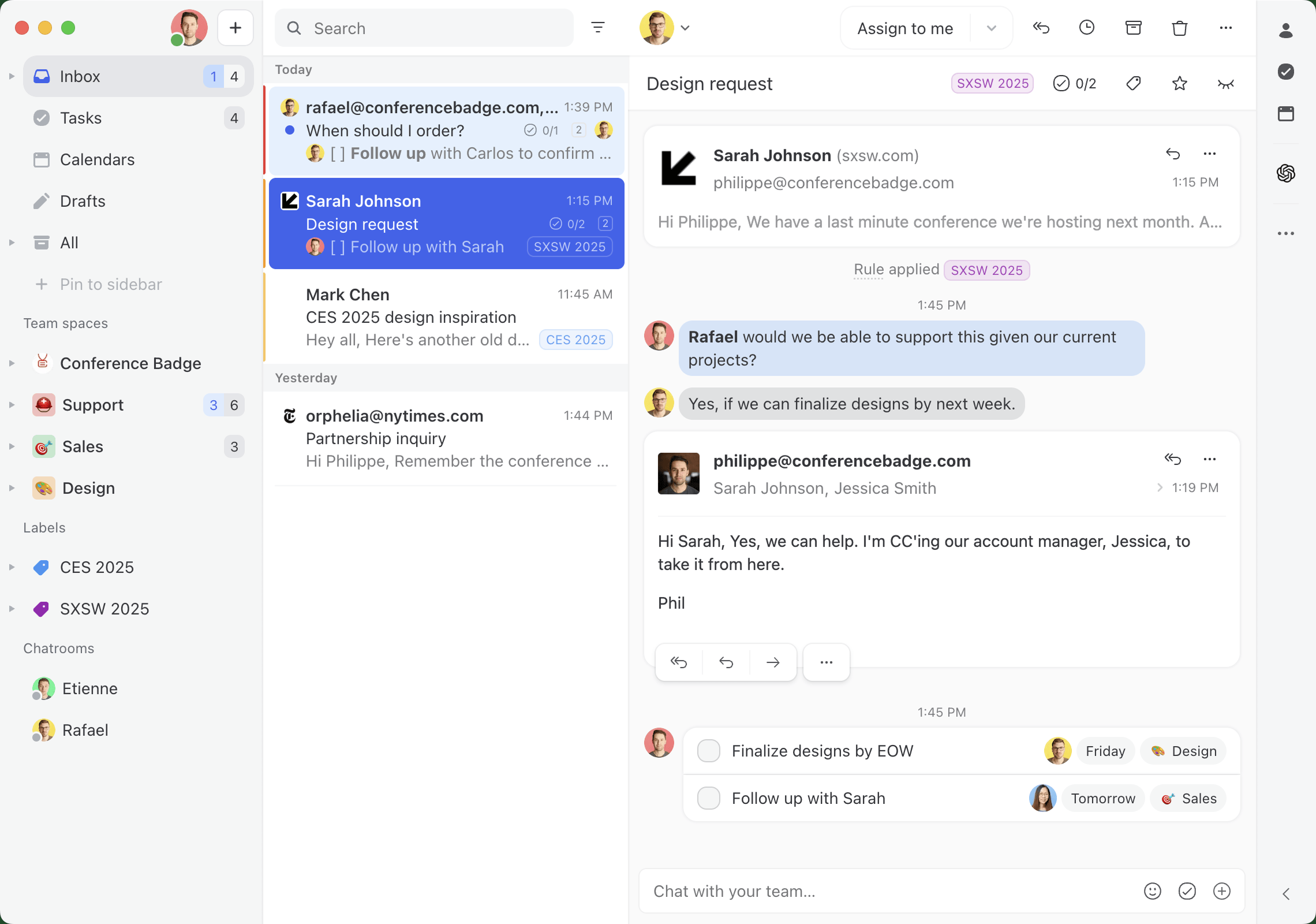
Support emails, SMS, WhatsApp, Facebook and Instagram messages, and live chat all land in the same place. On the Productive plan, rules can route conversations automatically with round-robin or least-busy assignment, and canned responses, shared labels, analytics, and an AI assistant help the team reply faster.
Because Missive works like an email client instead of a ticket queue, it’s also used for sales, operations, and everything else your team handles by email. Customers get replies that look like normal emails, not ticket numbers.
Trade-off: Missive has no built-in help center or customer portal, so if self-service articles are central to your support, pair it with a knowledge base tool or pick Help Scout or Freshdesk. Live chat also requires your own Twilio account.
Missive costs $14 per user per month (Starter, up to 5 users), $24 (Productive, up to 50 users), or $36 (Business) on annual billing, or $18, $30, and $45 billed monthly. Rules, integrations, and the AI assistant start on Productive. Every team gets a 30-day free trial, no credit card required. See the pricing page for details.
Best for: email-first support teams that also want a knowledge base.
Help Scout is an email-based help desk with shared inboxes, assignment, internal notes, saved replies, and a built-in knowledge base (Docs). Paid plans add live chat, SMS, and social channels, plus AI features that summarize conversations and draft replies from your help content.

Like Missive, Help Scout keeps replies looking like personal emails rather than ticket notifications, which customers tend to prefer.
Trade-off: the Standard plan caps you at two inboxes, and Salesforce and HubSpot integrations start on Plus. AI agent resolutions are billed separately. See our Help Scout alternatives if you’re comparing.
Help Scout has a free plan for up to 5 users with one inbox. Paid plans are $25 per user per month (Standard), $45 (Plus), and $75 (Pro).
Best for: small teams that want traditional ticketing at a low entry price, with room to grow.
Freshdesk is a ticketing help desk with automations, SLA policies, collision detection, a knowledge base, and Freddy AI agents that can resolve routine questions. Every ticket gets a status, priority, and owner, which works well if you need structured support processes.

Trade-off: the core Freshdesk plans focus on email support. Live chat and phone live in Freshdesk Omni, which starts at $29 per agent per month. AI agent sessions beyond the first 500 cost extra.
Freshdesk plans are $19 per agent per month (Growth), $55 (Pro), and $89 (Enterprise) on annual billing. There’s a 14-day free trial of the Enterprise plan.
Best for: very small teams on a tight budget, and businesses already using Zoho.
Zoho Desk is a full ticketing system with email, social, and web form support, workflows, escalations, and AI features. The Express plan is designed for micro teams, and higher tiers add live chat, a knowledge base, telephony, and round-robin assignment. If you already use Zoho CRM or other Zoho apps, it fits right in.
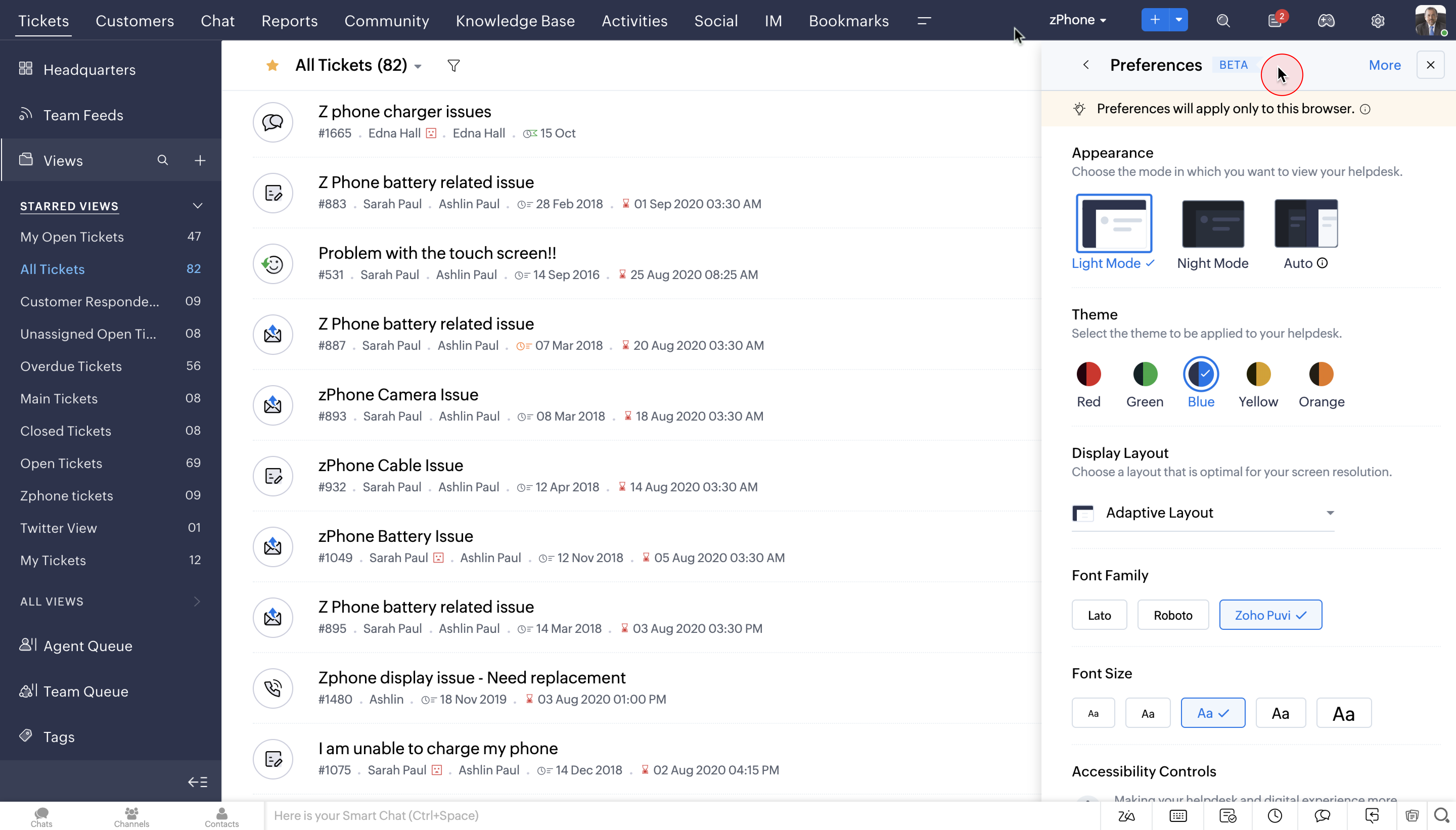
Trade-off: useful features are spread across tiers (round-robin assignment starts on Professional and the full live chat on Enterprise), and the interface takes longer to learn than simpler tools.
Zoho Desk has a free plan for up to 3 users with email ticketing. Paid plans start at $7 per user per month on annual billing (Express, up to 5 users). Every plan comes with a 15-day free trial.
Best for: teams that expect support volume to grow quickly and want a platform they won’t outgrow.
Zendesk is one of the most established help desks, with ticketing, a help center, live chat and messaging, voice, reporting, and AI agents. It integrates with almost everything and scales to large support organizations.

Trade-off: the entry Support Team plan is mostly email ticketing. Messaging, voice, and the full AI toolkit need a Suite plan, which starts at $55 per agent per month. For lighter options, see our Zendesk alternatives.
Zendesk Support Team is $19 per agent per month on annual billing ($25 monthly). Suite Team is $55 and Suite Professional is $115 per agent per month on annual billing. There’s a 14-day free trial.
Best for: small businesses already using HubSpot CRM for sales and marketing.
HubSpot Service Hub includes ticket routing, a help desk inbox, live chat and chatbots, a knowledge base, and customer feedback tools, all connected to HubSpot’s CRM. That means sales, marketing, and support see the same customer record, which makes handoffs between teams easier.
Trade-off: pricing jumps sharply from Starter to Professional, which is where advanced routing, SLAs, and reporting live. Its support tools are also less specialized than dedicated help desks.
HubSpot offers free customer service tools. Service Hub Starter is $20 per seat per month, Professional is $90 per seat per month on annual billing, and Enterprise is $150 per seat per month. HubSpot often runs discounts for new customers on Starter.
Best for: growing teams that want a shared inbox with advanced workflows and are willing to pay for it.
Front is similar to Missive in that it helps teams manage shared email addresses, SMS, social, and live chat in one place, with rules, assignment, and analytics. It’s not a traditional help desk, but it centralizes customer requests and adds ticketing features on top of a shared inbox.

Trade-off: the Starter plan is limited to 10 seats and email-focused. SMS, chat, and social channels start on Professional at $65 per seat per month, and AI features like Copilot are add-ons below Enterprise.
Front costs $25 per seat per month (Starter), $65 (Professional), and $105 (Enterprise) on annual billing. There’s a 14-day free trial.
Best for: teams that want help desk features without leaving Gmail.
Hiver started as a help desk inside Gmail and now also offers Hiver Omni, which brings email, chat, voice, and social into one queue. You get assignment, internal notes, collision alerts, templates, SLAs, and AI agents and copilot features on every plan.

Trade-off: Hiver in Gmail ties you to Google Workspace, and features like a customer portal, CSAT, and advanced analytics start on Pro. Voice is a paid add-on.
Hiver costs $25 per user per month (Growth), $55 (Pro), and $85 (Elite) on annual billing.
Best for: Gmail-only teams that want shared inboxes, shared labels, and kanban boards inside Gmail.
Gmelius adds shared inboxes, assignment, internal notes, shared drafts, and automation rules on top of Gmail. Since it works inside the Gmail interface, there’s very little to learn. It also includes kanban boards for tracking requests visually.

Trade-off: Gmelius only works with Gmail and Google Workspace and focuses on email. Every member of your team must be on the same plan, and the cheapest Meli tier is a personal AI assistant without shared inbox features.
Shared inbox features start on the Growth plan at $25 per user per month on annual billing, with Pro at $40. There’s a 7-day free trial of Growth.
Best for: budget-conscious teams that want email, SMS, and WhatsApp in a simple shared inbox.
Helpwise is a shared inbox for customer service email, SMS, WhatsApp, live chat, and social messages, with assignment, internal notes, templates, rules, and a help center. It’s part of SaaS Labs (the company behind JustCall), so it pairs well with business phone and texting setups.

Trade-off: the entry plan limits shared inboxes and automation rules, and workload balancing is reserved for higher tiers.
Helpwise starts at about $12 per user per month on annual billing (Standard), with higher tiers for more inboxes, rules, and analytics. There’s a free trial.
Best for: online stores that want live chat and an AI chatbot to handle common questions.
Tidio combines live chat, ticketing, chatbot flows, and Lyro, an AI agent that answers from your own content and hands off to a person when it can’t help. It centralizes chat, email, and social conversations into one inbox and integrates natively with Shopify.
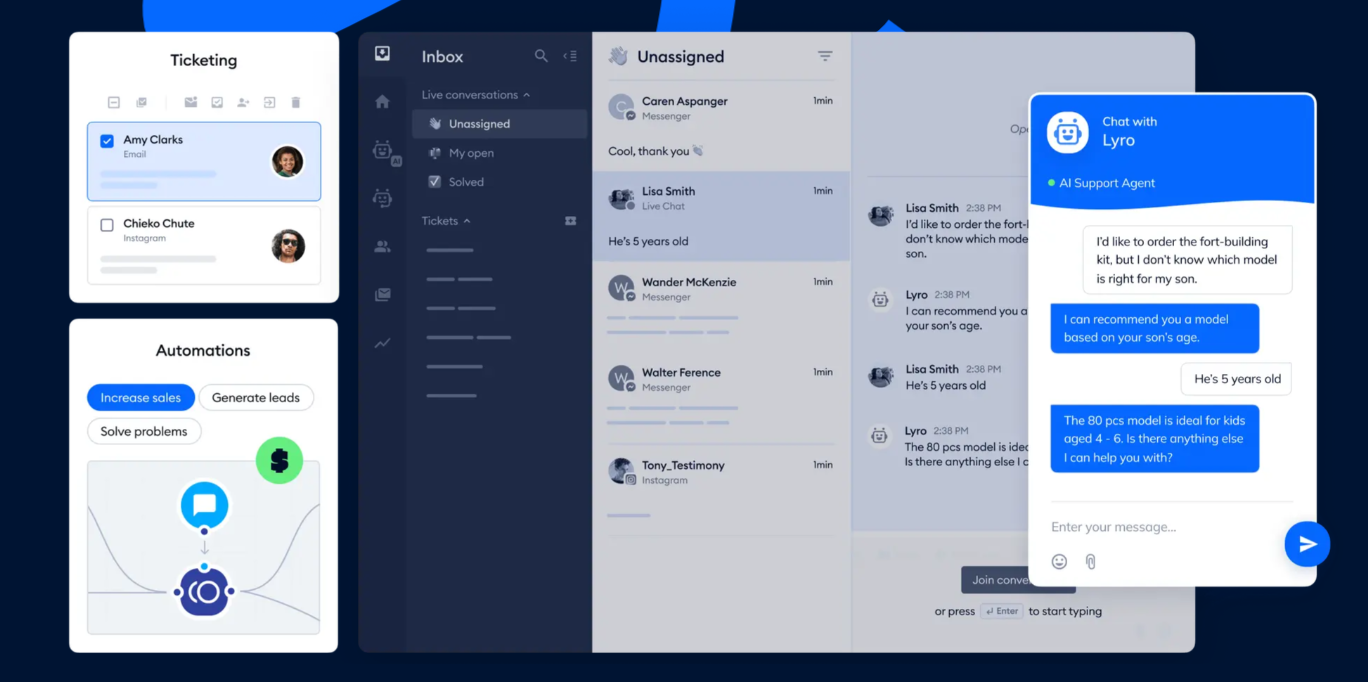
Trade-off: Tidio charges by conversation, and Lyro and Flows are priced separately, so costs grow with volume. It’s strongest for live chat rather than email-heavy support.
Tidio’s free plan includes 50 conversations per month and up to 10 seats. Starter is $24.17 per month on annual billing ($29 monthly) for 100 conversations, and Growth starts at $49.17 per month. The Lyro AI agent starts at $32.50 per month on annual billing for 50 AI conversations.
Best for: teams that want AI to handle most first replies and don’t want to pay per seat.
Groove, a long-time help desk for small businesses, now operates as Helply after merging with InstantDocs. It keeps the shared mailboxes and knowledge base Groove was known for, adds an AI agent that answers customers, and charges for AI work instead of seats, so you can add unlimited users.
Trade-off: credit-based pricing is harder to forecast than a per-user plan, and round-robin assignment and SLAs start on the Pro plan.
Helply starts at $49 per month (Starter, 3 mailboxes), with Pro at $199 per month and Scale at $449 per month, plus AI credit blocks based on volume. There’s a free trial.
Help desk software is a tool that helps you receive, organize, assign, and resolve customer requests in one place. It tracks every request from first message to resolution, so nothing slips through the cracks and customers don’t have to repeat themselves.
Most help desks include a shared inbox or ticket queue, assignment and automation rules, canned responses, reporting, and integrations with channels like email, chat, and social media. Many also offer self-service options like a knowledge base or a live chat widget.
Although they work similarly, these two kinds of software historically served different audiences.
Help desk software handles support requests from external people: prospects, customers, and users.
Service desk software handles requests from internal people, usually IT issues from employees and vendors.
Today, most help desk software can be used as service desk software, and vice versa.
Small businesses face unique challenges when it comes to customer service: limited resources, small teams, and high customer expectations. And 33% of customers say they’d consider switching companies after a single bad service experience.
Help desk software helps in three ways:
Choosing a help desk isn’t rocket science, but with so many options, it helps to answer a few questions first:
Beyond features, keep these in mind:
It depends on how your customers contact you. If most support comes in by email and your team wants to collaborate on replies, Missive or Help Scout is usually the best fit. If you need formal ticketing, SLAs, and a help center, Freshdesk and Zoho Desk offer the most for a small budget, and Zendesk is the safest bet if you expect to scale quickly.
Yes. Help Scout has a free plan for up to 5 users, Zoho Desk is free for up to 3 users, Tidio is free for up to 50 conversations per month, and HubSpot offers free customer service tools. Free plans usually limit inboxes, automations, or volume, so expect to upgrade as you grow.
Most entry plans cost $7 to $25 per user per month on annual billing. Plans with omnichannel support, automation, and AI features usually run $45 to $65 per user per month. Watch for add-ons like AI agent resolutions, which some vendors charge per conversation.
A help desk turns each request into a ticket with a status, priority, and owner. A shared inbox lets a team work from the same email addresses together, with assignment and internal chat, while keeping conversations looking like normal email. Small teams often find a shared inbox lighter to run. Our ticketing system vs. shared inbox guide goes deeper.
Microsoft 365 includes shared mailboxes in Outlook, but they don’t offer assignment, statuses, or tracking, so they work more like a group inbox than a help desk. Microsoft’s full customer service platform is Dynamics 365 Customer Service, which is aimed at larger organizations. Many small teams on Microsoft 365 connect their Outlook accounts to a shared inbox like Missive instead. Here are some shared mailbox best practices if you stay in Outlook.
Missive gives small teams shared inboxes, assignment, internal chat, and automation rules in an email client they’ll actually enjoy using. Try Missive free for 30 days, no credit card required.

December 22, 2023
8 soft skills proven to improve customer service
Soft skills aren’t soft, they’re the skills that separate a good customer service team from a great one. Here are the eight that matter most and how to build them.

December 19, 2023
66 Most Significant Customer Service Statistics in 2026
These statistics can help you see the direction the customer service industry is heading in—and what you need to do to prepare your business in 2026.
January 22, 2026
10 best AI tools for small businesses in 2026
The 10 best AI tools for small businesses in 2026, with verified pricing: Missive, Jasper, Copilot, CloudTalk, Dialpad, Freshdesk, Aissist, HeyGen, Grammarly, and HubSpot.

March 13, 2024
7 auto-reply email templates (with examples for every situation)
Seven ready-to-use auto-reply email templates for out-of-office, support, job applications, and more, plus setup steps for Missive, Gmail, and Outlook.

February 5, 2024
How to set customer service goals that actually stick
Setting customer service goals is more than picking a number and hoping. Here’s how to use SMART goals to build targets your team can actually hit, with examples for departments, managers, and individual agents.

November 10, 2022
Distribution List vs. Shared Mailbox: Which One Should You Use?
Distribution list or shared mailbox, which should I use? What are their strengths and weaknesses? This blog...

December 15, 2022
Shared mailbox rules: how to set them up (and what to use instead of Outlook)
Shared mailbox rules help teams automate incoming email — auto-replies, routing, filtering. Here's how to set them up in Outlook, where they fall short, and what a modern alternative looks like.

December 22, 2023
5 examples of bad customer service (and how to fix them)
Bad customer service costs companies customers and trust. Here are 5 clear examples of poor customer service, why they happen, and how to turn them around.

December 6, 2024
Managing client emails without losing track of anything
Managing client emails gets messy fast. Here’s how to organize shared inboxes, assign conversations, and automate routine work so nothing slips through.
