> For the complete documentation index, see [llms.txt](https://missiveapp.com/docs/llms.txt). Markdown versions of documentation pages are available by appending `.md` to page URLs; this page is available as [Markdown](https://missiveapp.com/docs/administration/billing-and-plans/faq.md).
# Billing FAQ
Common questions about billing, plans, and pricing in Missive.
Do you offer annual pricing?
Yes, starting in April 2024, you are able to subscribe to an annual plan, which offers a 20% discount over the monthly subscription.
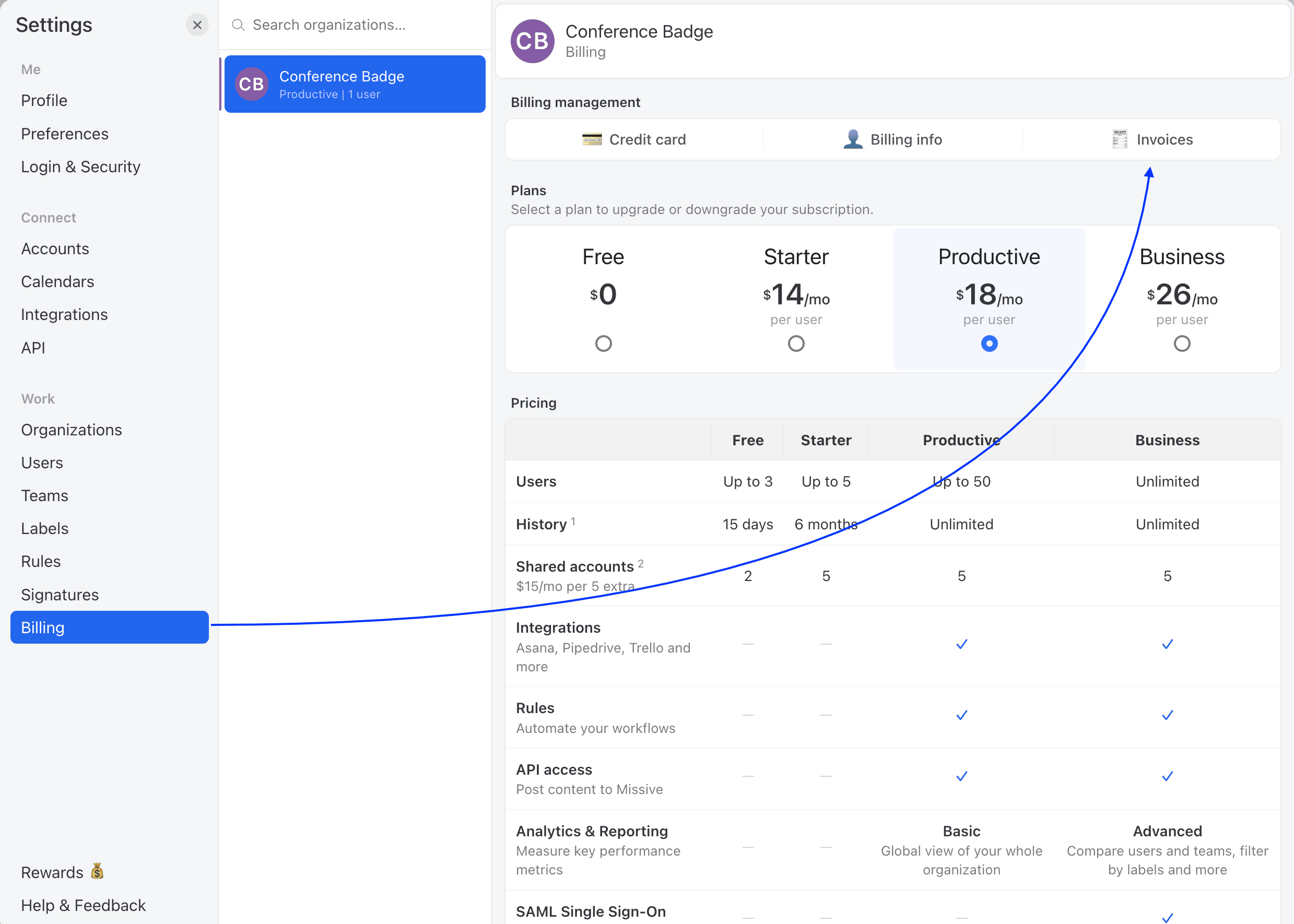
The organization owner can switch anytime in **Settings** > **Billing**.
Visit our [pricing](https://missiveapp.com/pricing) page to learn more.
Can I pay for multiple years in advance?
No, Missive only accepts payment month-to-month or for 12 months in advance on the yearly plan. You cannot prepay for multiple years at once.
Do I need to pay for multiple organizations?
Pricing is per organization, but you may not need multiple organizations.
**Organizations** are siloed: conversations can only be shared with members of a single organization. This is useful for owners of multiple companies who don't need to share information across them. A user can still be part of multiple organizations.
**Teams** exist within an organization and map to departments or business units (Sales, HR, Support, etc.). Teams let you share inboxes, canned responses, and conversations across "business units" where information sharing is expected.
If you need multiple organizations with different employees, each one requires its own subscription. The 30-day trial follows you rather than the organization, so a second organization doesn't come with a second trial.
Can I prepay for users?
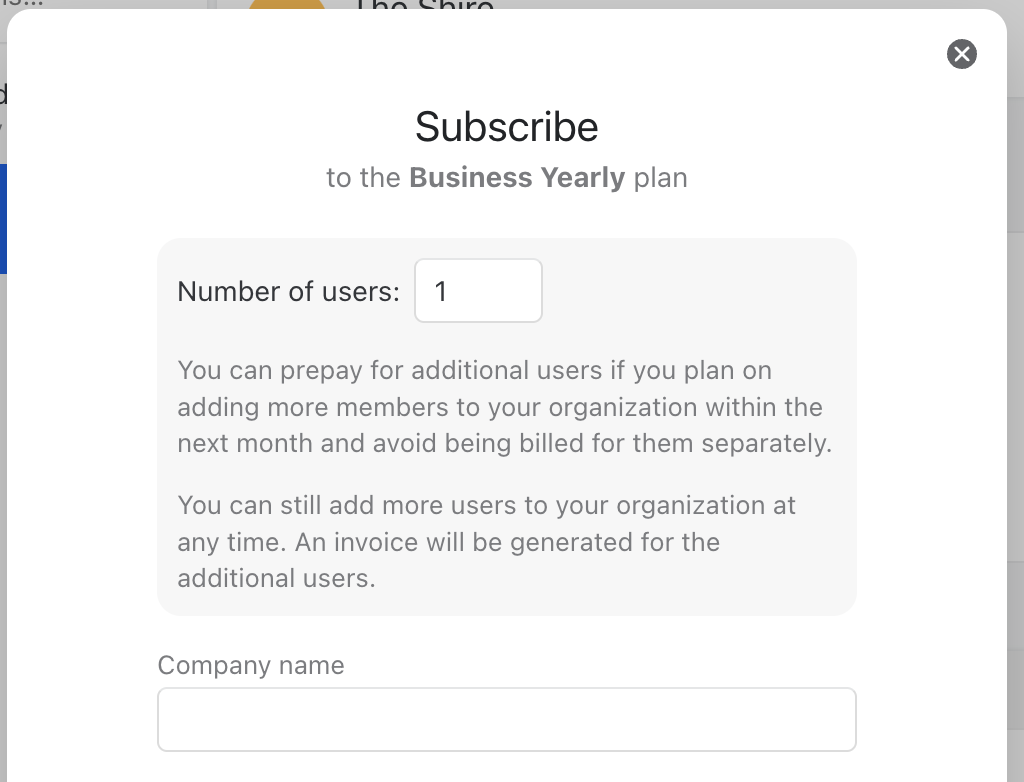
Yes, you can prepay for additional users if you plan to add more members to your organization within the next month. This is to avoid being billed separately for them.
This option is only available for users signing up for a yearly paid plan for the first time. You will see a screen like this one:
Can I pay with PayPal?
We do not accept PayPal payments. We accept Visa, MasterCard, American Express, Discover and JCB cards at the moment.
Can I use Missive for free?
For 30 days. Your first organization gets a free trial of the **Productive** plan, no credit card required, with no free plan afterwards.
The trial includes Productive features such as Rules, Integrations, and Analytics, with up to 25 users, 10 shared accounts, 2 personal accounts per user, and 30 days of history.
When the 30 days are up, the organization owner picks a plan in **Settings** > **Billing** to keep using Missive.
How does the history limitation work?
All paid plans currently include full access to your history. During the 30-day trial you see the last 30 days, and legacy plans may have their own limits. An organization with no active plan can't access its history at all.
Messages and chat comments that exceed your plan's history limit will be hidden from the interface and replaced with a prompt to upgrade. Rest assured, nothing is deleted from Missive; your complete email history remains accessible through Gmail, Office 365, or IMAP. This policy also applies to Instagram DMs, Facebook Messenger conversations, SMS, and other communication channels.
Is there a storage limit for emails in Missive?
No. Missive is an email client, not an email provider. There are no storage limits imposed by Missive.
Any storage limits you encounter are set by your email provider (Gmail, Office 365, etc.), not Missive.
{% hint style="info" %}
The 30-day trial shows the last 30 days of email history. All paid plans (Starter, Productive, and Business) include unlimited history.
{% endhint %}
My organization is tax-exempt. Can I get US sales tax removed from my invoices?
Missive collects sales tax in certain US states (currently New York, Ohio, and Maryland). If your organization is tax-exempt in one of these states -- for example, a non-profit, educational institution, or government entity -- contact us at .
Provide your state-issued exemption certificate. For New York, this is Form ST-119.1 (Exempt Organization Certificate) along with your six-digit NYS sales tax exemption number. Other states have their own equivalent forms.
Once we verify your exemption, we'll update your account so future invoices won't include sales tax. If you were previously charged tax, we'll refund or credit those amounts.
Can my invoice include a VAT number or Tax ID?
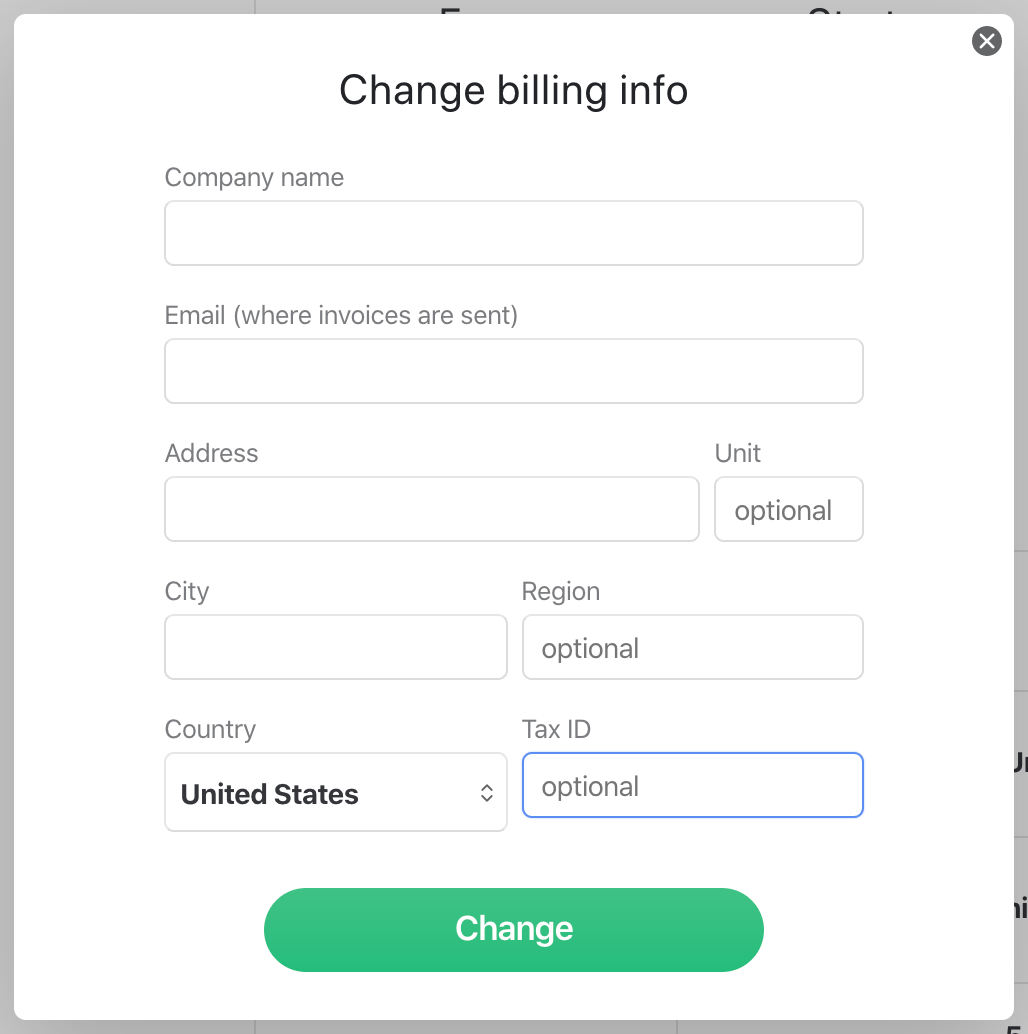
Yes. Go to **Settings** > **Billing**, click **Change billing info**, and use the **Tax ID field** to enter your VAT number.
Do you charge in C$ for Canadian customers? 🇨🇦
No, although we are a Canadian company all our prices are in US$.
Is there a free trial?
Yes. Your first organization gets a 30-day free trial of the **Productive** plan, no credit card required. It unlocks Productive features and supports up to 25 users and 10 shared accounts. See "How does the 30-day free trial work?" below for details.
There's no free plan after the trial. To keep using Missive, subscribe to a plan in **Settings** > **Billing**, monthly or yearly.
{% hint style="warning" %}
Upgrading must be done on a computer; it is not available on mobile.
{% endhint %}
How can I test Missive with a larger team?
The 30-day trial supports up to 25 users, so most teams can evaluate Missive with everyone on board. The trial can't be extended past 30 days or beyond 25 users.
To evaluate Missive with a bigger team, or for longer, subscribe to a monthly plan. Monthly subscriptions have no commitment, so you can cancel at the end of any billing period if it's not the right fit.
Do you offer student pricing or discounts?
We don't offer discounts at this time. As a small, bootstrapped company, we keep pricing simple and consistent for everyone, including students, nonprofits, schools, and businesses.
How can I cancel my subscription?
Go to **Settings** > **Billing** and click **Cancel subscription**. Your organization remains active until the end of your current billing period, then loses access to Missive until you choose a new plan.
To completely delete your Missive account, go to **Settings** > **Login & Security** and click **Delete account** at the bottom.
{% hint style="warning" %}
If you own an organization, you must delete it first in **Settings** > **Organizations**.
{% endhint %}
How do I delete my account and all my data?
To fully delete your Missive account and all associated data, follow these steps in order:
1. Go to **Settings** > **Accounts** and delete each connected account (email, SMS, etc.) using **Delete account**.
2. Go to **Settings** > **Calendars** and delete each connected calendar account using **Delete account**.
3. Go to **Settings** > **Integrations** and delete each integration (Asana, Todoist, etc.) using **Delete integration**.
4. If you own an organization, go to **Settings** > **Organizations** and delete it using **Delete organization**. If you are not the owner, ask an admin to remove you via **Organizations** > **Members**.
5. Go to **Settings** > **Login & Security**. You may need to enter your password or confirm your identity with Google or Apple.
6. Scroll down to **Delete account** and click **Delete**.
7. Confirm by clicking **Delete** in the confirmation dialog.
This process is compliant with Art. 17 GDPR (Right to erasure).
{% hint style="info" %}
If you only want to stop paying, go to **Settings** > **Billing** and cancel your subscription instead. Your organization keeps working until the end of the billing period, then loses access until you pick a new plan.
{% endhint %}
How do I cancel my free trial?
If you're on the free trial and haven't upgraded to a paid plan, no action is needed. Your trial will expire automatically, and you won't be charged.
To verify there's no active subscription, go to **Settings** > **Billing** on a computer and confirm there's no active subscription listed. If one appears, click **Cancel subscription**.
How can I update my billing information?
Updating billing details must be done by the organization owner on a desktop computer (it's not available on mobile).
Go to **Settings** > **Billing** and click **Change billing info**.
How many personal accounts can I import?
All paid plans include **10 personal accounts** (email, SMS, Messenger, etc). During the 30-day trial, each user can connect 2 personal accounts.
**Can I add more than 10?**
You can still add more than 10 accounts, but they must be added as **shared accounts** and will be billed according to [our pricing](https://missiveapp.com/pricing).
Workaround: create a team with only yourself, then connect accounts as team inboxes. Go to **Settings** > **Teams**, create a solo team, then when adding an account, select **Team Inbox** and pick that team.
How many shared accounts can I connect?
Each user in your organization contributes 5 shared accounts to the total pool. For example, an organization with 10 users can connect 50 shared accounts at no extra charge (10 users × 5 shared accounts each).
**Need more shared accounts?**
If your organization needs more shared accounts than what's included, there's an additional charge of **$15 per month for every 5 shared accounts** beyond the pool.
Example for an organization with 10 users:
* 1 to 50 shared accounts: included
* 51 to 55 shared accounts: +$15/month
* 56 to 60 shared accounts: +$30/month
* 61 to 65 shared accounts: +$45/month
This charge is added to your monthly bill and applies to the entire organization, not per user.
How to upgrade to a paid plan?
You must be the organization owner. Go to **Settings** > **Billing** and choose your subscription plan.
{% hint style="warning" %}
Upgrading must be done on a computer; it is not available on mobile.
{% endhint %}
Is there a commitment or yearly contract?
If you've subscribed to a monthly subscription, you can cancel it at any time without any commitment. Since it's a month-to-month subscription, you have the flexibility to opt out whenever you choose.
However, please note that if you opt for the yearly subscription, cancellations and refunds are not available.
Where can I view my invoices?
Go to **Settings** > **Billing** and click **Invoices**.
Will existing customers be exempted from price raises?
For the most part, yes. We may raise prices from time to time and generally do not increase the price of existing seats in paid organizations.
However, we do reserve the right to increase prices for existing seats on rare occasions, generally in line with or under global inflation numbers.
{% hint style="info" %}
We will always give you at least 30 days notice before any price increase.
{% endhint %}
How does the end-of-month Stripe charge breakdown work?
Missive's subscription system is designed to charge you on the same day each month based on your original subscription date. However, if a month doesn't have that specific date (for example, the 31st), the charge will occur on the last day of that month instead. So if your billing date is set for the 31st, you'll be charged on the 30th in months with only 30 days, or on the 28th/29th in February.
How are user additions and removals billed on an annual plan?
If you subscribe to the annual plan and:
* **Add a User**: You will be charged the prorated cost of the new user for the remaining months of your subscription. For example, if you have 11 months left on your yearly subscription and are on the Productive plan at $30/user/month, the charge will be calculated as follows: 30 x 11 - 20% = $264. Users added during the same month are grouped on one monthly invoice, so you may be charged up to a month after adding them. If less than a month is left in your yearly subscription, you are charged right away.
* **Remove a User**: You will not receive a refund for the removed user, even if they were added recently and not charged yet. If you decrease from 10 users to 9 users, you will still be considered as paying for 10 users for the entire 12 months. If you later add a user back within the same billing cycle, you will not be charged extra since you initially subscribed for 10 users. To replace a user, remove them before adding the new one; adding the new user first counts as an extra user.
Why can't I upgrade my account without upgrading my entire organization?
Billing is per organization, so you cannot upgrade your account without upgrading the rest of your organization.
Are yearly plan payments refundable?
Unfortunately, we do not offer refunds for yearly plans. We explicitly inform you of this when you select the yearly plan.
How can I switch to the yearly plan?
Go to **Settings** > **Billing** and click **Yearly** in the top-right corner of the **Plans** section.
If I start on a monthly plan, can I still get the 20% yearly discount later?
Yes. The 20% discount applies to anyone on the yearly plan, regardless of how you started. There's no penalty for starting on monthly and no special offer reserved for new customers.
The organization owner can switch anytime from **Settings** > **Billing** by clicking **Yearly** in the top-right corner of the **Plans** section. The discount applies as soon as you switch, but there's no retroactive discount for time already billed on monthly.
How can I switch from yearly back to monthly?
The yearly plan is a 12-month commitment with no mid-cycle cancellations or refunds, so switching to monthly isn't a direct toggle. To make the switch:
1. Go to **Settings** > **Billing** and cancel your subscription. Your yearly plan stays active until the end of your current billing cycle.
2. On the day your yearly cycle ends, subscribe to the monthly plan in **Settings** > **Billing**.
Do step 2 on the day the cycle ends. There's no waiting period, but there's no free plan to land on either, so the organization loses access from the moment the yearly plan expires until the monthly one starts.
The 20% discount only applies while you're on the yearly plan. Once you move to monthly, you'll pay the standard monthly rate.
Can I change my plan tier (Starter, Productive, Business) on a yearly subscription?
You can upgrade at any time, moving from Starter to Productive, or Productive to Business. The change takes effect immediately and you're charged a prorated amount for the remainder of your billing cycle.
Downgrades can't happen mid-year. If you want to move to a lower tier, the change takes effect at the end of your current yearly billing cycle. Your new tier starts at renewal.
Does my yearly subscription renew automatically?
Yes. Yearly subscriptions renew automatically at the end of each 12-month cycle.
To stop the renewal, cancel your subscription before your renewal date in **Settings** > **Billing**. Your yearly subscription stays active until the end of the current cycle, and won't renew afterward. Once it ends, the organization loses access to Missive until you choose a new plan.
How does the 30-day free trial work?
You get a single 30-day free trial of the **Productive** plan, no credit card required. It starts when you create your first organization and unlocks Productive features, including Rules, Integrations, and Analytics.
During the trial you can add up to 25 users, connect up to 10 shared accounts and 2 personal accounts per user, and see the last 30 days of history.
The trial follows you rather than the organization, so creating a second organization doesn't start a second trial. Teammates who join while you're trialing share the days you have left.
When the 30 days are up, choose a plan from **Settings** > **Billing** to keep access.
What happens when my trial ends?
Missive has no free plan, so an organization without an active plan is paused: you can't send messages, write comments, or connect new accounts, past conversations are hidden, and push notifications stop.
Your conversations and settings are still there, and everything comes back as soon as the organization owner picks a plan in **Settings** > **Billing**. Paused organizations aren't kept forever, though: connected accounts are disconnected and data is eventually deleted, so [export your data](/docs/administration/security/faq.md#can-i-export-my-data) if you're stepping away for a while.
The same happens to a paid organization that cancels or lets its subscription lapse, starting at the end of the billing period.
Can existing yearly customers prepay for additional seats?
No. Prepaying for seats is only available when you first subscribe to a yearly plan.
If you're already on a yearly plan and add new users later, you'll be charged a prorated amount for the remaining months of your subscription on your next monthly invoice for added users. See "How are user additions and removals billed on an annual plan?" above for the full breakdown.
When am I charged for extra shared accounts?
Extra shared accounts (beyond your included pool) are charged at your next billing cycle, not immediately when connected.
On a monthly plan, the $15 per 5 extra accounts is added to your next monthly invoice.
On a yearly plan, the same pricing applies but is prorated based on the time remaining before your yearly renewal. It is charged on the same monthly invoice as added users, not at your yearly renewal.
What happens if my payment fails?
If a payment fails (insufficient funds, bank declining the transaction, etc.), your Missive account keeps working normally. There's no interruption to your service while we sort things out, and an automated email is sent to the organization owner and the admins. Non-admin users are not notified of a failed payment.
You have about 3-4 weeks from the first failed attempt to resolve the issue. During that window, we automatically retry the payment up to 4 times on the same card. If all retries fail, the subscription is cancelled after approximately 30 days and your organization loses access to Missive until you choose a new plan.
Our team is not able to extend the retry period beyond the first 30 days after the first payment fails.
Contact us at if you need help with a failed payment.
---
# Agent Instructions
This documentation is published with GitBook. GitBook is the documentation platform designed so that both humans and AI agents can read, navigate, and reason over technical content effectively. Learn more at gitbook.com.
## Querying This Documentation
If you need additional information that is not directly available in this page, you can query the documentation by asking a question.
Perform an HTTP GET request on the following URL with the `ask` and `goal` query parameters:
```
GET https://missiveapp.com/docs/administration/billing-and-plans/faq.md?ask=&goal=
```
`ask` is the immediate question: it should be specific, self-contained, and written in natural language.
`goal` is what the user is ultimately trying to achieve, the reason they need the answer. Sharing it helps GitBook give you a better, more relevant answer. A goal is most helpful when it describes the outcome the user wants rather than restating the question. For example, with `ask=how do I create an API token`, a goal like `automate deployments from our CI pipeline` lets GitBook tailor the answer to that use case.
The response will contain a direct answer to the question and relevant excerpts and sources from the documentation.
Use this mechanism when the answer is not explicitly present in the current page, you need clarification or additional context, or you want to retrieve related documentation sections.