> For the complete documentation index, see [llms.txt](https://missiveapp.com/docs/llms.txt). Markdown versions of documentation pages are available by appending `.md` to page URLs; this page is available as [Markdown](https://missiveapp.com/docs/core-features/canned-responses/using-variables.md).
# Using variables
Use variables in canned responses for personalized, dynamic templates.
You can easily customize your responses or templates with dynamic content like your recipient's name by using our variables templating engine.
A response like this:
```liquid
Hi {{ recipient.first_name | default: 'there' }},
```
… if it matches a `recipient.first_name` would render something like this
> Hi Philippe,
… and if it didn't match anything something like this:
> Hi there,
## Getting started
### Adding variables
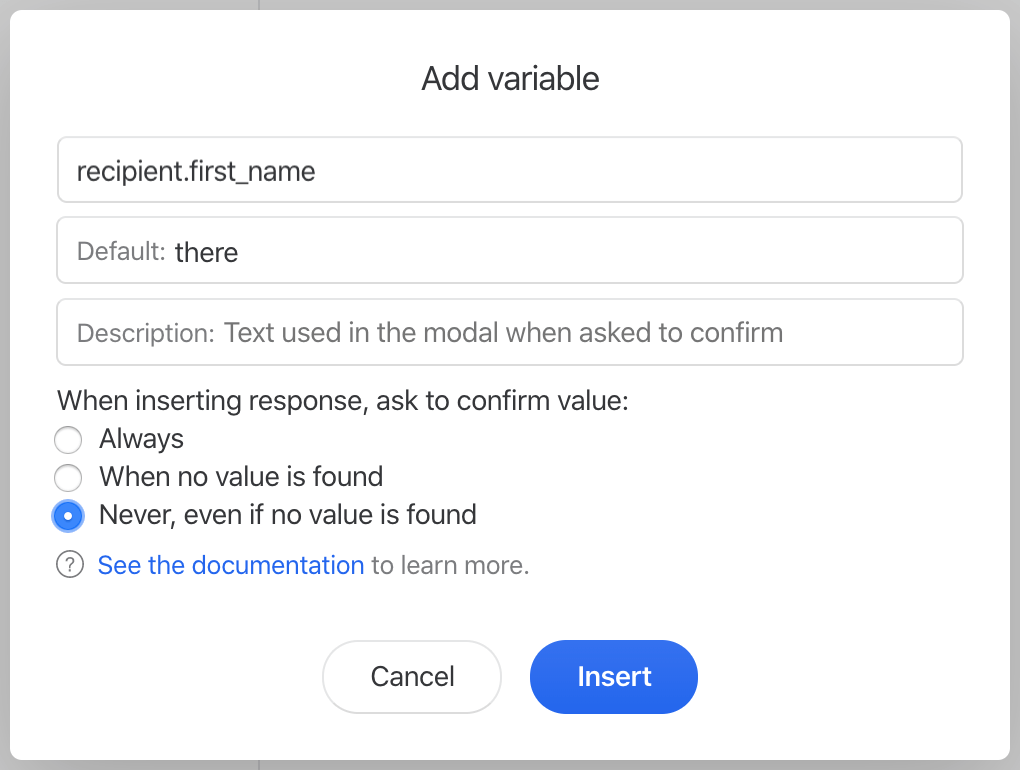
Adding a variable to a response is as easy as clicking the **{{** icon in the response composer:
A new modal will open where you can easily create your variable without knowing the exact syntax.
You can also create a response with dynamic content that entirely change depending if a variable is present or not.
It would look like this:
```liquid
{% if recipient.first_name == null %}Hello,
{% else %}Hi {{ recipient.first_name }},{% endif %}
```
... if there's no recipient first name, it will render like this:
> Hello,
... and if there's a recipient's first name, it will render like this:
> Hi Philippe,
### Build forms
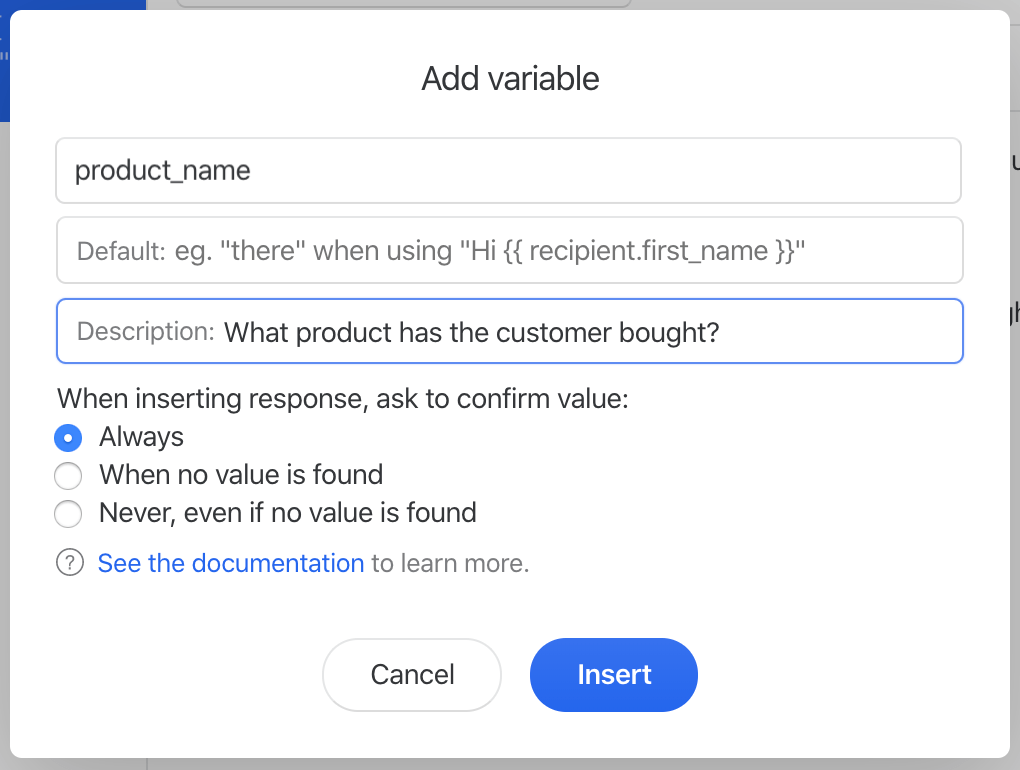
When adding a variable, you don't have to use one that matches a data point provided by Missive ([recipient](#recipient-object), [user](#user-object)). You can create a variable linked to no data, like in this screenshot:
{% hint style="warning" %}
Make sure to use **underscores** and **dots** instead of spaces.
{% endhint %}
When inserted in a draft, a form will ask the Missive user what should the value be:
Instead of using text placeholders (that you might forget to replace), this technique lets you create forms your team always has to fill in when inserting a response.
### Liquid.js
Our templating engine is based on [liquid.js](https://shopify.github.io/liquid/) and supports all of its [tags](https://shopify.github.io/liquid/tags/control-flow/) and [filters](https://shopify.github.io/liquid/filters). Make sure to read the documentation if you want to go deeper and create complex logic.
## Objects
### `recipient` **object**
The recipient data is matched by first looking into the user contacts for matches based on the message recipient address, then on the message data itself.
#### Labels
Contact labels can be used to scope the search. For instance `{{ recipient.work.phone_number }}` would search only in phone numbers with the label *work*.
| Object key | Description | Example |
| -------------------------------- | ---------------------------------------------------------------------------------------------------------------------------------------------------------------------------- | -------------------------------------------------------------------------------------------------- |
| `recipient.handle` | Handle of the recipient(s). This depends on the message type, can be an email address, a phone number, etc. |
+1 (155) 555-555
@frodo
|
| `recipient.name` | First and last name(s) of your recipient(s). | `Philippe Lehoux` |
| `recipient.first_name` | First name(s) of your recipient(s). | `Philippe` |
| `recipient.middle_name` | Middle name(s) of your recipient(s). | `L.` |
| `recipient.last_name` | Last name(s) of your recipient(s). | `Lehoux` |
| `recipient.email` | Email address(es) of your recipient(s). | `frodo@missiveapp.com` |
| `recipient.phone_number` | Phone number of your recipient(s). | `+1 (155) 555-555` |
| `recipient.url` | URL(s) associated with your recipient(s). | `https://missiveapp.com/` |
| `recipient.physical_address` | Physical address(es) associated with your recipient(s). | 123 Missive Street
Quebec, QC, G1K 3B4
Canada
|
| `recipient.twitter` | Twitter username(s) associated with your recipient(s). | `@frodo` |
| `recipient.facebook` | Facebook username(s) associated with your recipient(s). | `Philippe Lehoux` |
| `recipient.nickname` | Nickname of your recipient(s). | `Chewbacca` |
| `recipient.prefix` | Prefix(es) of your recipient(s). | `Mr.` |
| `recipient.suffix` | Suffix(es) of your recipient(s). | `PhD` |
| `recipient.gender` | Gender(s) of your recipient(s). | `Male` |
| `recipient.file_as` | File as value of your recipient(s). | `ACME` |
| `recipient.phonetic_first_name` | Phonetic first name(s) of your recipient(s). | |
| `recipient.phonetic_last_name` | Phonetic last name(s) of your recipient(s). | |
| `recipient.phonetic_middle_name` | Phonetic middle name(s) of your recipient(s). | |
| `recipient.custom.order_amount` | Access your recipient(s) custom contact data. Both variations **Order Amount** and **order\_amount** would be accessible using the same key: `recipient.custom.order_amount` | `$99` |
### `user` **object**
The user object data is matched with the logged-in Missive user (you).
| Object key | Description | Example |
| ------------------- | ------------------------- | ---------------------- |
| `user.first_name` | First name of the user | `Philippe` |
| `user.last_name` | Last name of the user | `Lehoux` |
| `user.name` | Name of the user | `Philippe Lehoux` |
| `user.email` | Email address of the user | `frodo@missiveapp.com` |
| `user.avatar_url` | URL of the user avatar | `https://...` |
| `user.status` | Status of the user | `Working from home` |
| `user.status_emoji` | Status emoji of the user | 🏠 |
### `conversation` **object**
The conversation object data is matched with the current conversation.
| Object key | Description | Example |
| ----------------- | -------------------------- | -------------------------------------- |
| `conversation.id` | The ID of the conversation | `d85eed67-5ac2-477b-aa27-521f01eb9783` |
### `message` **object**
The message object data is matched with the current draft.
| Object key | Description | Example |
| ------------------------- | ----------------------------------------------------------------------------------------------------- | -------------------------------------------------------------------------------------------------- |
| `message.id` | The ID of the message | `d85eed67-5ac2-477b-aa27-521f01eb9783` |
| `message.from_handle` | Handle of the sender. This depends on the message type, can be an email address, a phone number, etc. |
+1 (155) 555-555
@frodo
|
| `message.from_email` | Email address of the sender | `info@missiveapp.com` |
| `message.from_name` | Name of the sender | `Philippe Lehoux` |
| `message.from_first_name` | First name of the sender | `Philippe` |
| `message.from_last_name` | Last name of the sender | `Lehoux` |
---
# Agent Instructions
This documentation is published with GitBook. GitBook is the documentation platform designed so that both humans and AI agents can read, navigate, and reason over technical content effectively. Learn more at gitbook.com.
## Querying This Documentation
If you need additional information that is not directly available in this page, you can query the documentation dynamically by asking a question.
Perform an HTTP GET request on the following URL with the `ask` and `goal` query parameters:
```
GET https://missiveapp.com/docs/core-features/canned-responses/using-variables.md?ask=&goal=
```
`ask` is the immediate question: it should be specific, self-contained, and written in natural language.
`goal` is what the user is ultimately trying to achieve, the reason they need the answer. Sharing it helps GitBook give you a better, more relevant answer. A goal is most helpful when it describes the outcome the user wants rather than restating the question. For example, with `ask=how do I create an API token`, a goal like `build a script that syncs our docs to a CMS` lets GitBook tailor the answer to that use case.
The response will contain a direct answer to the question and relevant excerpts and sources from the documentation.
Use this mechanism when the answer is not explicitly present in the current page, you need clarification or additional context, or you want to retrieve related documentation sections.