If you're evaluating Helpwise, the lay of the land is straightforward. Helpwise is a multichannel help desk for support teams: shared inboxes for email, SMS, WhatsApp, live chat, social DMs, and (with the cloud phone add-on) voice. It ships ticketing scaffolding, a knowledge base, CSAT scoring, automation rules, a chatbot, and 60+ integrations. For teams whose job is formal customer support, those features earn their keep.
The friction tends to surface when a team's actual job isn't help-desk support. Sales teams, account management, operations, finance, real estate, agencies, anyone whose work is "answer email together" rather than "process a ticket queue", usually finds the help-desk frame is overkill, and the missing pieces (a real email client, native desktop apps, personal email handling, deeper internal collaboration) start to matter.
This piece walks through where Helpwise and Missive actually diverge, with verbatims from teams that ran trials of both. We'll go deep on Missive specifically since it's the alternative we know best.
Helpwise vs. Missive at a glance
Helpwise (by SaaS Labs) is a multichannel customer service platform with shared inboxes for email, SMS, WhatsApp, Facebook, Instagram, live chat, and voice (cloud phone add-on). It includes ticketing-style automation rules, a built-in knowledge base, CSAT surveys, AI-assisted reply features, and 60+ integrations. The product is delivered as a web app and mobile apps for iOS and Android.
Missive is a team email client built around collaborative shared inboxes. It connects to every email provider (Gmail, Microsoft 365, IMAP) and adds SMS, WhatsApp, live chat, Messenger, and Instagram in the same workspace. Internal chat lives threaded inside every conversation. Native apps run on Mac, Windows, iOS, Android, and the web.
The distinction that matters most isn't channel coverage, both products handle the same set of channels for the most part. It's the product shape: Helpwise is a help-desk layer that treats every conversation as a ticket. Missive is an email client that treats conversations as conversations, with collaboration and routing layered in.
Help desk vs. email client
This is the architectural choice that drives most of the practical differences below.
Helpwise structures incoming messages as tickets flowing into a support-team interface: status, priority, SLA, agent assignment, CSAT score on close. The mental model is "queue of items needing resolution by my support team." That model works when your team's job is exactly that.
Missive keeps your inbox shaped like an inbox. Conversations show in a unified view, with the ability to assign, add tasks, label, and discuss internally, without converting them into ticket records. The mental model is "shared inboxes that the team works in together." That model fits when your team's job is collaborative email rather than support tickets.
Concretely: in Missive, your personal email and your team's shared email both live in one workspace. You can chat with a teammate inside an email thread, draft together in real time, assign with a due date, and respond, all in the same view where you read the email. In Helpwise, the help-desk frame is always present.
Channels both products cover
Both Helpwise and Missive support email plus SMS, WhatsApp, Facebook Messenger, Instagram, and live chat. Multichannel coverage is not a meaningful differentiator between them.
Where they differ at the edges:
- Voice calling. Helpwise ships a cloud phone system as an add-on with per-minute pricing. Missive doesn't have a phone channel; teams use Aircall or another telephony tool and connect it via integration.
- Twitter/X. Helpwise lists Twitter as a supported channel. Missive doesn't ship a native Twitter integration.
- Personal email. Missive treats your personal email account as a first-class channel alongside shared inboxes. Helpwise is built around shared mailboxes only.
- Custom channels. Missive lets you build custom channels via the API (e.g., bespoke chat from your own product). Helpwise's channel set is what ships in the product.
Pricing
Missive and Helpwise are in similar pricing neighborhoods at the entry tier and diverge sharply at the top tier.
Missive pricing
Missive offers three paid tiers, all annual (monthly billing is roughly 20% higher). Every new team starts with a 30-day free trial that includes Productive features:
- Starter, $14/user/month: up to 5 users, unlimited history, shared inboxes.
- Productive, $24/user/month: up to 50 users, integrations, rules, API access, AI Assistant.
- Business, $36/user/month: unlimited users, advanced analytics, SAML SSO, IP restriction.
30-day free trial with Productive features, up to 25 users. No credit card required.
Helpwise pricing
Helpwise has three published tiers plus an enterprise tier, with user minimums and maximums that affect the real cost:
- Standard, $15/user/month: minimum 2 users, maximum 10 users. 5 shared inboxes (email and Facebook only), 3 automation rules, 10 saved replies.
- Premium, $29/user/month: minimum 2 users. 10 shared inboxes (all channels), 25 automation rules, unlimited saved replies, CSAT surveys.
- Advanced, $49/user/month: minimum 3 users. Unlimited shared inboxes, auto-assignment with load balancing, SLA reporting, AI auto-prioritization.
- Enterprise: custom pricing, unlimited automation rules, custom integrations, team onboarding.
7-day free trial, no free plan, no credit card required for the trial.
The math: a 5-person team on Missive Productive runs $1,440/year. The same team on Helpwise Standard (capped at 10 users) is $900/year, but you're stuck on the entry tier with 3 automation rules and email/Facebook only. If you want full multichannel and more rules, you move to Helpwise Premium at $1,740/year for 5 users, slightly above Missive Productive. At 10 users, Missive Productive is $2,880/year vs. Helpwise Premium at $3,480/year. The Standard tier is the cheapest option but has feature ceilings; the realistic comparison most teams care about is Premium-and-up vs. Missive Productive.
Personal email and unified inbox
Missive can hold personal email accounts alongside shared inboxes in the same workspace. Your support@ alias and your work email account both live in one place. You triage and reply across both without switching apps.
Helpwise is built around shared mailboxes only. There's no concept of a personal inbox living in the same client. Teams using Helpwise typically pair it with another email client for personal email, which means context-switching between two tools to handle a full day of email.
For teams whose work mixes shared-inbox conversations with personal email correspondence (sales reps, account managers, operations leads, founders), the unified inbox approach is the difference between "I live in one app" and "I switch tabs constantly."
Apps and platform support
Missive ships native desktop apps for Mac and Windows, mobile apps for iOS and Android, and a web app. Feature parity across platforms is a design goal: assignment, internal chat, rules-driven workflows, and multi-swipe actions all work on mobile.
Helpwise is delivered as a web app plus mobile apps for iOS and Android. There's no native desktop app, you're either in a browser tab or on your phone.
For most teams this matters less than it sounds, until it suddenly matters: notification reliability, OS-level keyboard shortcuts, fast switching from other apps, and the ability to keep your inbox open without it competing with 30 other browser tabs are all easier in a native desktop app.
Help-desk features Helpwise has and Missive doesn't
If your team's job is formal customer support, Helpwise ships features Missive doesn't. Worth listing honestly.
- Built-in customer-facing knowledge base. Helpwise lets you publish a public help center with articles. Missive doesn't ship a knowledge base; teams pair it with Notion, GitBook, or a standalone help-center tool.
- CSAT surveys. Helpwise has built-in customer satisfaction scoring on Premium and Advanced. Missive doesn't ship native CSAT.
- Native cloud phone system. Helpwise's cloud phone add-on adds a voice channel. Missive integrates with Aircall and other telephony tools instead of shipping a phone system.
- Chatbot. Helpwise ships a chatbot, available as an add-on or bundled into Advanced. Missive doesn't have a native chatbot.
- SLA tracking and reporting. Helpwise Advanced ships formal SLA features. Missive supports time-based escalation through rules but doesn't ship SLA reports as a built-in module.
- AI auto-prioritization. Helpwise Advanced sorts incoming tickets by inferred urgency. Missive's AI rules can do similar work but require setup.
If you'd describe your team's job as "running a customer support function with formal metrics," these features matter. If you'd describe it as "collaborating on email together," they don't.
Rules and automation
Helpwise automation is gated per tier: 3 rules on Standard, 25 on Premium, unlimited on Advanced. The rule capabilities cover the support-workflow basics: route by sender or content, auto-assign, set status, add tags.
Missive supports up to 1,000 personal rules plus 1,000 organization rules per organization on the Productive and Business plans. Rules can fire on incoming messages, outgoing messages, or user actions (new comment, label applied, conversation assigned, conversation closed):
- Auto-label conversations by content, sender, or thread state
- Route emails to teammates based on the email content
- Run an SLA program with time-based escalation
- Snooze after-hours emails until business hours
- Notify a Slack channel when a labeled conversation arrives

Internal chat and collaboration depth
Helpwise supports internal notes inside conversations and @mentions of teammates. The model is help-desk-style: leave a note, ping a colleague, hand off the ticket.
Missive treats internal chat as a first-class layer threaded inside every conversation. The discussion about an email lives next to the email itself, and the chat thread persists alongside the conversation history. Multi-assignee tasks attach to conversations with due dates and subtasks. Drafts can be edited collaboratively in real time, the way a Google Doc works.
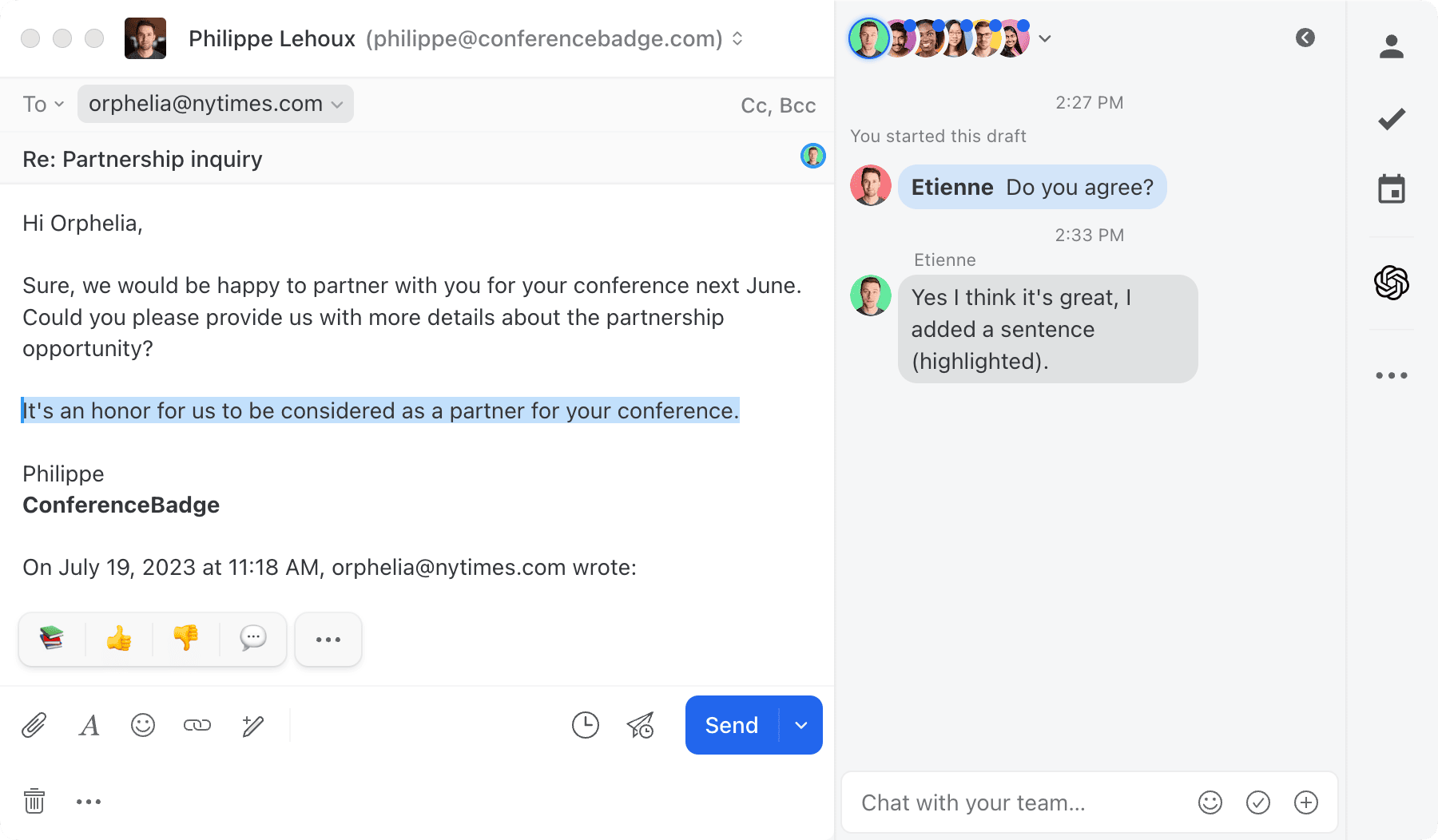
Read more about the internal chat feature and how it changes shared-inbox workflows.
AI features
Both products ship AI, with different design centers.
Helpwise's AI is built around support workflows: AI Assist for drafting replies, thread summarization, and AI Auto-Prioritization (Advanced tier) that ranks tickets by inferred urgency.
Missive's AI covers the same individual workflows (drafting, summarizing, tone adjustment, translation) and goes further with AI rules, automation that uses plain-language prompts to triage, label, route, and reply. An example: detect whether an inbound email is a buying or selling inquiry, label it accordingly, assign the right teammate, create follow-up tasks with due dates, and post a summary in chat.
The AI shape mirrors the product shape: Helpwise's AI accelerates ticket handling, Missive's AI integrates into team workflows.
Integrations
Helpwise lists 60+ integrations, with Slack, Zapier, Shopify, HubSpot, and Pipedrive among the most-used.
Missive offers native integrations with Salesforce, HubSpot, Pipedrive, Asana, Trello, Aircall, Dropbox, Shopify, Todoist, and many more. Native means seeing CRM records, deals, contacts, and tasks alongside email, and creating them from inside Missive, not a Zapier bridge. You can also build custom integrations using the JavaScript API, working on desktop, mobile, and web.
What teams choosing between Helpwise and Missive tell us
Three patterns from teams in our customer base who evaluated Helpwise alongside Missive.
The integration limitations were the dealbreaker. Stephanie at Lighting Dynamics, a commercial lighting firm, ran a serious evaluation of Helpwise before settling on Missive: "I thought I had a folder for them helpwise. Yes." Her trial went deep enough that she remembered specific details about why it didn't land. The dealbreakers were technical: the two-way email synchronization was unreliable, and Helpwise couldn't change the outgoing sender name on her shared mailboxes, a small detail with big customer-facing consequences for a B2B firm where customers expect to see a person's name in their inbox, not a help-desk address.
The closest miss came down to time zones. A supply chain operations director we interviewed shortlisted Hiver, Help Scout, Helpwise, and Zoho Desk before landing on Missive. Helpwise nearly won. "I think maybe helpwise came the closest," he told us, "but I think theirs was based in India and I think their time zones were off. So anytime for example if I wanted to schedule a demo it had to be really late at night… so then that made me think okay if I need help I'm not going to get any help late at night until maybe the next day." Helpwise's parent company SaaS Labs is India-based; that itself was the friction point. "If they had a American team they probably could [have helped]."
"We just wanted email to work better." The broader pattern shows up in Kason's story at i-SOLIDS, a 3D printing manufacturer. His team needed shared-inbox collaboration as the sales team grew past three people, and he started by evaluating ticketing systems and help-desk tools generally. The conclusion mapped to the help-desk-vs-email-client distinction directly: "the vast majority of it was overkill for what we needed and we just wanted email to work better. We didn't really want a help desk ticketing system." The specific concern was duplicate emails: "a lot of Helpdesk ticketing systems will just forward that email to multiple inboxes and it'll be multiple instances of essentially the same message." If they ever left the tool, the underlying inbox would be a mess.
The pattern: Helpwise is a real product that wins teams whose job genuinely is help-desk customer support. The teams that shortlist it and land on Missive instead are usually teams whose job isn't help-desk support, sales, account management, operations, agencies, professional services, and the help-desk frame plus its limits (web-only, no personal email, ticket-style architecture) become the reason to keep looking.
Is Missive the right Helpwise alternative for you?
Quick gut check:
- If your team runs a formal customer support function with SLA reporting, CSAT scoring, and a customer-facing knowledge base: Helpwise's help-desk frame is built for that work. Missive can do parts of it but doesn't ship support-specific reporting or knowledge-base tooling.
- If your team's actual job is collaborative email (sales, account management, ops, agencies, professional services): Missive is built for that workflow. Helpwise's ticketing scaffolding usually feels like overkill for non-support teams.
- If your team uses both personal email and shared inboxes: Missive consolidates them in one workspace. Helpwise is shared mailboxes only.
- If you want native desktop apps for Mac and Windows: Missive ships them. Helpwise is web + mobile only.
- If you want time to evaluate with your actual team: Missive’s trial gives you 30 days and up to 25 seats. Helpwise gives you 7 days, and its smallest paid plan carries a 2-user minimum, so the real starting cost is $30 a month.
- If your headcount is in flux: Helpwise's 2-3 user minimums and 10-user cap on Standard create friction at small headcount and at the upgrade boundary. Missive's tiers don't have minimums.
Try Missive for free. 30-day trial with Productive features, no credit card required.
Frequently asked questions
What is Helpwise?
Helpwise is a multichannel customer service platform built around shared inboxes for email, SMS, WhatsApp, live chat, Facebook, Instagram, and (with the cloud phone add-on) voice. It also includes a built-in knowledge base, automation rules, CSAT scoring, and analytics. Teams use it to manage customer-facing communication across channels with collision detection, internal notes, and assignment.
What's the main difference between Helpwise and Missive?
Helpwise is a customer service platform with a shared inbox at its core. Missive is an email client with team collaboration built in. Helpwise treats every conversation as a ticket flowing into a help-desk interface; Missive treats your inbox as your inbox, with internal chat threaded inside every conversation so coworkers can talk without leaving it.
If your team's job is "answer support tickets with formal SLA tracking," Helpwise fits. If your team's job is "answer email together," Missive fits.
Is Missive cheaper than Helpwise?
Comparable at the entry tier and divergent above it. Missive Starter is $14/user/month (up to 5 users) versus Helpwise Standard at $15/user/month (minimum 2, maximum 10 users, with email and Facebook channels only). For full multichannel, Helpwise Premium is $29/user/month versus Missive Productive at $24/user/month. At the top tier, Missive Business is $36/user/month versus Helpwise Advanced at $49/user/month.
Neither has a free plan. Missive’s trial runs 30 days with no credit card; Helpwise’s runs 7.
Does Helpwise have a free plan?
No. Helpwise offers a 7-day free trial with no credit card required, but no permanent free tier. Paid plans start at $15/user/month with a 2-user minimum, so the realistic starting cost is $30/month for the smallest paid team.
Missive doesn’t have one either. Every new team gets a 30-day trial with shared inboxes, internal chat, and the rest of the Productive features, for up to 25 users.
What does Helpwise have that Missive doesn't?
Helpwise was built as a help desk first, so it ships support-specific features Missive doesn't. The differences matter mostly for teams whose primary job is customer support; less so for teams using shared inboxes for email collaboration more broadly.
- Built-in customer-facing knowledge base. Missive doesn't ship one natively; teams pair it with Notion, GitBook, or a standalone tool.
- Native cloud phone system. Helpwise includes voice calling as an add-on. Missive doesn't ship a phone channel and integrates with Aircall instead.
- Dedicated CSAT scoring. Helpwise has built-in customer satisfaction surveys on Premium and Advanced.
- Chatbot. Available as an add-on or bundled into Advanced.
- Formal SLA reporting. Helpwise Advanced ships SLA tracking and reports as a module.
Why do teams switch from Helpwise to Missive?
Three patterns come up consistently. The unifying theme is that Helpwise was built for support orgs with a help-desk workflow, but most growing teams want shared-inbox collaboration without the ticketing scaffolding around it.
- It's not a real email client. Helpwise is web-only with mobile apps. Missive ships native desktop apps for Mac and Windows alongside web and mobile, and handles personal and shared email in one workspace.
- The help-desk frame feels wrong for non-support teams. Operations, finance, sales, and account management teams using Helpwise often describe ticketing as overkill for what they actually need: collaborative email.
- Per-tier pricing climbs steeply. Helpwise jumps from $15 to $29 to $49 per user, with key features (SLA rules, advanced integrations, custom views) gated to the $49 tier. Missive's tiers stay flatter.
Does Helpwise work with Outlook and Microsoft 365?
Yes. Helpwise supports both Gmail and Microsoft 365 inboxes. So does Missive, plus any IMAP provider. Provider support isn't a meaningful differentiator between the two; the differentiator is product shape (help desk vs. email client).
Does Missive have AI features like Helpwise?
Yes. Missive includes AI for drafting replies, summarizing threads, and powering AI rules that triage and route messages using plain-language prompts. Helpwise's AI is more focused on support-specific tasks: AI Assist for replies, thread summarization, and AI Auto-Prioritization on the Advanced tier.
The shape differs: Missive's AI sits inside the human workflow (a person owns every conversation), while Helpwise leans toward AI-assisted ticket triage.
Is Helpwise better for customer support or for shared inbox workflows generally?
Helpwise is purpose-built for customer support: SLA tracking on Advanced, CSAT surveys, a knowledge base, AI auto-prioritization, and collision detection across channels. Missive is closer to how email already works, for teams that primarily live in shared addresses (support@, sales@, ops@) and want to discuss messages without leaving the inbox.
Quick gut check: if your team would describe their work as "handling customer queries" and needs formal SLA reporting, Helpwise fits. If they'd describe it as "collaborating on email," Missive fits.
Check out how Missive compares to Front, Missive compares to Superhuman, Missive compares to Gmelius, and Missive compares to Spark.
If Helpwise gets an update and this article becomes outdated, email us and we will update it.
