Shortwave is an AI-first email client built on Gmail. Bundles, AI search, AI-drafted replies, thread summarization, natural-language inbox commands, and a learned writing-style feature. Founded by former Google Inbox engineers. For one person on Gmail processing high-volume email, the AI is genuinely good and the per-seat pricing is reasonable.
Missive is a team email client that works across every email provider, with collaboration, multichannel, and rules-based automation as core features rather than add-ons. The two products have different design centers, and the choice usually comes down to two questions: does your team use one provider or multiple? And is your AI need shaped around individual inbox processing or team workflows?
This piece walks through where Shortwave and Missive actually diverge. We'll go deep on Missive specifically since it's the alternative we know best.
Shortwave vs. Missive at a glance
Shortwave is a Gmail-focused AI email client. AI bundling auto-categorizes incoming mail. AI search runs natural-language queries across your full email history. AI Write learns your tone and drafts replies. The team features (Team Inboxes, Team Comments, shared snippets) layer on top of an individual-first design. Native apps run on Mac, Windows, iOS, Android, and the web.
Missive is a team email client built around collaborative shared inboxes. It connects to every email provider (Gmail, Microsoft 365, IMAP) and adds SMS, WhatsApp, live chat, Messenger, and Instagram in the same workspace. Internal chat lives threaded inside every conversation. AI features cover individual workflows (drafting, summarizing, translation) and AI rules that automate triage and routing across team workflows.
The most obvious split is provider support. Shortwave is Gmail-only; Missive works with everything. The deeper split is design center: Shortwave optimizes individual inbox velocity with AI; Missive optimizes team workflows with shared inboxes and rules.
Email provider support
This is the cleanest differentiator in the comparison.
Shortwave is Gmail-only. Personal Gmail and Google Workspace accounts work; Microsoft 365, Outlook, IMAP, iCloud, Yahoo, and any non-Google provider don't. Shortwave has been testing Outlook support, but as of writing it isn't generally available. If your team is mixed-provider, Shortwave is a non-starter today.
Missive supports Gmail, Microsoft 365, and any IMAP provider. Mixed-provider teams (a CEO on Gmail, a finance lead on Outlook, a support inbox on a custom domain) all work in the same shared workspace. This is the most common reason mixed-provider teams choose Missive over Shortwave.
AI features
Both products ship AI, with genuinely different shapes.
Shortwave's AI is built around individual inbox processing. AI bundling auto-categorizes incoming mail without manual rules. AI search runs natural-language queries across years of email ("emails about Q3 budget last month"). AI Write drafts replies in your tone. The AI Assistant handles cross-thread questions, scheduling drafts, and inbox commands conversationally. For one person processing dense personal email, the AI depth is the product's strongest feature.
Missive's AI covers the same individual workflows (drafting, summarizing, tone adjustment, translation) and goes further with AI rules, automation that uses plain-language prompts to triage, label, route, and reply across team workflows. An example: detect whether an inbound email is a buying or selling inquiry, label it accordingly, assign the right teammate, create follow-up tasks with due dates, and post a summary in chat.
The shapes mirror the product shapes. Shortwave's AI is "make me faster at my own inbox." Missive's AI is "automate team triage and grounded replies across the workflow." Both are real; the choice depends on which job you're hiring AI to do.
Pricing
Different price ranges, different trade-offs.
Missive pricing
Missive offers three paid tiers, all annual (monthly billing is roughly 20% higher). Every new team starts with a 30-day free trial that includes Productive features:
- Starter, $14/user/month: up to 5 users, unlimited history, shared inboxes.
- Productive, $24/user/month: up to 50 users, integrations, rules, API access, AI Assistant.
- Business, $36/user/month: unlimited users, advanced analytics, SAML SSO, IP restriction.
30-day free trial with Productive features, up to 25 users. No credit card required.
Shortwave pricing
Shortwave has a free tier plus four paid tiers, with a per-seat model:
- Free: personal Gmail only, AI features capped, 90-day search history.
- Personal, $8.50/user/month: for individual paid use.
- Pro, $18/user/month: three years of search history, full AI in your voice, three signed-in accounts on the same device.
- Business, $30/user/month: Team Inboxes for shared addresses, Team Comments, shared AI snippets, full email history, up to 10 accounts.
- Premier, $45/user/month: deeper AI features, larger usage quotas, advanced support.
- Max, $100/user/month: the top consumer tier with the highest AI usage and integrations.
- Enterprise: custom pricing for advanced security and integrations.
14-day free trial, signature footer on outbound emails on the free plan, all team members must be on the same plan.
The math: for a 10-person team on annual billing, Shortwave Business runs $3,600/year and Missive Productive runs $2,880/year. At the team-workflow tier most teams care about, Missive Productive is cheaper than Shortwave Business while shipping multichannel and full automation rules. Shortwave Pro at $18/user/month is the closest comparison to Missive Starter at $14, but Pro doesn't include the Team Inboxes that make Shortwave usable for shared addresses.
Channels: email-only vs. multichannel
Shortwave is email-only. SMS, WhatsApp, live chat, social DMs, all live in another tool.
Missive consolidates email plus:
- Live chat on your website
- SMS via Twilio, SignalWire, Dialpad, or Quo
- Social: Facebook Messenger, Instagram
- Custom channels via the API
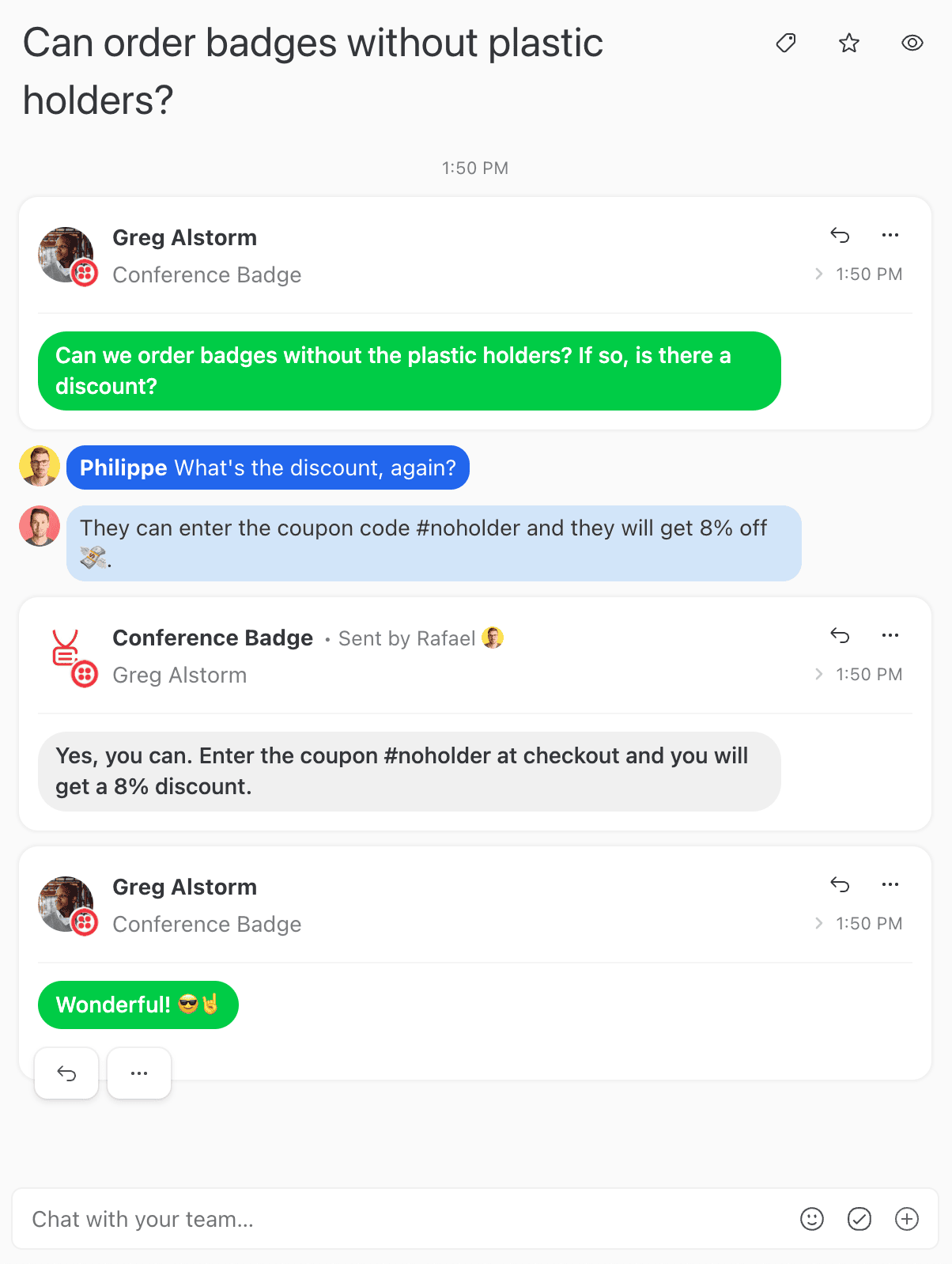
If a customer emails you Monday and texts you Wednesday, both threads land in the same workspace, and your team can pick up the second message with full context from the first.
Designed for teams
Shortwave's Business tier ($30/user/month) ships Team Inboxes for shared addresses and Team Comments for internal discussion on a thread. The features work for small teams doing collaboration on top of personal Gmail accounts. The underlying architecture is still individual-first; the team layer adds visibility and shared snippets.
Missive's design center is the unit of work most teams actually have: a shared conversation that needs an assignee, an internal discussion, sometimes a few tasks, and a clear "who's responsible" answer. Internal chat lives threaded inside the conversation. Multi-assignee tasks attach to conversations with due dates and subtasks. Drafts can be edited collaboratively in real time, the way a Google Doc works.
Concretely: if a partner emails about renegotiating contract terms and you need legal and finance to weigh in before replying, in Missive you chat about it inside the email thread, assign tasks for the work the renegotiation triggers, and reply once the team has aligned, all without leaving the conversation. Read more about the internal chat feature.
Rules and automation
Shortwave's automation is shaped around AI bundling and a small set of rule-style behaviors. There isn't a full rules engine for outgoing email, user-action-based rules, or team-level automation that routes work across people.
Missive supports up to 1,000 personal rules plus 1,000 organization rules per organization on the Productive and Business plans. Rules can fire on incoming messages, outgoing messages, or user actions (new comment, label applied, conversation assigned, conversation closed):
- Auto-label conversations by content, sender, or thread state
- Route emails to teammates based on the email content
- Run an SLA program with time-based escalation
- Snooze after-hours emails until business hours
- Notify a Slack channel when a labeled conversation arrives

Calendar
Shortwave's calendar pulls in your Google calendar, with the AI Assistant able to access it for scheduling. There's no support for non-Google calendar providers.
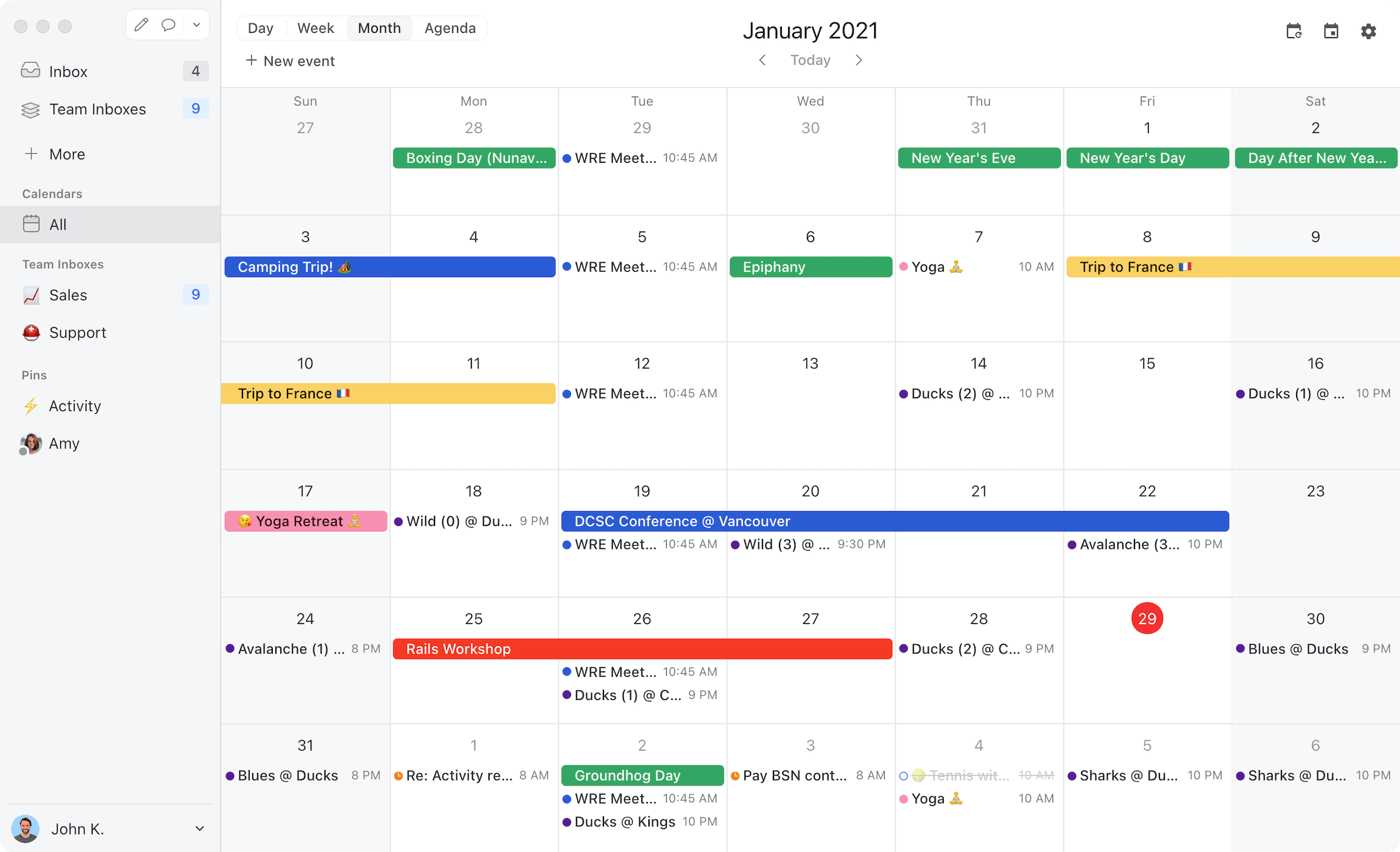
Missive ships a built-in calendar that supports Google Calendar and Microsoft 365 accounts, with team-shareable events and entire calendar accounts. Calendar lives in the same workspace as your inboxes, and you can convert an email thread into a meeting invite with the recipients pre-populated. The rebuilt calendar also handles team scheduling: with Meet with, type a teammate, team, or contact into the sidebar and their availability appears over your own, create the event and they’re added as guests, and extra time zone columns show up automatically when teammates are in different zones. Focus time (on Google Workspace calendars) and custom recurrence are built in too.
Integrations
Shortwave integrates with HubSpot and Salesforce via a BCC pattern (forward email to log it to a CRM record), plus a small set of productivity integrations. Shortwave's sister product Tasklet provides connections to 3,000+ apps for cross-tool workflows, but it's a separate product.
Missive offers native integrations with Salesforce, HubSpot, Pipedrive, Asana, Trello, Aircall, Dropbox, Shopify, Todoist, and many more. Native means seeing CRM records, deals, contacts, and tasks alongside email, and creating them from inside Missive, not a Zapier bridge or BCC pattern. You can also build custom integrations using the JavaScript API, working on desktop, mobile, and web.
Apps and platforms
Both products run on Mac, Windows, iOS, Android, and web. Feature parity across platforms is comparable; Shortwave's mobile app is solid for individual email processing, and Missive's mobile app does what the desktop app does, including assignment, internal chat, rules-driven workflows, and multi-swipe actions.
Is Missive the right Shortwave alternative for you?
Quick gut check:
- If your team is Gmail-only and you want the deepest AI for individual inbox processing: Shortwave is purpose-built for that. Missive isn't trying to win the Gmail-AI-power-user comparison.
- If your team uses mixed providers (Gmail + Microsoft 365 + IMAP): Shortwave is a non-starter today. Missive supports all three in the same workspace.
- If you run a shared inbox or coordinate email with teammates: Missive is built for that workflow from day one. Shortwave's team features layer on top of an individual-first design.
- If your team handles email plus SMS, WhatsApp, live chat, social DMs, or other channels: Missive consolidates these. Shortwave is email-only.
- If you need rules-based automation today: Missive ships a full rules engine. Shortwave's automation primitives are narrower.
- If you’re one person and want something permanently free: Shortwave has a free tier and Missive doesn’t. It’s a single Gmail account with capped AI and a signature footer on outbound mail, but it costs nothing.
- If you’re a team that needs shared inboxes: neither free tier helps, since Shortwave’s doesn’t include them. Missive’s 30-day trial does, for up to 25 people, against Shortwave’s 14 days.
Try Missive for free. 30-day trial with Productive features, no credit card required.
Frequently asked questions
What is Shortwave?
Shortwave is an AI-powered email client built on top of Gmail. It adds intelligent bundling, AI search across email history, AI-drafted replies, thread summarization, and natural-language inbox commands. Founded by former Google Inbox engineers, it's positioned as a faster, smarter Gmail experience for power users and small teams.
What's the main difference between Shortwave and Missive?
Shortwave is an AI-first email client built specifically for Gmail. Missive is a multi-provider email client built specifically for team collaboration. Shortwave optimizes for one person processing their inbox faster with AI; Missive optimizes for multiple people working on the same inbox together. Both have AI, but the design centers are opposite: Shortwave is "AI for me," Missive is "collaboration for us."
Is Missive cheaper than Shortwave?
It depends on which tier you compare. For a single Gmail user, Shortwave is cheaper, because it has a free tier and Missive doesn’t. For teams, Missive Productive at $24/user/month annual is comparable to Shortwave Pro at $18/user/month and cheaper than Shortwave Business at $30/user/month, where Team Inboxes unlock.
The cleaner team comparison: Missive Productive at $24 versus Shortwave Business at $30, both per user per month. Missive wins on multi-provider support, multichannel, and full rules-based automation; Shortwave wins on individual-inbox AI depth.
Does Shortwave work with Outlook or Microsoft 365?
Not today. Shortwave is Gmail-only and works with personal Gmail or Google Workspace accounts. Outlook, Microsoft 365, and IMAP accounts can't connect. Shortwave has been testing Outlook support, but it isn't generally available as of this writing.
This is the most common reason mixed-provider teams choose Missive instead. Missive supports Gmail, Microsoft 365, and any IMAP provider, so coworkers on different providers work in the same shared inbox.
Does Missive have AI features like Shortwave?
Yes, with a different focus. Missive includes AI for drafting replies in your tone, summarizing long threads, and powering AI rules that triage and route incoming messages using plain-language prompts. Shortwave's AI is deeper for individual inbox processing: AI search across years of email, automatic bundling, and AI executive assistant features.
If your AI use case is "make me faster at my own inbox," Shortwave goes deeper. If it's "automate team triage and replies grounded in our docs," Missive fits better.
What does Shortwave have that Missive doesn't?
Shortwave's depth is in personal inbox AI and Gmail-specific features. For teams whose primary workflow is one person processing high-volume email faster, Shortwave's investment in those areas shows.
- AI search across full email history. Natural-language queries like "emails about Q3 budget last month" return relevant threads. Missive's search is solid but less semantic.
- Automatic bundling. Newsletters, notifications, and other low-priority emails get auto-grouped without manual rules.
- AI executive assistant features. Deeper AI involvement in scheduling, drafting, and inbox management for individual power users.
- Tasklet integration. Shortwave's sister product for AI-driven cross-app workflows (3,000+ apps via the broader Tasklet platform).
Why do teams switch from Shortwave to Missive?
The two patterns are provider expansion and team workflow. Shortwave is built for one person on Gmail; teams that grow past that hit ceilings.
- Mixed email providers. Hiring on Outlook, supporting clients on different providers, or running multiple brands across Workspace and Microsoft 365 means Shortwave can't help.
- Real shared-inbox collaboration. Shortwave's team inboxes (Business tier) are basic compared to Missive's threaded internal comments inside email, real-time collaborative drafts, and assignment with rules.
- Multichannel support. Email, SMS, WhatsApp, live chat, Facebook Messenger, and Instagram all unified in Missive. Shortwave is email-only.
- Pricing for teams. Shortwave Business at $30/user/month is steeper than Missive Productive at $24, with Missive shipping more team features at the lower price.
Does Shortwave have a free plan?
Yes. Shortwave's free plan covers a single personal Gmail account, AI features (with usage caps), and 90 days of search history. Outgoing emails on the free plan include a "Sent with Shortwave" signature footer.
Missive has no free plan. Every new team gets a 30-day trial with shared inboxes, team collaboration, and Productive features, for up to 25 users and no signature footer.
Is Shortwave a team email client?
Partially. Shortwave's Business plan ($30/user/month) adds Team Inboxes for shared addresses like support@ or hello@, plus Team Comments and shared snippets. The product was built around individual inbox optimization first, with team features added on top. Missive was built around team collaboration from the start, which shows in features like real-time collaborative drafts, threaded internal chat inside conversations, and rules that route across team workflows.
If your team is two or three people on Gmail who want AI productivity, Shortwave fits. If you're a real team with shared inboxes, multiple providers, or multichannel needs, Missive maps better.
Check out how Missive compares to Front, Missive compares to Superhuman, Missive compares to Gmelius, and Missive compares to Spark.
If Shortwave gets an update and this article becomes outdated, email us and we will update it.
