> For the complete documentation index, see [llms.txt](https://missiveapp.com/docs/llms.txt). Markdown versions of documentation pages are available by appending `.md` to page URLs; this page is available as [Markdown](https://missiveapp.com/docs/advanced-features/rules/templates/forward-invoices-to-accounting.md).
# Auto-forward invoices and receipts
Template: Auto-forward invoices to your accounting team.
**Auto-forward invoices and receipts** is a Missive rules template designed for businesses that have an accountant, bookkeeper, or accounting team. With this rule, any incoming email containing an invoice or receipt will be forwarded to your accountant automatically.
#### When enabled:
{% stepper %}
{% step %}
The incoming rule allows you to automatically label and forward all **recurring invoices** to your accountant or accounting system's email address.
{% endstep %}
{% step %}
On the other hand, some invoices may come to you that are not recurring, but should still be forwarded effortlessly.
{% endstep %}
{% endstepper %}
#### Here’s how it works:
* You need a forwarding address (like @qbodocs.com, @dext.cc, or your accountant’s email, etc.)
* (Optional) You need an organization label for invoices (if you want to sort all your forwarded invoices into a single, common label)
* (Optional) A note is added as internal documentation inside Missive for your team to understand why the rule triggered and what to do with it. Then, the conversation closes automatically.
***
### 1. Incoming email rule: For recurring invoices
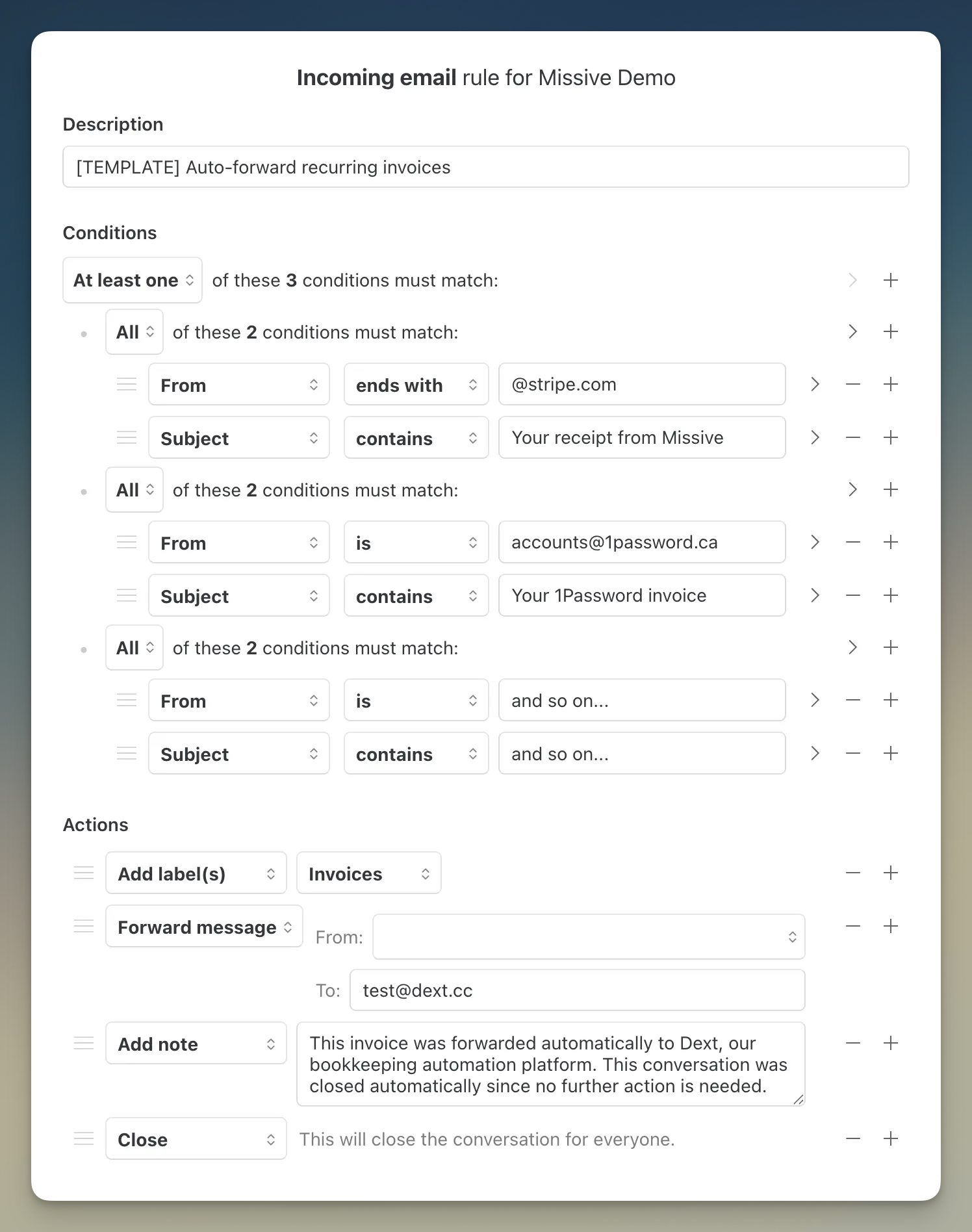
The goal of each set of nested conditions is to capture the recurring invoice email you get in Missive. For example, your monthly invoice email from Missive will always be sent by an address that ends with @stripe.com and will always contain “Your receipt from Missive” in its subject.
The **At least one** logic at the top makes sure that only one set of nested conditions is true to trigger. Using this method, it means you only need a single rule to forward all your recurring invoices.
Add to Missive
| Component | Value |
|---|
| Condition 1 | From → ends with {...} |
| Condition 2 | Subject →contains {...} |
| Action 1 | Add label(s) → Invoices |
| Action 2 | Forward message → {...} |
| Action 3 | Add note → {...} |
| Action 4 | Close |
***
### 2. User action rule: Manual trigger
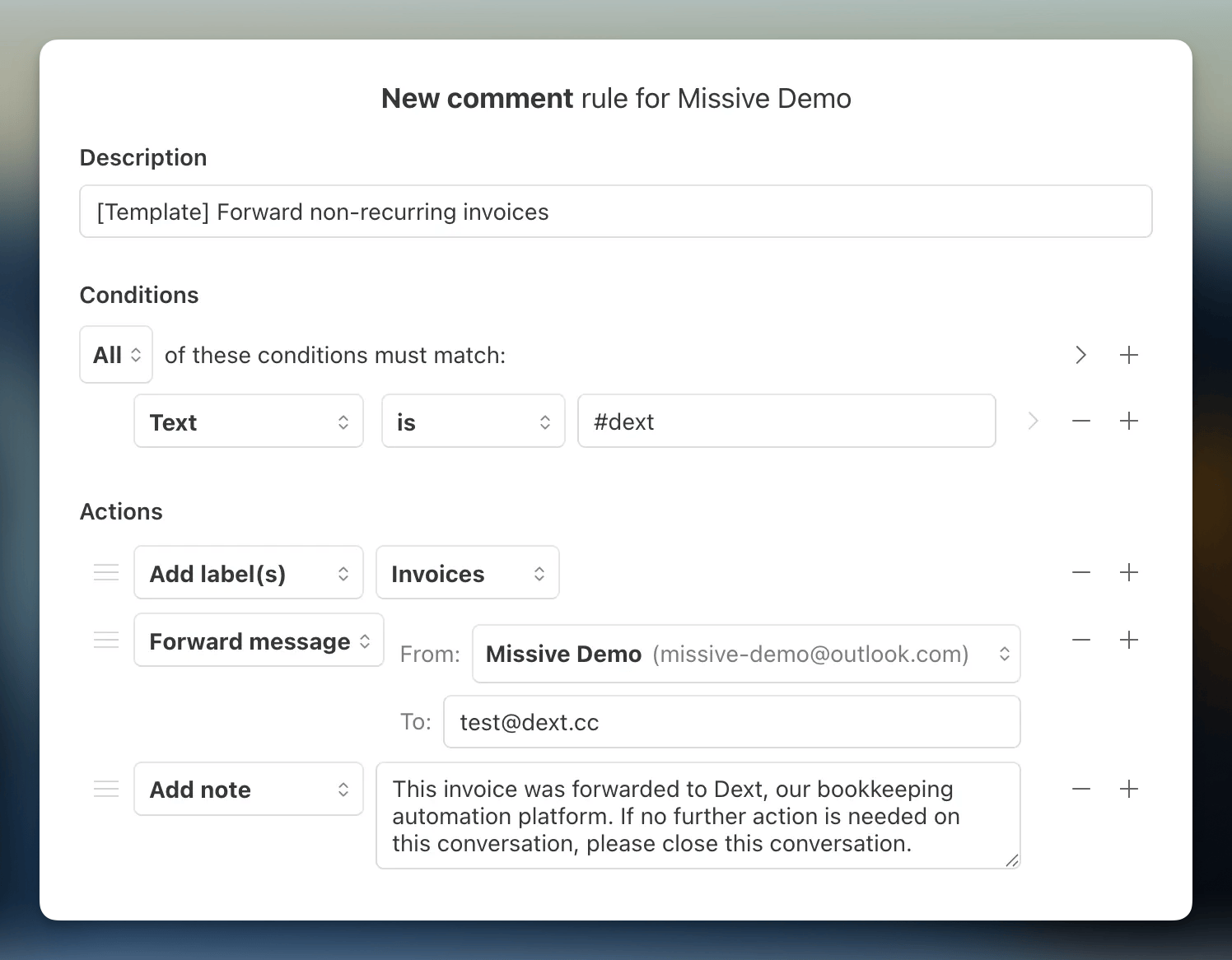
If the auto-forward rule above didn’t catch a specific invoice email that was received, then you can trigger the same forwarding actions manually by typing something in the Missive chat to have the same effect. This is a good method for every non-recurring invoices you get.
Add to Missive
{% hint style="info" %}
Do you prefer to trigger the rule with a label instead of typing? Simply change the condition to "Label is → Invoices."
{% endhint %}
| Component | Value |
|---|
| Condition 1 | Text is → #dext |
| Action 1 | Add label(s) → Invoices |
| Action 2 | Forward message → {...} |
| Action 3 | Add note → {...} |
| Action 4 | Close |
***
---
# Agent Instructions
This documentation is published with GitBook. GitBook is the documentation platform designed so that both humans and AI agents can read, navigate, and reason over technical content effectively. Learn more at gitbook.com.
## Querying This Documentation
If you need additional information that is not directly available in this page, you can query the documentation by asking a question.
Perform an HTTP GET request on the following URL with the `ask` and `goal` query parameters:
```
GET https://missiveapp.com/docs/advanced-features/rules/templates/forward-invoices-to-accounting.md?ask=&goal=
```
`ask` is the immediate question: it should be specific, self-contained, and written in natural language.
`goal` is what the user is ultimately trying to achieve, the reason they need the answer. Sharing it helps GitBook give you a better, more relevant answer. A goal is most helpful when it describes the outcome the user wants rather than restating the question. For example, with `ask=how do I create an API token`, a goal like `automate deployments from our CI pipeline` lets GitBook tailor the answer to that use case.
The response will contain a direct answer to the question and relevant excerpts and sources from the documentation.
Use this mechanism when the answer is not explicitly present in the current page, you need clarification or additional context, or you want to retrieve related documentation sections.