Duplicate rules to a different scope
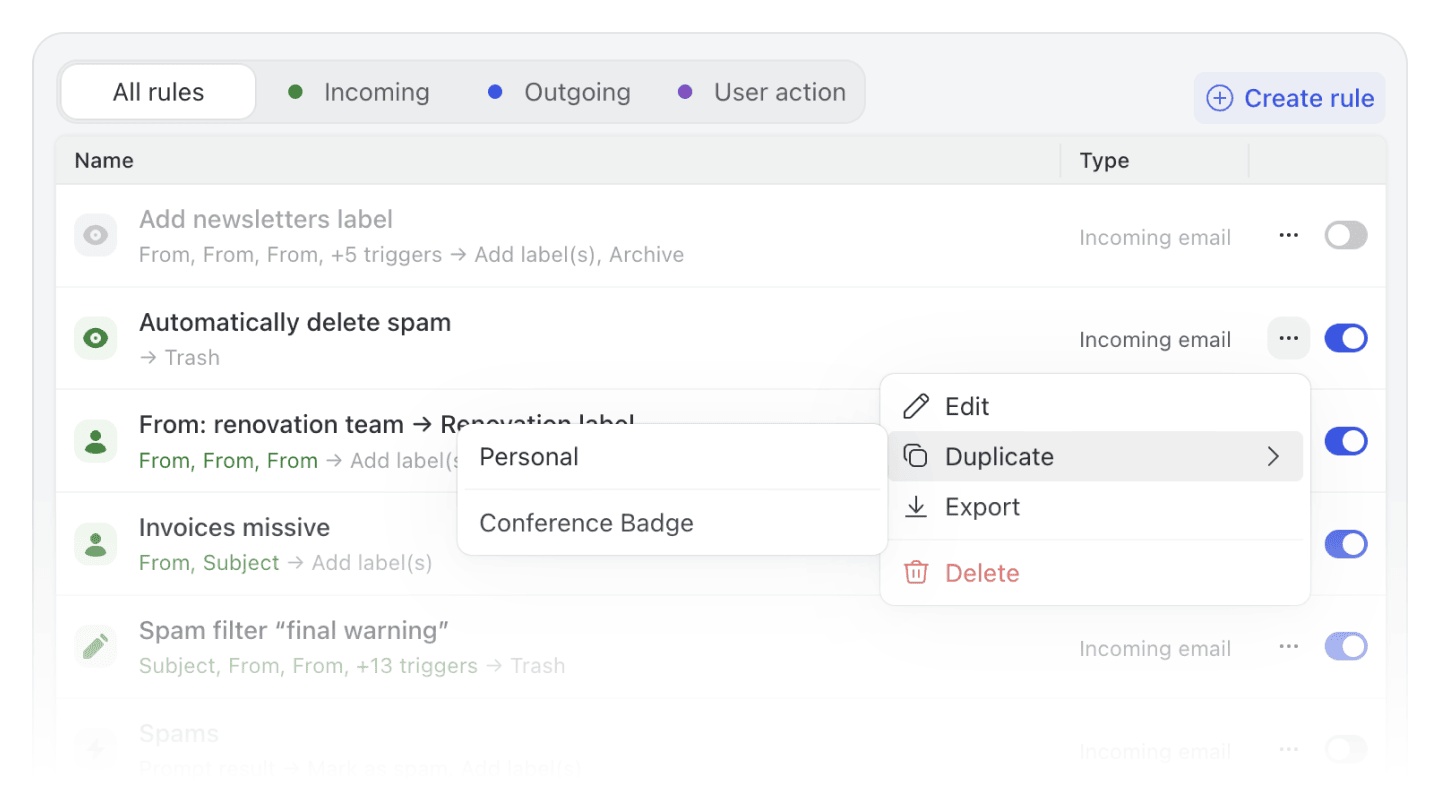
Until now, if you built a useful personal rule and wanted to share it with your organization, you had to export the rule and re-import it manually. The Duplicate action now opens a sub-menu that lets you pick a destination: Personal, the rule's current organization, or any other organization you manage. Missive creates a pre-filled copy scoped to that target, automatically removing any conditions or actions that don't apply to the new scope. Much faster than export/import when you want to reuse a rule across contexts.
Improved MCP integrations in the assistant
MCP integrations are now loaded on demand instead of all up front, so connecting several integrations no longer burns tokens on capabilities the assistant never uses. Handling of multiple MCP integrations of the same type (e.g. two Stripe accounts) has also been improved so they stay distinct.
Instant calendar loading
Your calendar events are now saved on your device, so they show up immediately when you open or reload Missive. No more blank calendar while things load, fresh updates sync quietly in the background.
Out of office unassignment is now visible in conversations
When a teammate's Out of office status causes them to be unassigned from a conversation, that action now appears as a visible event in the conversation timeline, so the rest of the team can see why the conversation returned to the team inbox.
Conversation subjects preserved from out-of-office replies
Receiving an out-of-office auto-reply no longer overwrites the conversation's displayed subject line with the OOO message subject.
Mailto links now support the from parameter
When a mailto: link includes a from field (e.g. mailto:john@acme.com?from=sales@acme.com), Missive automatically selects the matching sender alias. Useful for CRMs, help desks, or internal tools that generate mailto links where the sending address matters.
Account provider icon badges in the sidebar
Per-account sub-mailboxes under your unified Inbox and All now show a small provider icon badge (e.g. Messenger, Aircall, Dialpad), so you can distinguish between accounts that share the same name. Only non-email accounts get a badge. You can turn this off under Settings > Preferences > Left sidebar.
Fixed freeze when opening drafts with very long canned responses
Indexing canned responses could cause a multi-second freeze for organizations with large response libraries. This has been resolved.
Better email quote detection for dashed separators
Quoted text detection has been improved for messages that use dashed separators (common in forwarded emails from HEY and other providers). Quoted text is now correctly collapsed in more cases.
- Search results now show the latest message preview and organization labels again, instead of the "N matches" count that replaced them in the previous release.
- Calendar reminders no longer fire for events that were rescheduled or deleted. Previously, moving an event could leave behind a stale reminder that would still notify you at the original time.
- Accepting a calendar invite that includes multiple team members now correctly RSVPs for the right person, instead of sometimes targeting the wrong attendee.
- The "Auto-shared users" dropdown in the organization label editor now lists all teams in your organization, not just teams with a team inbox.
- Triple-backtick code blocks in comments now render correctly when the code inside contains backticks (e.g. template literals or shell commands). Previously, the inner backticks broke the formatting.
- Image URLs with query parameters (e.g. Dropbox share links with auth tokens) pasted in comments are no longer stripped of their query string, which could break the link or prevent the image from loading.
- Scrolling to the bottom of search results no longer causes the jump-between-matches navigation bar to overlap conversation content.
- Copying text to the clipboard now shows a clear error dialog when the browser blocks the operation, instead of failing silently.
- Declining a single occurrence of a Microsoft recurring calendar event no longer declines the entire series.
- Dialpad forwarded calls to a shared number now correctly land in the shared team inbox instead of the operator's personal inbox.
- Email account deletion no longer gets stuck in a "being deleted" state indefinitely.
- Organization-owned Shopify integrations can now be reconnected after they disconnect.
- MCP tools no longer fail to load on Gemini when using multiple integrations from the same MCP server.
- Long-pressing a file attachment on mobile no longer triggers overlapping context menus.
mailto:links in comments now preserve query string parameters.