Recent statuses
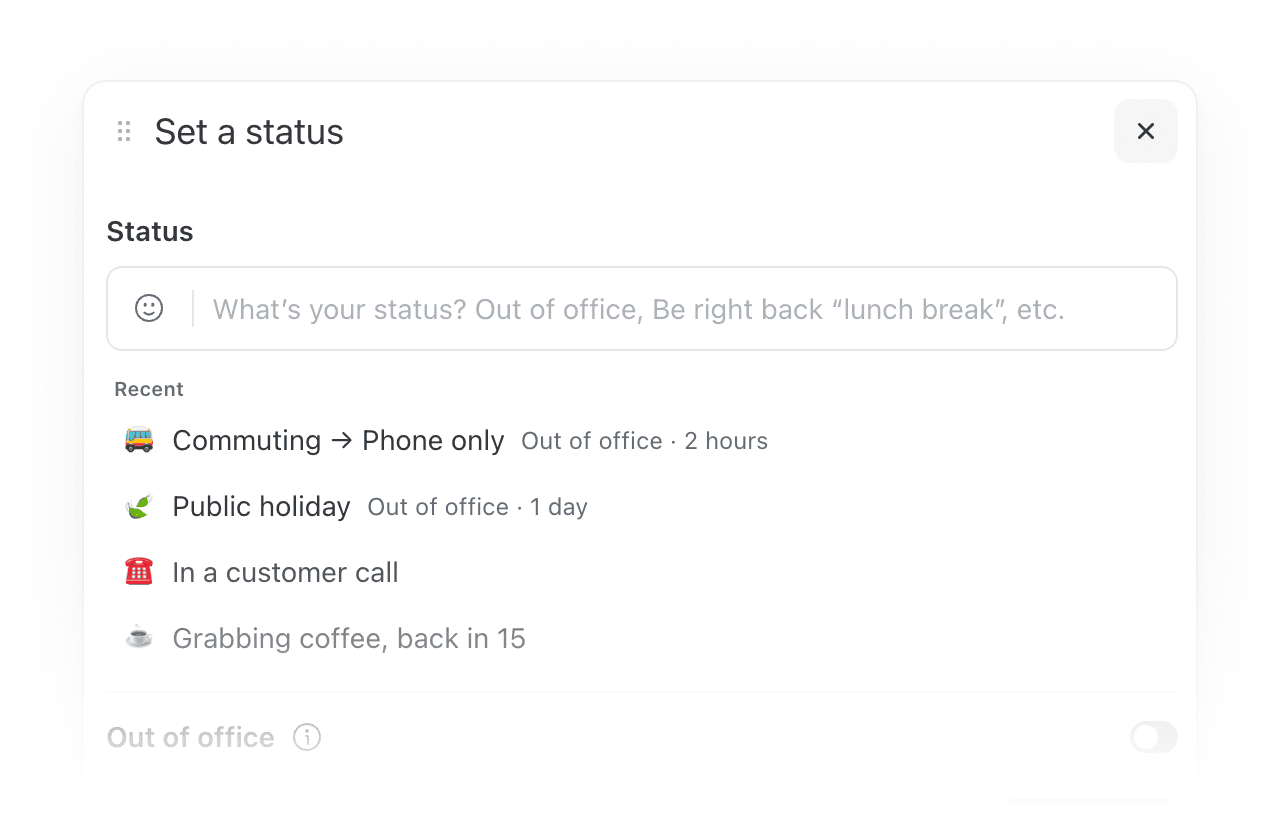
Your recently used statuses are now saved in the status dialog. Reapply any of them with a single click and everything comes back: emoji, message, Out of office duration, and auto-responder settings. You can also search your full status history or apply any saved status from the command bar.
The assistant can now read your attachments
Missive AI can now open files attached to a conversation (PDFs, images, documents, and more) and use them as context.
- Summarize a contract or proposal that came in as a PDF
- Pull key figures from an attached spreadsheet or report
- Ask what an attached screenshot or image shows
The assistant can now start new messages, not just replies
Until now the assistant could only draft a reply in the conversation you had open, and it always used the recipients that thread implied. It can now compose a message from scratch and control who it goes to, so you can hand off the whole task instead of finishing it yourself in the composer. It works across email, SMS, and WhatsApp.
- Start a brand new conversation with someone, not just a reply
- Reply to a specific message in a thread rather than the most recent one
- Set or change the From, To, Cc, and Bcc fields
Search your calendar from the assistant
The assistant’s calendar tool can now search your events by keyword, instead of paging through your entire calendar. This is much faster on busy schedules and lets you ask things like “when is my next meeting with Acme?” without scanning every event.
Conversations reopen where you left off
Missive now remembers where you were in a conversation and restores it when you navigate Back or Forward. This is a real time saver when you're working through a thread of tasks or links one by one. Note that it applies to Back and Forward specifically (the browser arrows, or ⌘/Ctrl + Left and Right), not to reopening a conversation from the list, which still follows your usual open-on preference.
Managed configuration (MDM) for the desktop app • Read more
On managed machines, users often don't have administrator rights, so the in-app updater asks for credentials they can't provide and the update fails. IT administrators can now disable the in-app updater through device management and handle updates through their own tooling. Ready-to-deploy templates are available for macOS and Windows. Interface and most feature updates still arrive with a simple reload.
- macOS: apply a configuration profile, or point your MDM at Missive's preference domain
- Windows: import the registry file, or deploy the Group Policy template
- New OpenAI and Gemini models are now available in the model picker for the assistant, prompts, and AI rules, and Missive picks up future model releases automatically. Older models remain available under the Legacy submenu.
- Native browser UI (scrollbars, form controls, spellcheck underlines) now matches your light or dark theme instead of staying in the light variant.
- API: creating a draft now accepts an
add_default_signatureoption, so drafts made through the API can include the sending alias's signature just like drafts composed in Missive.
- Variables in a personal signature now fill in from your organization profile, so fields like your job title render properly in the "Add variable" preview and in the emails you send.
- Pasting a URL over selected text in the comment box now turns the selection into a link, instead of replacing it with the raw URL.
- Typing a slash date like
9/8in the snooze menu resolves to the date again, instead of forcing you to type "Sep 8". - The onboarding dialog no longer renders too small and clips its right side.
- Messages backfilled through the API with a custom account alias now show as outgoing (gray) instead of incoming (green).
- Recipient fields on SMS and other channel messages now update live when the recipient changes.
- The spinner when opening a calendar event from the Activity feed no longer spins forever after a fresh app launch.
- Integration forms that outgrew their dialog can be scrolled again, and narrow integration popups now open at a usable width.
- Inserting file links via the Google Drive integration.