Rule steps: follow up automatically over time
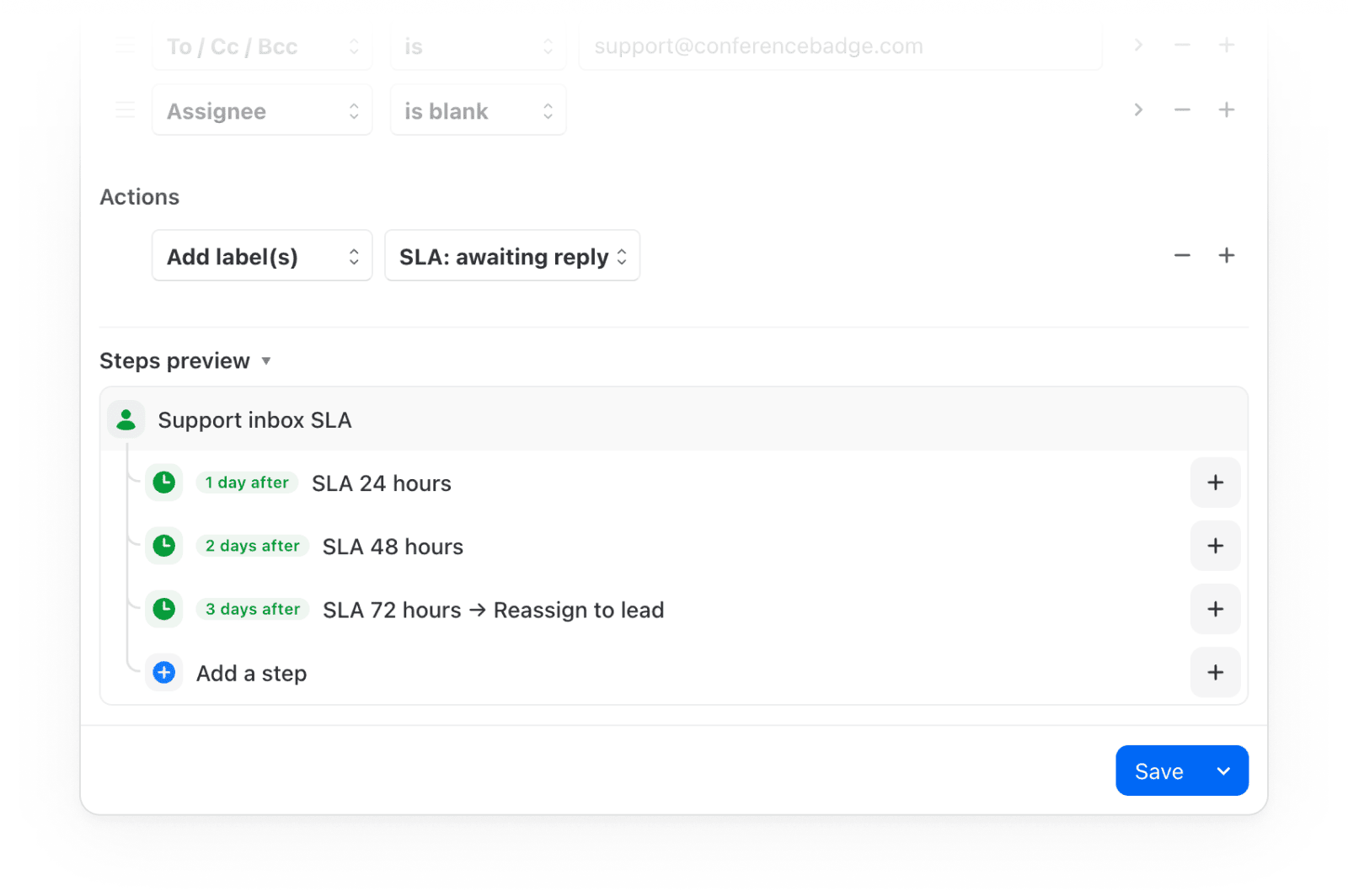
Rules can now run in steps over time. Each step waits, checks its own conditions, then acts on the same conversation. SLA alerts and follow-up sequences now fit in one rule instead of several. For example:
- Escalate unanswered support emails: label at 24 hrs, notify the lead at 48, reassign at 72.
- Send a reminder 3 days after a quote goes without a reply, follow up again at 7 days, then close the conversation at 14.
Open a rule and click “Add a step” to get started. Delays can count calendar time or business hours.
Missive in Spanish (beta)
Pick Español in Settings > Appearance > Display. One translation covers Spain and Latin America.
Help us improve translations
Spot something off? “Suggest improvements” next to the Language setting opens a page with every string alongside its English original. Write your fix and send it our way.
Replace an AI integration’s API key
When an API key expires, “Edit credentials” on the integration lets you swap in a new one. Your AI rules, saved models, and assistant conversations stay intact, no need to delete and recreate the integration.
Connect to mail servers with untrusted certificates
When an IMAP or SMTP server's certificate is self-signed, expired, or issued for another host, the account form now offers "Don't verify the SSL / TLS certificate" so you can connect anyway. It only appears when your server needs it.
Better French and German translations
Many strings now read more naturally in both languages, and the Rules settings no longer overflow.
Steadier keyboard on mobile
The keyboard stays out of the way in more places across iPhone, iPad, and Android.
- Rotating keeps the keyboard open with no empty space left behind
- In landscape, a long comment keeps the send button visible
- On Android, only the text area grows as you type
- Menus for search suggestions, recipients, @mentions, and emoji stay above the keyboard and shrink as you filter
- Text typed in the To field stays visible
- The iPad modal composer no longer reserves keyboard space twice
- Calendar time zone columns, the time zone picker, and event times in another zone show that zone's time again, not your local time.
- On mobile, all-day events use the native date picker again, with separate start and end dates.
- Event times are no longer cut off at larger font sizes.
- Pinned conversations follow a merge instead of repeatedly showing "Invalid resource ID(s)".
- Reactions you've already seen no longer stay unread in the Activity feed.
- Guest invite events show the guest's email again instead of an empty token.
- The insert link dialog (Cmd+K) focuses its URL field again when it opens.
- Cmd+K in the composer opens the insert link dialog again after you've used it once, instead of the command bar.
- Undo in the comment box no longer loses its history after an @mention, #label, emoji, or Shift+Enter.
- The search field takes focus again after you click a link in a comment and come back to Missive.
- New aliases show up in the composer's From menu without reopening it.
- Long subjects no longer overflow the sending banner.
- WhatsApp templates with an apostrophe near a numbered variable open the variables form again, instead of inserting nothing.
- Rule tasks set to "Due on" are no longer created already overdue.
- The "Open Docs" and "Close" buttons in the Help assistant sidebar work again.
- The iPad app no longer comes back from the background with blank areas in the top bars, search field, or sidebar.
- On Android, back goes back one screen instead of two.