Blog →
7 Fyxer AI alternatives: from email clients to add-on tools

Blog →

by
Eva Tang
July 24, 2025
· Updated on
April 20, 2026
Fyxer AI promises to save you an hour a day by triaging your inbox, drafting replies in your voice, and taking meeting notes. If you’re weighing it against other options, this piece breaks down what Fyxer does well and walks through seven alternatives, from Gmail-native add-ons to full-featured email clients built for teams.
A quick note before the list: email AI pricing has shifted meaningfully in the past six months. Prices below reflect annual billing unless noted. Monthly billing usually runs 20 to 40% higher. Verified April 2026, but always spot-check current tiers before buying.
Fyxer AI is an AI assistant that connects to your Gmail or Outlook inbox. It does three things well:
It genuinely feels like a capable assistant managing your email inside your existing Gmail or Outlook inbox. No new interface, no complex installation. Just an organized “person” who opened your messy inbox and took over, in a way that still gives you final control over what goes out.
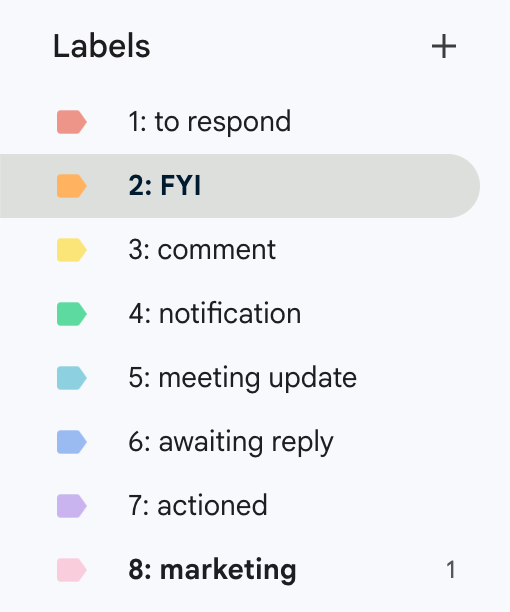
Within 10 minutes of setting up Fyxer AI, all my emails were auto-tagged into one of their default labels (I use Gmail):
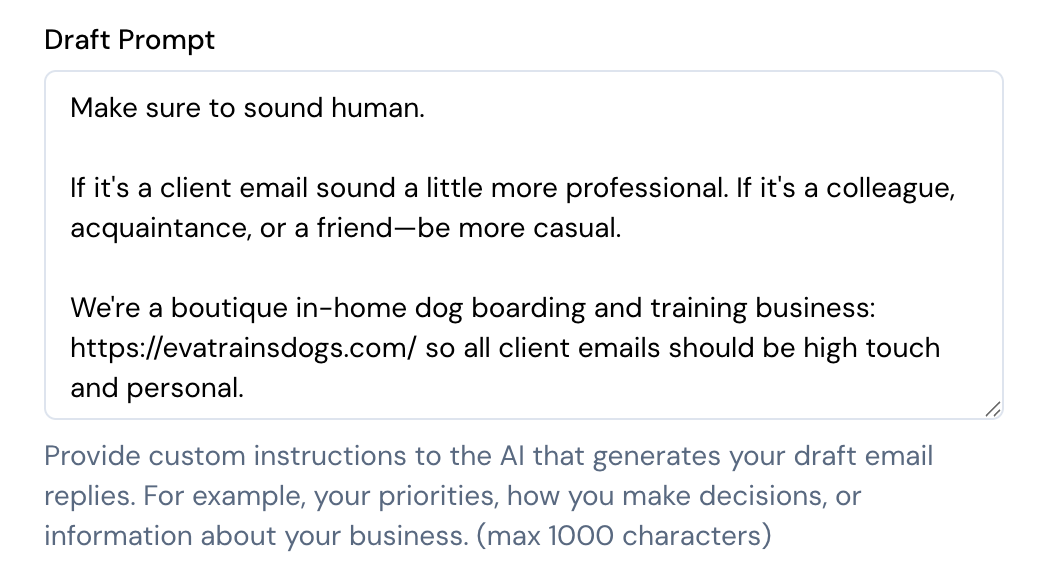
To enable auto-drafting, you give Fyxer AI’s draft prompter a bit of context about your tone and business.
And here’s what an auto-drafted reply looked like:
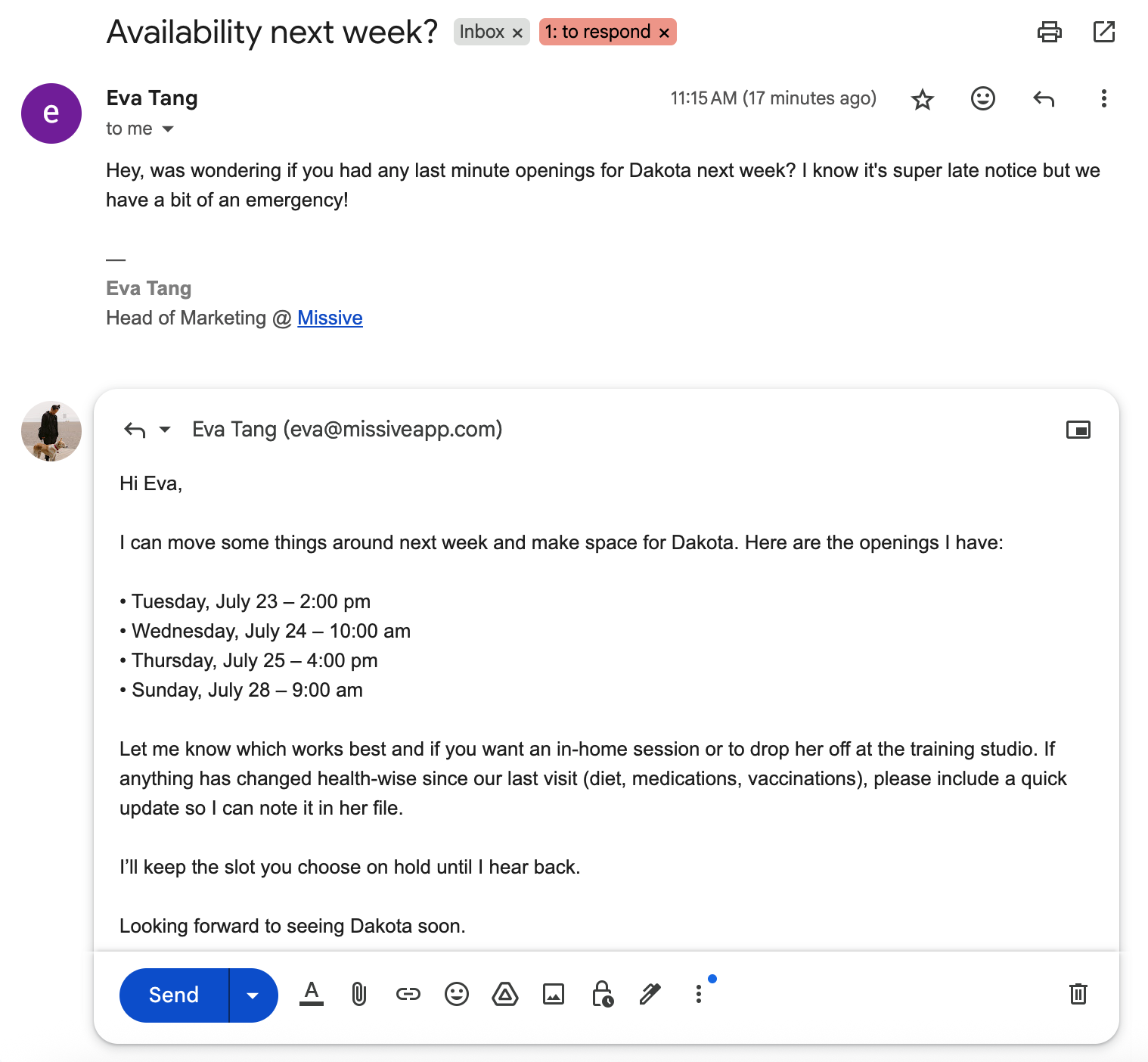
This is a great experience if you want to stay in the Gmail or Outlook interface but need ongoing organization and administrative help because of the volume of emails you personally handle.
Like Superhuman, Fyxer AI is focused on inbox throughput, how much faster can you process your emails. That’s an important goal, but often times it’s the wrong goal. Maybe the real question is whether you should be replying to most of those emails in the first place, which we’ll get into for some of the Fyxer alternatives.
We grouped the seven alternatives into three types:
We’ll start with similar functionality and interface and work our way down the list.
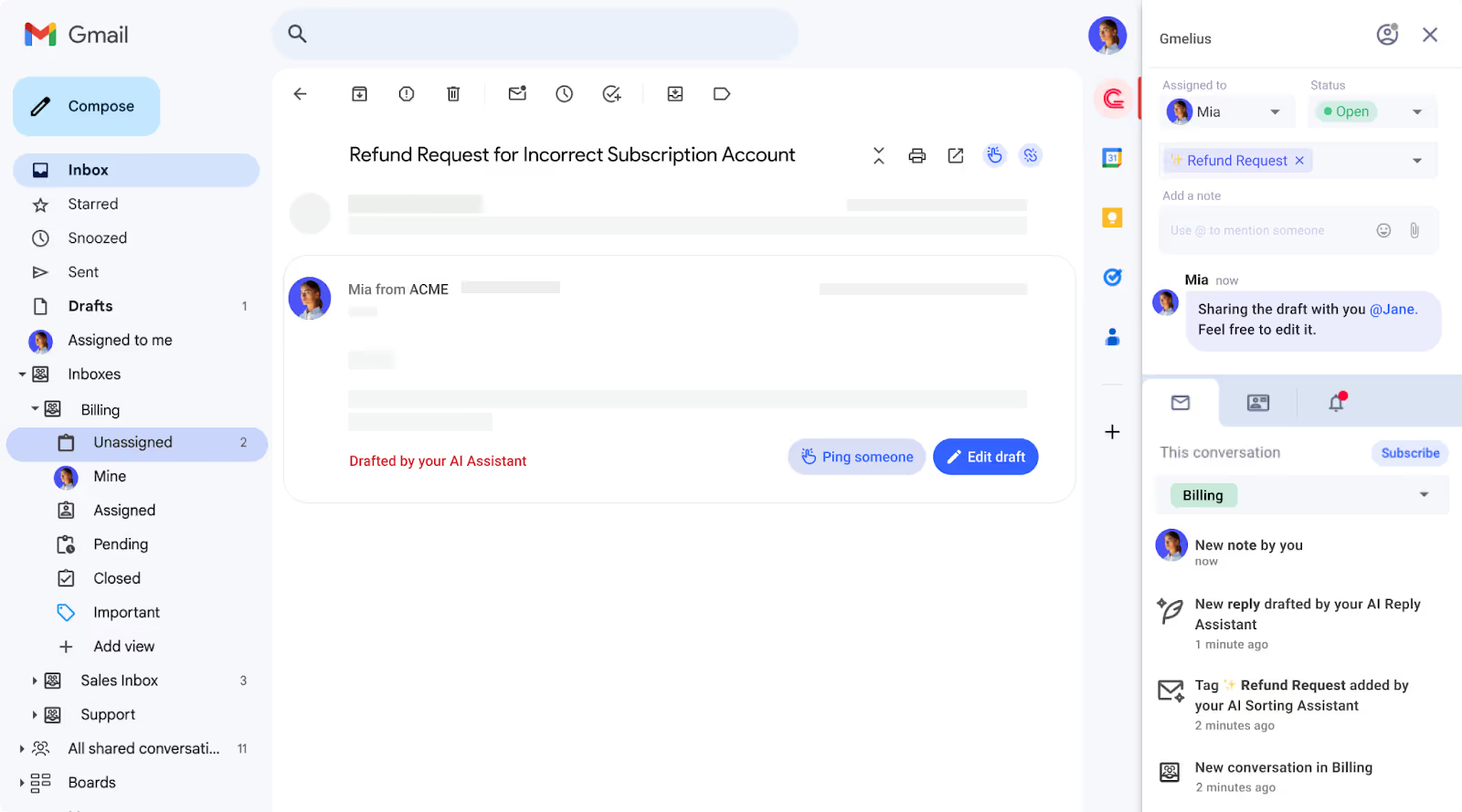
Like Fyxer, Gmelius lives on top of your existing Gmail interface, so you get a familiar experience with new functionality layered on.
Gmelius also has an AI-powered assistant that auto-categorizes emails and drafts replies on your behalf. There are small differences between the two, though. By default, Fyxer only drafts replies for emails auto-labeled “to respond.” Gmelius tries to respond to every email, but for anything it detects as promotional, it adds a note saying it didn’t respond because the email is promotional. Small detail, but Fyxer’s execution feels smoother.
On the other hand, Gmelius is a collaboration-focused tool, not a purely productivity-focused one like Fyxer. That means Gmelius has more for teams working together in an inbox: internal chat on emails, assignments, automation rules that run based on AI tagging, SLA escalation, and more.
Both Gmelius and Fyxer have a closed AI assistant, meaning you can’t bring your own AI key or pick the model. If you don’t have a strong preference, that’s fine.
Gmelius is a little more expensive than Fyxer for the AI-inclusive tier. Meli (capped at 5 users) starts at $19/user/month billed annually, and Growth starts at $25/user/month billed annually, compared to Fyxer’s $22.50/user/month.
If you want a Fyxer alternative oriented more to teams, but with much of the same functionality and interface, Gmelius is worth a look.
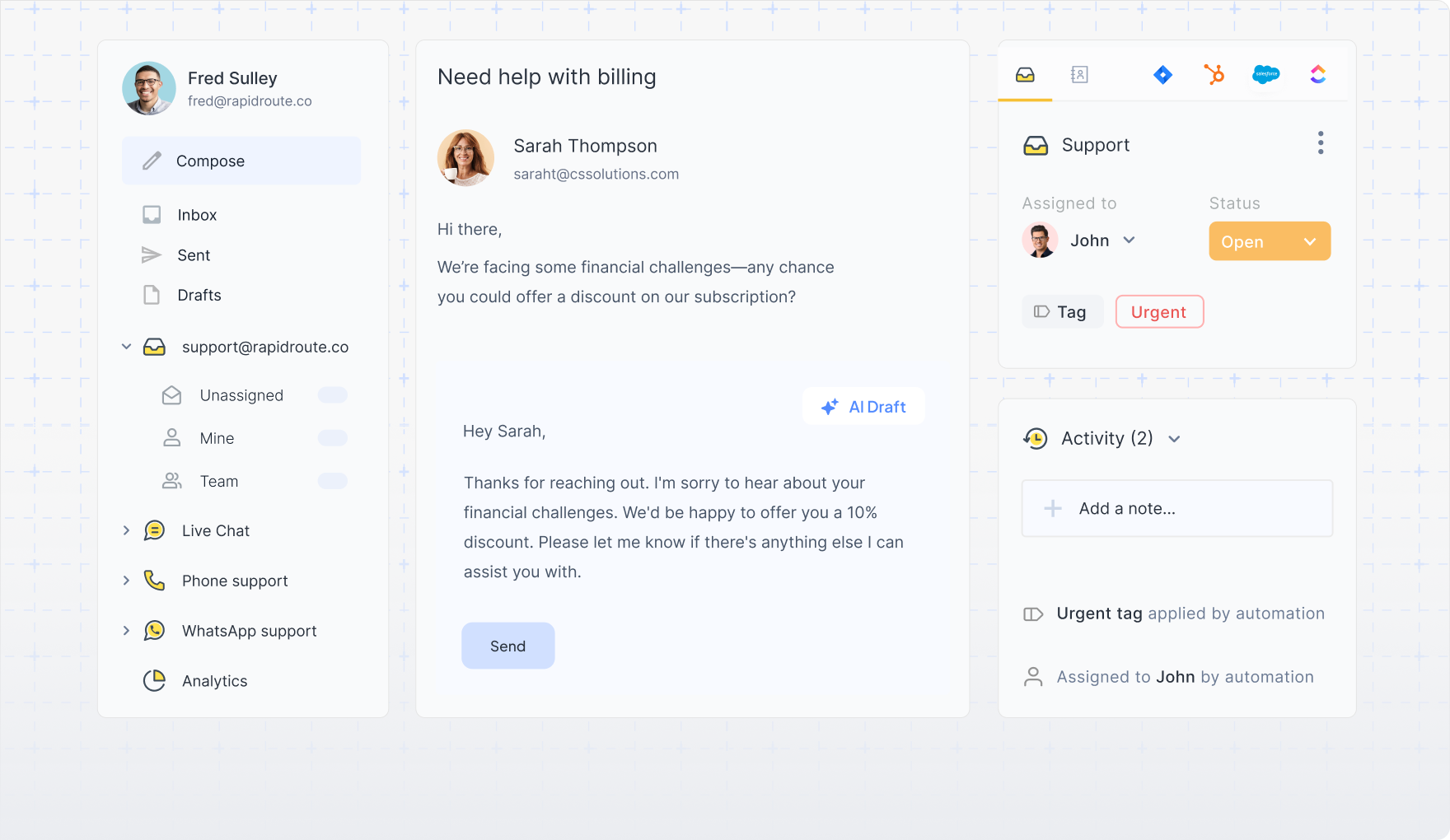
Like Gmelius, Hiver integrates directly into your existing email client, giving you a familiar interface to work with. Unlike Gmelius, Hiver supports both Gmail and Outlook accounts.
Like Fyxer, Hiver has an AI-powered email assistant that can auto-draft replies and auto-label emails based on their contents. But Hiver’s core users are customer support teams working out of shared inboxes, so it’s not quite as simple as Fyxer’s default experience.
If you’re an executive who just wants to replace Fyxer’s lightweight functionality without team features like collaboration, automated workflows, analytics, or SLA monitoring, Hiver might be overkill. Could you get it to work? Absolutely. Will it feel like it was built for your use case? Probably not.
Hiver’s Growth plan with AI (AI Compose and AI Summarizer) starts at $25/user/month billed annually. Heavier AI features like AI Agents and AI Copilot are on Pro at $65/user/month, and AI QA is on Elite at $105/user/month.
Now we move into tools with more functionality than Fyxer, but a less familiar interface.
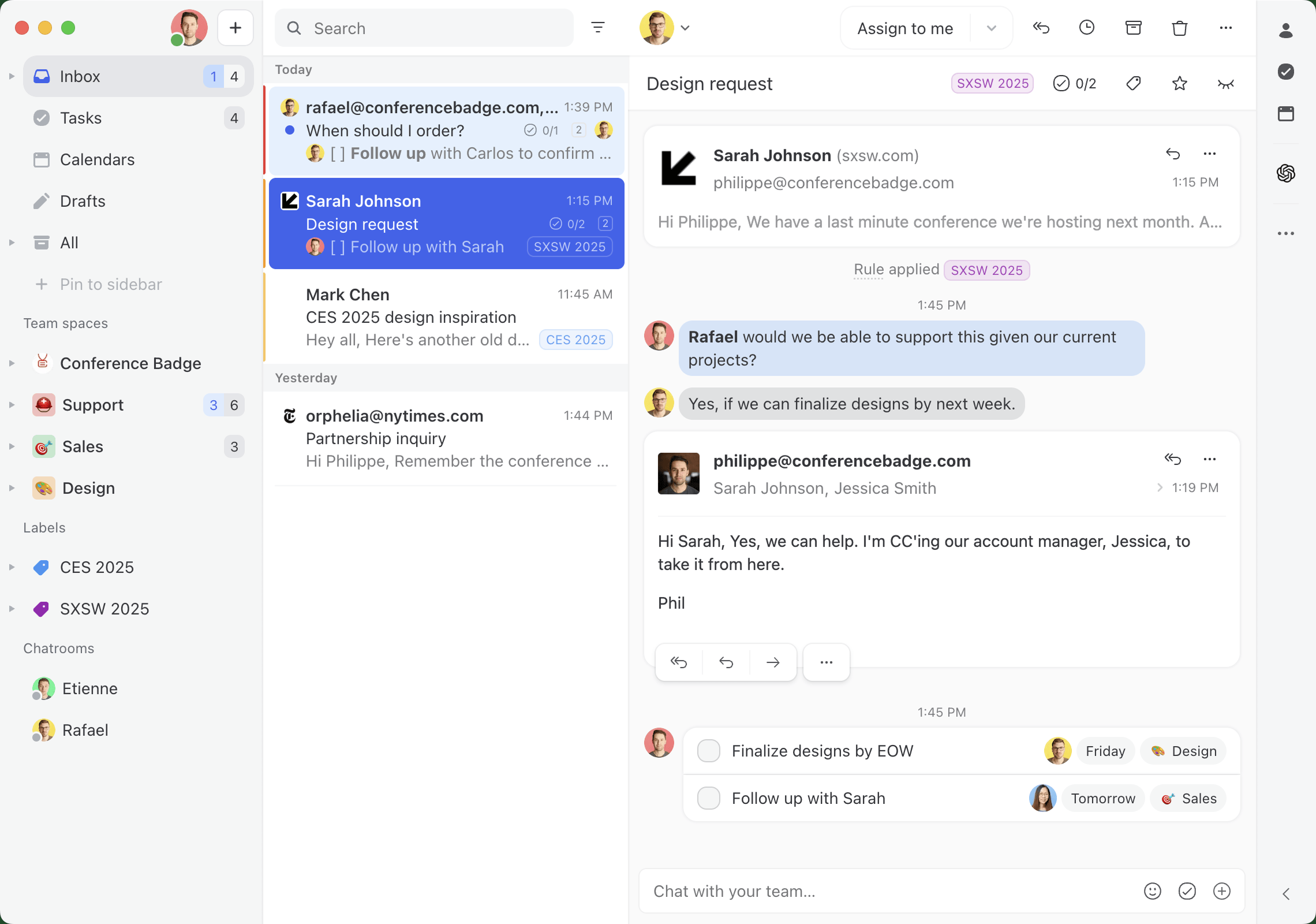
Missive is an email client for teams that collaborate in their inbox. Like Fyxer, you can set up AI-powered email assistants that triage, label, and draft replies. Unlike Fyxer, Missive is much more flexible in how you implement it, which depending on who you are, could be a good or bad thing.
Missive lets you start with Missive AI credits or bring your own AI key, and pick the model. If you want to use a specific model for drafting emails and a different one for triaging, you can fine-tune that experience.
Because Missive is a collaborative inbox built for your whole team, your AI assistant can assign and triage emails to the right teammate, not just sort them in your own inbox. Picture an old client emailing you because you have a long-standing relationship, but the question is really for your support team. Missive’s AI rules can route it there automatically.
The same is true for drafting replies. Instead of drafting only against your personal inbox, Missive’s AI rules can help your whole team auto-draft replies to customers.
That’s critical if you’re handling hundreds or thousands of emails every day. The most common questions get taken care of by an AI assistant, and your team focuses on the rest.
Where Missive is lighter than Fyxer is meeting notes. Missive’s rebuilt calendar handles team scheduling well: type a teammate or team into the sidebar to see their availability over your own, with extra time zone columns when people work in different zones, and the AI Assistant can check your calendar and draft scheduling replies for you to review. What it doesn’t do is transcribe meetings or hand out booking links. If meeting transcripts and booking links are the main thing you want, Fyxer covers that ground.
Pricing-wise, Missive’s AI-inclusive Productive plan is $24/user/month billed annually, comparable to Fyxer. The Starter plan at $14/user/month covers the shared inbox basics without AI rules.
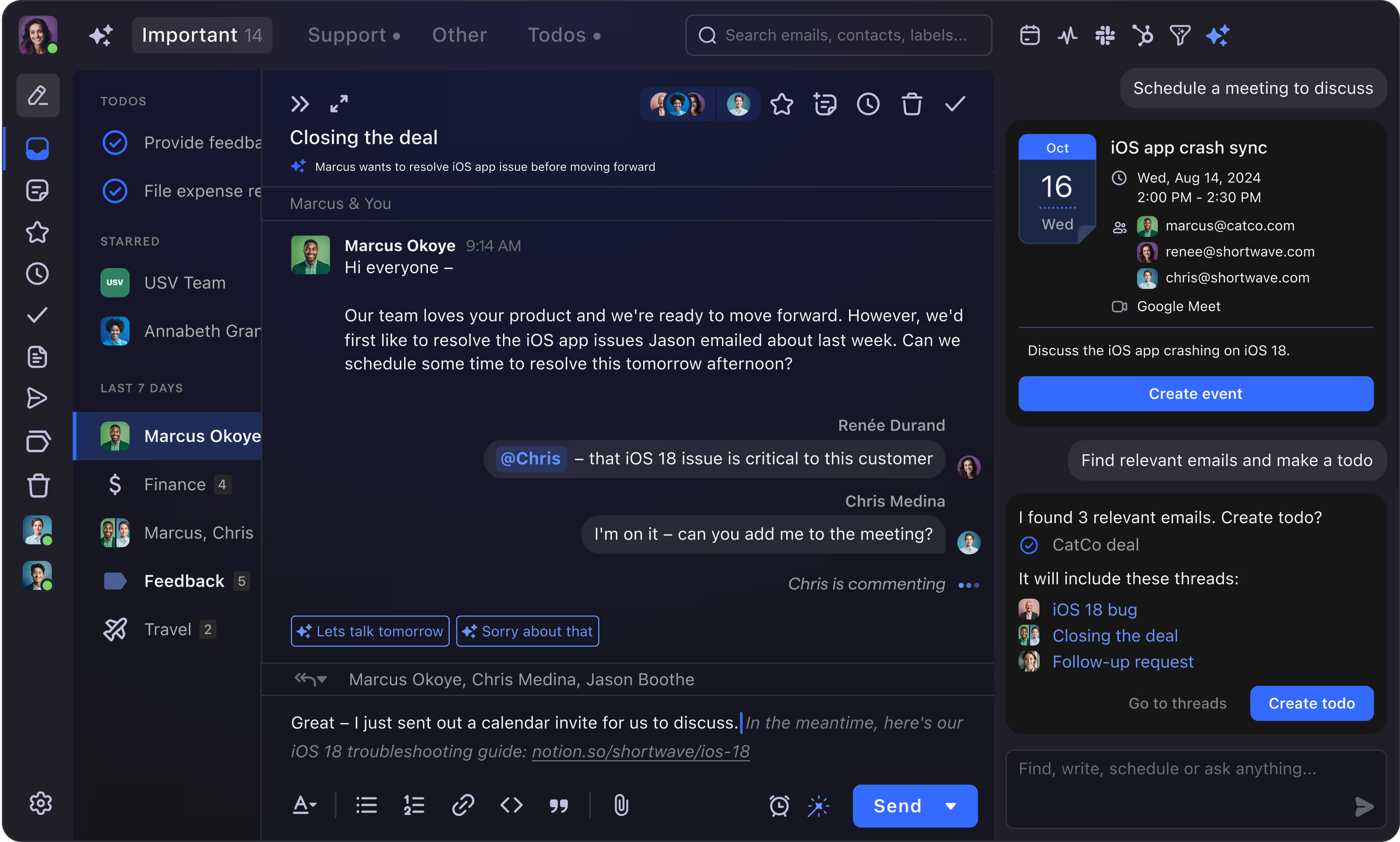
If you’re looking for an AI-powered email client that’s essentially Fyxer with more features, Shortwave might be a good fit.
Shortwave has all of Fyxer’s AI assistant features right out of the box, auto-drafting emails, default AI categorization, calendar scheduling, and it adds some team collaboration features too.
Shortwave is its own email client, so it looks and feels different from Gmail and Outlook. It also only supports Gmail accounts natively. There’s a workaround for Microsoft 365, Outlook, and other providers, but it’s essentially forwarding your email to a Gmail account to connect to Shortwave, which many teams will find unworkable.
If you don’t want or need the customization and flexibility that Missive has, you don’t care about BYOK (bring your own keys), and you use Gmail or Google Workspace, Shortwave could be a good Fyxer alternative for you.
Pricing has shifted. Shortwave Pro is $14/user/month billed annually for individuals, and Business is $24/user/month billed annually for teams that need shared inboxes and Google Workspace support.
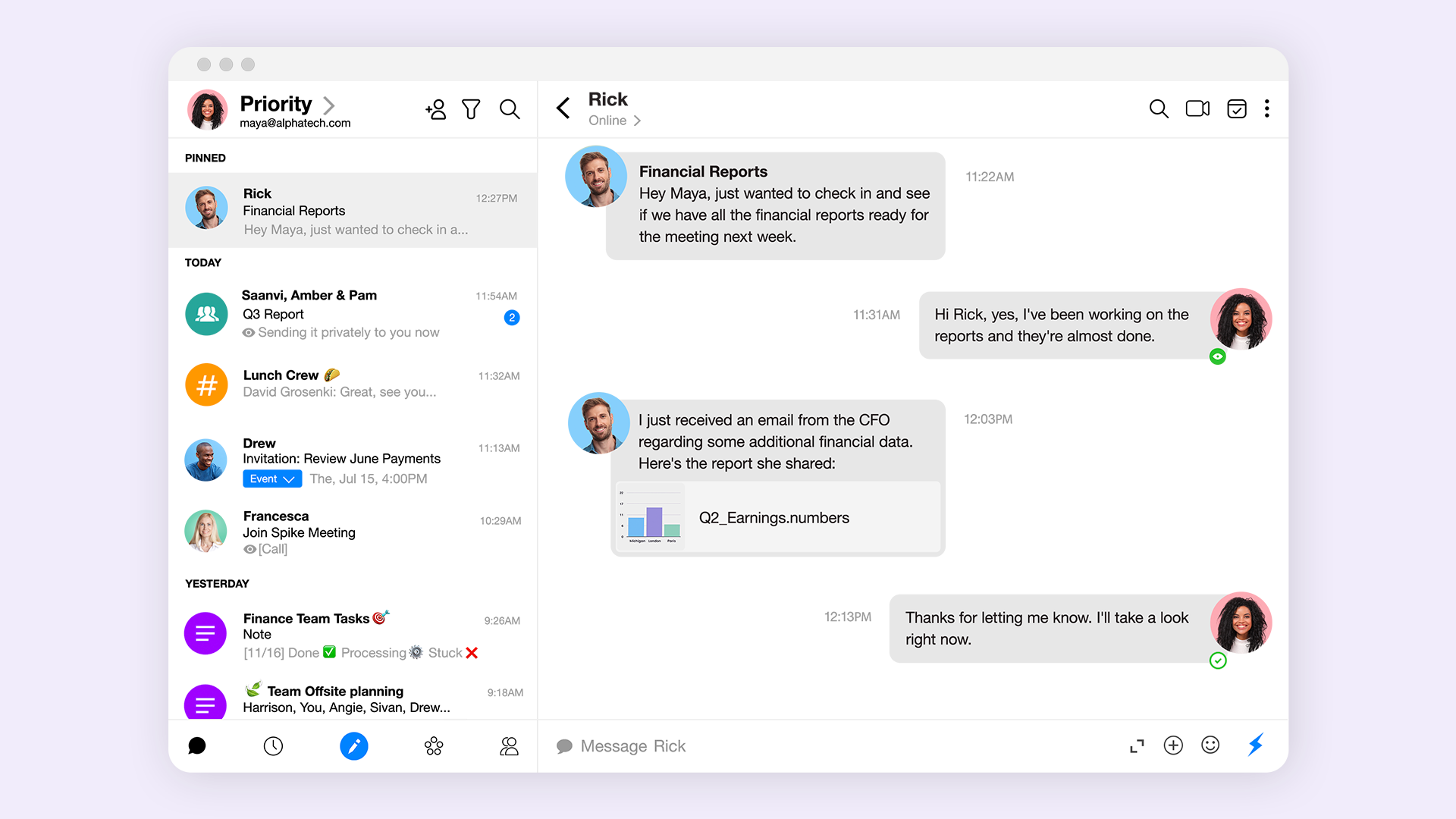
Spike turns email into a conversational tool, which makes it a distinct kind of Fyxer alternative. It reformats your cluttered inbox into a chat-like feed organized by sender, cutting repetitive headers and signatures so you can focus on the actual conversation.
Like Fyxer, Spike uses AI to manage your inbox. Its priority inbox works similarly to Fyxer’s auto-tagging, separating important mail from newsletters and promotional content. Spike’s AI can also summarize email threads and suggest replies, mirroring Fyxer’s core productivity features.
Where Spike stands apart is its focus on team collaboration, with features like group chats and shared notes built into the inbox itself.
Spike’s Pro plan starts around $5/user/month billed annually, with a Business tier roughly double that. It’s the cheapest option on this list if you’re an individual user testing the chat-style inbox idea.
If you mostly loved Fyxer for its ability to sort and organize emails, there are AI-powered tools like Clean Email that focus only on that. For your drafting needs, you can use Copilot or Gemini (depending on whether you’re a Gmail or Outlook user) to help draft the occasional email.
Like Fyxer, Clean Email works within your existing email client. It has predetermined categories to suggest and label your emails, and it learns your preferences over time.
Copilot is a general AI assistant that comes with Microsoft 365. You can use simple prompts like “Check for typos and make this more professional,” or more complex prompts such as:
You’re an executive assistant replying to emails on my behalf. Take the existing tone of the conversation into consideration and match it. If it’s a customer or prospective client asking about a specific product question, use https://learn.missiveapp.com/ to find the answer. Do not make up any information.
Pricing-wise, Clean Email is $9.99/month for one account on monthly billing, or $29.99/year billed annually. Copilot is included free with Microsoft 365 Personal and Family plans, with Microsoft 365 Copilot for business running $30/user/month.
An alternative to Clean Email and Copilot is SaneBox and Gemini. The functionality and features are incredibly similar, with minor differences around user interface. Gemini is also a better fit if you’re already in the Gmail or Google Workspace stack.
Where SaneBox stands out compared to both Clean Email and Fyxer is its third-party integrations. By connecting to tools like Todoist, SaneBox lets you create basic automated workflows inside your inbox, something in between Missive’s flexible rules and Fyxer’s single HubSpot integration.
SaneBox’s Snack plan starts at $7/month (monthly) or $59/year (annual) for one account. Gemini is bundled into Google Workspace Business Standard at $14/user/month, and Gemini Advanced for individuals is $19.99/month.
Fyxer AI is a solid pick for tackling email as an individual, plugging into Gmail or Outlook and helping you regain time through triage, drafting, and note-taking. But the right alternative depends on who’s actually using it.
If you’re a solo executive or professional and the Gmail-native experience matters most, Gmelius, Hiver, or Fyxer itself tend to be the closest fits. If you need team collaboration around a shared inbox, Gmelius, Missive, Spike, or Shortwave make more sense, with Missive and Shortwave offering more flexibility at the cost of a steeper learning curve. And if you just want inbox sorting with occasional AI drafting, a Clean Email or SaneBox pairing with Copilot or Gemini keeps costs low.
AI email tools are moving fast. The shortlist you build today is worth revisiting every six months, because pricing, features, and positioning all shift quickly in this category.
Fyxer AI doesn’t offer a permanent free plan. It has a 7-day free trial on the Standard plan, after which it starts at $22.50/user/month on annual billing or $30/user/month on monthly billing.
For teams managing shared inboxes, Missive and Gmelius are the strongest fits. Missive works across Gmail, Outlook, and IMAP and lets you bring your own AI key. Gmelius is Gmail-only but sits natively inside the Gmail interface, which shortens the learning curve.
Yes. Fyxer AI supports both Gmail and Outlook and is verified by both Google and Microsoft. It runs inside your existing inbox rather than replacing it.
If you’re an individual, Spike’s Pro plan at around $5/user/month (annual billing) is the lowest-cost option with AI features. Clean Email at $29.99/year is cheaper still if all you need is inbox cleanup without AI drafting.
Fyxer’s Professional plan ($37.50/user/month annually) and Enterprise plan support multiple inboxes per user and basic team setup, but Fyxer is fundamentally built for individual productivity. There’s no shared inbox, no conversation assignment, and no internal chat. Teams coordinating on email should look at Missive, Gmelius, or Hiver instead.
Most don’t. Fyxer, Gmelius, Hiver, Shortwave, and Spike all use closed AI assistants where you can’t choose the model. Missive is the exception: it integrates with OpenAI, Anthropic, and Gemini via your own API key (or Missive AI credits if you’d rather not manage a provider account), so you can pick which model drafts replies and which one handles triage.
Missive is a collaborative email client built for teams that work out of shared inboxes. With built-in AI rules, internal chat on every conversation, and support for Gmail, Outlook, and any IMAP account, Missive handles the team email workflow that Fyxer wasn’t designed for. Try Missive free for 30 days.

October 8, 2020
How to add live chat to Shopify (and actually manage it as a team)
Adding a chat widget to your Shopify store takes five minutes. Managing those conversations as a team without dropping the ball? That’s the real challenge. Here’s how to set it up right.

October 27, 2022
Email thread: what it is, how to use it, and why it breaks at scale
An email thread keeps a conversation together in one place, but they quickly become unwieldy when teams collaborate. Here’s how email threads work, how to manage them, and what to do when they stop working.

December 10, 2020
Missive security and privacy FAQ
Missive is SOC 2 Type II and GDPR compliant. Full FAQ on our security and privacy practices: encryption, AI data handling, SSO, data export, and account deletion.

November 21, 2024
Email Delegation for Assistants, Leaders, and More.
Today's email delegation requires strategic thinking, careful prioritization, and the right tools to make it all work seamlessly.

March 6, 2020
How to receive emails in batches
Email batching saves focus time by scheduling when you check your inbox instead of reacting to every notification. Here’s how to set it up with alarms, add-ons, or rules.

January 29, 2026
5 best alternatives to the Outlook for Teams integration
The Outlook for Teams add-in can be unreliable. Here are 5 tools in 2026 that combine team chat and email into one workspace.

October 31, 2023
8 Steps to Customer Service Recovery (with templates)
Learn the 8 steps to recover from a customer service failure—plus free email templates for apologies, follow-ups, and escalations that turn frustrated customers into loyal ones.
September 23, 2020
How to add live chat to Squarespace (and manage it without losing your mind)
Squarespace doesn’t have built-in live chat. Here are the six tools worth shortlisting (with prices), how to add a chat widget, and how to handle conversations alongside your email.

November 21, 2025
The best Gmail alternatives for teams in 2026: pros, cons & features
The best Gmail alternatives for teams in 2026, compared. Pros, cons, pricing, and which tools actually solve the shared inbox problem.
