Blog →
How to answer common customer inquiries with Claude
.png)
Blog →

by
Eva Tang
March 5, 2026
· Updated on
You know the pattern. A customer emails asking about your return policy, and you write a thoughtful reply. An hour later, someone else asks the same question, and you write it again, slightly differently this time. By the end of the week, four different teammates have answered the same question four different ways, and now your customers are getting inconsistent information.
This is the daily reality for most small and mid-size teams handling inbound email. The questions are predictable, the answers exist somewhere in your head (or scattered across docs and past replies), and yet every response still takes manual effort. You can’t hire fast enough to keep up, and canned responses feel robotic.
Claude, Anthropic’s AI model, is particularly well-suited to this problem. It’s strong at following nuanced instructions, adapting tone, and handling the kind of unstructured, context-heavy communication that customer email requires. Here’s how to set it up in a way that actually works for a team.
The biggest mistake teams make with AI email is jumping straight to “write me a reply.” Before you touch a prompt, spend an hour looking at your inbox. You’re looking for the 20% of question types that make up 80% of your inbound volume.
Pull up your last 50–100 customer emails and sort them into rough categories. You’ll likely find clusters like:
The first five categories are strong candidates for AI-assisted drafting. The last one, complaints and escalations, generally needs a human touch, at least for the initial response. We’ll come back to what you should not automate later.
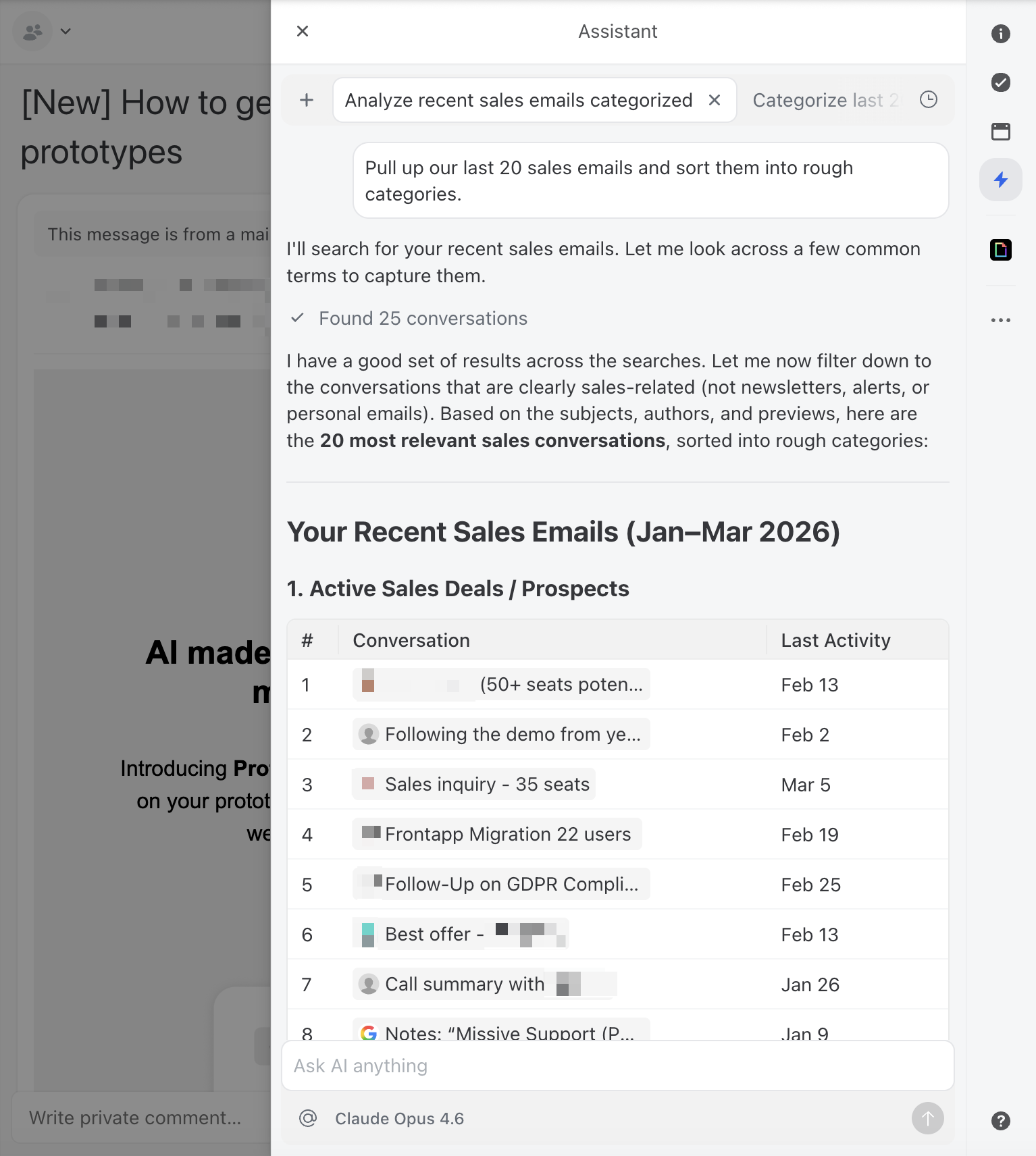
If you use a team inbox tool like Missive, you can actually ask the AI assistant to do this analysis for you. Ask it to find recent conversations and categorize the types of inquiries. It’s a good first test of Claude’s usefulness before you build anything more structured.
Claude is good at writing. The problem is that it’s good at writing like Claude, helpful, slightly formal, and generic. Your customers can tell the difference between a human reply and a default AI reply, and that gap erodes trust fast.
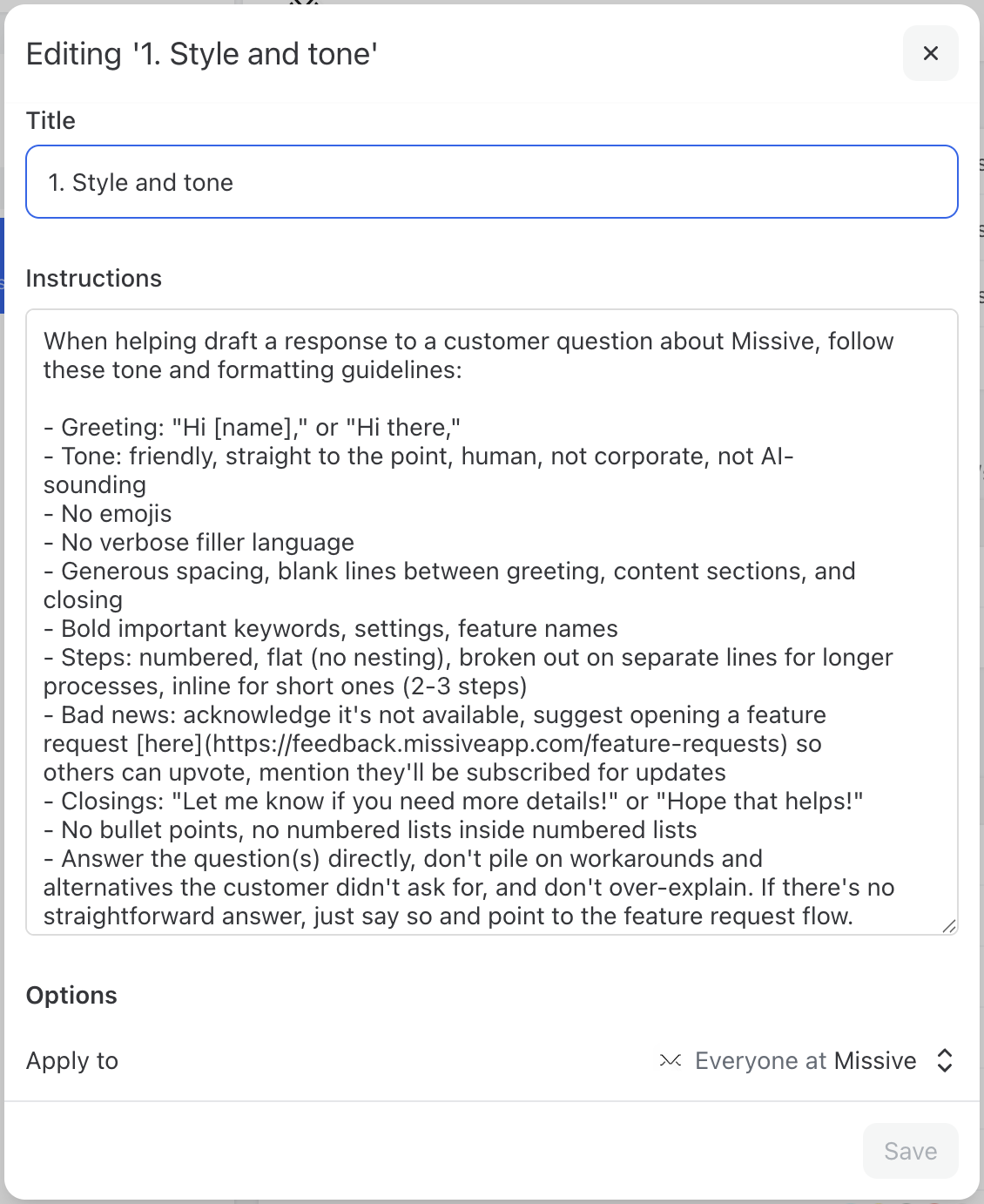
The fix is a set of written instructions that define your communication style. Think of it as a style guide specifically for AI. This doesn’t need to be long, a few clear paragraphs work better than a multi-page document.
A good style instruction covers:
Here’s a practical tip: if you’re not sure how to articulate your style, gather 10 or so of your best customer email replies—the ones where you thought “yes, that’s exactly how we should sound.”
Paste them into a session with Claude and say:
Here are examples of customer emails that represent our ideal tone and style. Can you analyze these and create a style guide I can use as AI instructions?
Claude will pick up on patterns you might not even consciously notice, your sentence length, how you open and close emails, whether you use contractions, how you handle bad news. From there, you go back and forth to refine until it feels right.
In tools like Missive, you can scope AI instructions to specific team inboxes, so your support team gets one set of drafting guidelines and your sales team gets another. This means the AI adapts its voice depending on which inbox the conversation lives in, without anyone having to think about it.
With your style guide in place, the next step is creating prompt templates for your most common inquiry types. A good prompt has three components: context about your business, the specific task, and constraints on the output.
Here’s a general template you can adapt:
You are a customer support specialist at [Company Name]. We [one sentence about what you do]. The customer has written to us with a question. Draft a reply that: - Directly answers their question using the information below - Matches our company tone (warm, professional, concise) - Includes a specific next step for the customer - Keeps the response under [X] sentences. Relevant information: [Paste your FAQ answer, policy details, or product information here]. If the customer’s question is ambiguous or you’re not confident in the answer, say so clearly rather than guessing. Flag it for human review.
Notice the last line. This is important. Claude is generally good about not fabricating information when explicitly told not to, and that instruction acts as a safety net. You want the AI to surface uncertainty rather than confidently give a wrong answer.
For recurring question types, create dedicated prompts. Here are two examples:
A customer is asking about our pricing. Draft a reply using these details: [Your pricing tiers, what’s included, any current promotions]. Be specific about what each tier includes. If they haven’t told us which tier they’re interested in, ask a clarifying question. Don’t volunteer discounts unless they specifically ask.
A customer is asking about shipping. Draft a reply using these details: [Your shipping options, typical delivery times by region, tracking process]. If they’ve provided an order number, reference it. If they haven’t, ask for it so we can look up the specific status. Be honest about timelines—don’t promise faster delivery than our standard windows.
Store these prompts somewhere your whole team can access them. Some team inbox tools let you save prompts as reusable one-click actions, this is ideal because it removes the friction of finding and pasting the right prompt every time.

The goal isn’t to remove humans from the loop. It’s to change the human’s job from writing replies to reviewing them. Here’s what a good AI-assisted email workflow looks like:
The review step is non-negotiable, especially early on. Even a well-prompted Claude will occasionally miss context, use slightly wrong terminology, or misjudge the situation. The review step catches these issues before they reach your customer.
This is actually why Missive’s AI assistant only drafts emails, it never sends them automatically. That’s a deliberate design choice, not a limitation. AI is good, but it’s not perfect. It can hallucinate details, misread tone, or confidently answer a question with outdated information. By keeping a human between the AI draft and the send button, you get the speed benefits of AI without the risk of a bad reply landing in a customer’s inbox. Some tools let AI fire off emails unsupervised. We think that’s a mistake, at least for now.
In a team setting, this is where collaborative tools earn their keep. If you’re working in a shared inbox, a teammate can comment on a draft internally “actually, this customer already reached out about this last week, add a note acknowledging that”, before anyone hits send. The AI draft becomes a starting point for collaboration, not a black box.
.png)
To make this less abstract, here’s how this workflow plays out in practice using Missive’s AI assistant with Claude.
Say a customer emails your shared inbox asking whether your product integrates with their project management tool, and whether that’s included in their current plan. It’s the kind of question your team gets several times a week—not complex, but it requires pulling together information from a couple of different places.
In Missive, a team member opens the conversation and launches the AI assistant in the sidebar. The assistant already has the full conversation context, not just the latest email, but any previous messages in the thread and any internal chat your team has had about this customer. It can also look up contact details to add context about who you’re emailing.
The team member selects a saved prompt like “answer product question” and the assistant drafts a reply. Because you’ve set up team-wide style instructions, the draft automatically matches your tone. Because you’ve built a prompt that includes your integration details and plan breakdowns, the response is specific and accurate.
The team member scans it, tweaks one line, and sends, total time maybe 30 seconds instead of five minutes of digging through docs.
Now here’s where it gets more interesting. Missive is rolling out support for MCP (Model Context Protocol), which means the AI assistant will be able to connect directly to your external knowledge sources—your Google Docs, product database, CRM, help center, or any other tool that supports MCP. Instead of pasting product details into your prompts manually, the assistant will pull that information on its own when it needs it.
For the integration question above, that means the AI wouldn’t just rely on what you’ve written in the prompt template or even what's in your inbox. It could check your documentation, cross-reference the customer’s plan in your CRM, and draft a response that’s accurate to what’s true right now, not what was true when you last updated the prompt.
The human still reviews and sends, but the draft requires less editing because the context is richer.
This is the trajectory: start with saved prompts, style instructions, and inbox context today, and as MCP rolls out, progressively connect more of your tools to have a meaningfully helpful AI agent.
The prompts above work when you paste relevant information directly into them. But the real unlock is when Claude can access your knowledge base automatically—your FAQ documents, product guides, policy pages, and past conversations.
There are a few ways to approach this, depending on your technical setup:
Start with manual context. Get comfortable with the quality of Claude’s output. Then move toward connected docs or MCP as your volume and confidence grow. The mistake is over engineering the integration before you’ve validated that the prompts and instructions produce good results.
Not every customer email should get the same level of AI autonomy. For routine inquiries, a quick scan of the draft before hitting send is usually enough. But some situations deserve more careful human review, and knowing where to draw that line is what separates teams that use AI well from teams that damage customer relationships with it.
Give these extra attention before sending:
.png)
A practical rule of thumb: if you’d hesitate to send the email without reading it twice, that’s a sign the AI draft needs more than a quick glance before it goes out.
Rolling out AI-assisted email to a team is as much a people challenge as a technical one. Here’s what works:
Don’t just assume AI is helping, measure it. The metrics that matter:
Check these monthly. The first week will be rocky as you refine prompts and learn what Claude handles well. By week three or four, you should see a clear pattern of which inquiry types Claude nails and which still need heavy human involvement.
Most teams see the biggest gains in response time—cutting average reply time from hours to minutes on routine inquiries. Draft acceptance rate is the metric to watch over time: if 70–80% of AI drafts are going out with only minor tweaks, your prompts and instructions are in good shape.
In most setups, Claude drafts responses that a human reviews before sending. Fully automated sending is technically possible through API integrations, but we’d strongly recommend against it for customer-facing email, at least until you’ve validated accuracy over hundreds of drafts and have solid error handling in place.
It depends on the task. Claude offers three model tiers, and each has a sweet spot:
Write a style instruction document (see the “Teaching Claude your voice” section above). The key is being specific about what you don’t want as much as what you do. “Don’t use exclamation points” is more useful than “be professional.” Feed this into your AI tool’s instruction settings so it applies to every interaction.
This depends on your AI provider setup. When you connect Claude through an API key, requests go through Anthropic’s infrastructure. Review Anthropic’s data retention and privacy policies, they offer options for zero data retention on API calls. If you’re in a regulated industry, check with your compliance team before sending customer PII through any AI service.
Escalations, complaints, legal or compliance-sensitive matters, and high-value relationship management. As a rule: if the email requires judgment, empathy, or carries significant risk if handled poorly, keep it human. Use AI for the predictable, repeatable inquiries that eat up your team’s time.

January 14, 2025
Email Management Best Practices: How to Master Your Inbox
Say goodbye to email overwhelm with the top email management best practices for work. Take back control of your inbox with quick wins, daily habits, and team systems.

July 2, 2025
Setting up your accounting firm in Missive (the POD model)
Configure Missive for an accounting firm running the POD model: shared inboxes, aliases, rules, and assignments for firm-wide clarity and accountability.

April 6, 2023
Shared Inbox for Gmail in 2026: How to Set One Up (and When to Move On)
Build a shared inbox for Gmail in 2026: delegation, Google Groups, and Collaborative Inbox setup steps, plus when to switch to real shared inbox software.

November 29, 2024
17 Affordable Intercom Alternatives for 2026
The best affordable Intercom alternatives for 2026 are Missive, Zendesk, Help Scout, Freshdesk, and Crisp—all offering shared inboxes, live chat, and team collaboration at a fraction of Intercom's price.

November 28, 2024
How to Centralize Client Communication for Better Team Productivity
Learn how to centralize client communication and improve team productivity for service businesses using Missive.

March 23, 2021
Automate Customer Feedback
Four practical ways to use Missive rules to collect customer feedback—request social reviews, send feedback to a spreadsheet via webhooks, embed surveys in signatures, and automate follow-ups.

December 19, 2022
Improve Your Small Business Customer Service with 14 Tips
14 actionable customer service tips for small businesses—from centralizing communication and using canned responses to collaborating as a team—plus the tools that make it all manageable.

November 21, 2024
Email Delegation for Assistants, Leaders, and More.
Today's email delegation requires strategic thinking, careful prioritization, and the right tools to make it all work seamlessly.

December 15, 2022
Shared mailbox rules: how to set them up (and what to use instead of Outlook)
Shared mailbox rules help teams automate incoming email — auto-replies, routing, filtering. Here's how to set them up in Outlook, where they fall short, and what a modern alternative looks like.
