
November 29, 2024
Google Collaborative Inbox: Why Your Teams Won't Like It
Google’s Collaborative Inbox offers a free way to manage shared email addresses—but its limitations around collaboration, mobile access, and automation push most teams toward better alternatives.
At its core, email was designed to be addressed to a single individual, just like regular mail.
But with more and more businesses starting to increase their online presence, catch-all email addresses (info@, sales@, support@) began to increase. And with no way to efficiently distribute the workload of these catch-all addresses, email quickly became a burden. To resolve the problem, it wasn’t uncommon to see people use the oldest hack in the book:
Sharing individual account passwords.
It might have worked very early on when online security was not a big thing for most organizations. But email providers, like Gmail, quickly started dissuading this practice by temporarily locking people’s accounts when detecting multiple sign-ins to the same account. As an alternative, Google offers Google Groups and its Collaborative Inbox.
But what is it exactly? And is it the solution you’re looking for? Let’s find out!
Key Takeaways
- What it is: Google Collaborative Inbox is a free Google Groups feature that lets teams manage shared email addresses like support@ or info@ without sharing passwords.
- Best for: Very small teams (2–3 people) with low email volume who already use Google Workspace and need a basic shared folder, not real collaboration.
- Key limitations: No internal chat on email threads, no collision detection (multiple people can reply to the same email without knowing), no mobile access, no automation, and replies go from personal addresses instead of the shared address.
- When to switch: If your team has had duplicate replies, uses a spreadsheet to track who’s handling what, or needs to discuss emails internally before responding, you’ve outgrown Google Groups.
- Better alternative: Dedicated shared inbox tools like Missive offer internal chat, real-time collision detection, assignment automation, and multi-channel support (email, SMS, WhatsApp, live chat) in one place.
What is Google Collaborative Inbox?

Google Collaborative Inbox is a free feature of Google Groups available to businesses using Google Workspace (also known as G Suite). It can be used by teams to manage shared email accounts that are meant to be shared mailboxes, such as support@ or info@.
While not a complete shared inbox software tool, it offers stronger features than Gmail when it comes to email collaboration.
To simplify things, Google Collaborative Inbox is a shared email folder that members of a group can access through their own accounts.
The idea is that group members can access a shared email address securely. All members can email everyone in the group and can also allow external emails. They can assign conversations to different group members, mark the progress, create labels, and filter them.
It’s the simple evolution of a distribution list, allowing teams to somewhat collaborate around a shared mailbox.
What Are the Benefits of Collaborative Inbox?
Google Collaborative Inbox allows teams using Google Workspace to access a basic shared mailbox without the need of other software.
It can be used to manage email addresses that need to be accessed by a group of people. The benefits of using Collaborative Inbox come mostly from the collaborative nature of the feature and not the tool itself.
Here are the benefits of a having a shared mailbox with collaboration functionalities:
- Better collaboration: Teams can access and respond to emails form a shared alias without the need to share credentials.
- Free for Google Workspace users: Collaborative Inbox is a free feature for business using Gmail to manage their emails.
- Assigning conversations: Collaborative Inbox enables group members to assign a conversation to a specific person simplifying team workflow.
What Are the Disadvantages of Collaborative Inbox in Google Groups?
Google Collaborative Inbox sounds great, but according to its users, the solution is complex to use yet limited in its features.
Your customer support and sales teams will certainly be the most impacted. Here are the most important ones:
1. Not Integrated Into Gmail
The UI is unfamiliar and doesn’t integrate into the Gmail inbox. So your team will have to shuffle between the two apps. It also means that you can’t manage all your email from one place.
2. No True Team Collaboration
You cannot easily discuss an issue with a coworker in the context of an email. Nor can emails truly be delegated. You need to either forward emails, which will generate more emails, or use the built-in chat, but you will need to describe the problem since your message won’t be in context.
Compare this to tools like Missive, where you can @mention a coworker right inside the email thread and have a full internal discussion, without the customer ever seeing it.
3. Inadequate Accountability
Replies to customers are sent from the individual’s account, not the group email address, so you always need to remember also to send them to the group address. Otherwise, teammates will no longer see that email. And if the customer forgets to "reply-all", the email will never show up in the group’s inbox. Emails can easily fall through the cracks.
4. Ineffective Delegating & Visibility
If an email has been assigned to someone, other people won’t see if others are already working on it, not until the reply is sent. This may lead to double responses, wasted time for your team, slower response time, and customers getting a negative impression of your organization.
5. Hard to Manage
There’s no simple way for a manager to monitor emails from their team. Filtering is also a bit rudimentary, so important things might get easily overlooked.
You also need to switch between Gmail and the Google Groups UI to be on top of things. This also means that emails sent to the group address can’t be read on mobile devices, because they cannot be accessed through a Gmail account or any other app.
6. No Automation
Creating automation rules that help your team triage emails faster is impossible. Everything needs to be done manually, which can lead to mistakes. Modern shared inbox tools offer rules that auto-assign conversations based on subject, sender, or keywords, saving your team from repetitive triage work.
7. Zero Integrations
You can’t centralize your team’s communications. As we all know, customers nowadays contact organizations through various channels, like, Messenger, Instagram, SMS, etc.
8. No Analytics or Reporting
Google Collaborative Inbox gives you no way to measure how your team is performing. You can’t track response times, see how many conversations each person handled, or identify bottlenecks. For a team that wants to improve, you’re flying blind.
To wrap things up, we could say that using Google’s Collaborative Inbox is far from the right tool for the job. Lost emails, unclear ownership, unintuitive UI... Here’s where Missive might prove to be an excellent weapon to keep in your arsenal.
Signs You’ve Outgrown Google Collaborative Inbox
Not sure if it’s time to switch? Here are some red flags:
- You’ve had two or more duplicate replies to the same customer this month
- You’re using a spreadsheet or Slack channel to track who’s handling what
- New hires take more than a day to understand your email workflow
- Your team needs to discuss emails internally before responding, and forwarding isn’t cutting it
- You need to manage customer conversations across email, SMS, or social media, not just email
How to Create a Google Group Collaborative Inbox?
You want to give Google Group Collaborative Inbox a shot?
Here’s how to (relatively) easily turn on the collaborative inbox features in Google Groups:
- If you don’t already have one, you’ll need to create a group, select the group email you want, and add the members you want in that specific team.
- Once you have a group and are the admin, click on the Group in which you want to add the Collaborative Inbox
- On the left, click Group settings.
- In the Enable additional Google Groups features section, select Collaborative Inbox.
- Give at least one of the following permissions to the group members in order for them to access the collaborative inbox:
- Moderate metadata: Take a conversation, assign or unassign a conversation, mark a conversation as completed
- Moderate content: mark a conversation as duplicate, mark a conversation as no action needed
How to Manage a Collaborative Inbox in Google Groups?
Managing the workflow of a Collaborative Inbox inside Google Groups can be done in a few different ways. Depending on the permissions you gave to each team member they can use Google Groups features to manage the shared folder of email.
Assigning a Conversation
You can assign a conversation to any group member including yourself to manage messages and responsibilities. Conversations can be sorted based on their assignment status.
Resolving a Conversation
You can mark a conversation as complete, no action required, or as a duplicate. Right next to the subject will be the status of the conversation.
Categorizing a Conversation
You can organize your Collaborative Inbox by using labels on related conversations. Labels can be used in conversations no matter their assignment and resolution status.
What Are Your Alternatives?
Your best option when looking for an alternative to Google Groups’ Collaborative Inbox is dedicated email collaboration software for business.
While you have multiple options (refer to our top shared inbox software), we believe that this short list of alternatives are the ones that will check all the boxes to make your team love shared email.
Here’s how they compare at a glance:
| Feature | Google Collaborative Inbox | Missive | Gmelius | Hiver | Help Scout |
|---|---|---|---|---|---|
| Internal chat on emails | No | Yes | Yes | Yes | Yes |
| Collision detection | No | Yes | Yes | Yes | Yes |
| Assignment & routing | Basic | Advanced (round-robin, rules) | Yes | Yes | Yes |
| Mobile app | No | Yes (iOS & Android) | Gmail app only | Gmail app only | Yes |
| Multi-channel (SMS, social) | No | Yes | No | No | Limited |
| Automation rules | No | Yes | Yes | Yes | Yes |
| Analytics & reporting | No | Yes | Yes | Yes | Yes |
| Works outside Google Workspace | No | Yes | No | No | Yes |
| Starting price | Free (with Workspace) | $14/mo, 30-day free trial | $15/mo | $19/mo | $25/mo |
1. Missive
Missive is a real collaborative inbox. It features team inboxes and chats that empower teams to collaborate not only around email but other channels of communication like SMS, WhatsApp, Messenger, Instagram, and live chat.
Missive was built with collaboration in mind.
The Team Inbox lets you collaborate with team members and assign them to conversation. It is useful for teams who want a “triage” step that will clean up messages for all coworkers at once.
It lets you communicate with coworkers right inside an email thread. You can also @mention a coworker and start a conversation, all without leaving the email in question.
With Missive, you can create sets of rules that automate actions; these can save time and spare support employees from doing repetitive tasks. For example, all refund-related emails can be automatically assigned to the Finance team or a specific employee.
Getting your Google Group into Missive is also a guided process now. Shared addresses have their own section under Settings > Accounts, with a setup flow that walks you through connecting the group address so replies come from the shared address, not personal inboxes.
Price: 30-day free trial, no credit card. Paid plans from $14 per user per month (billed yearly).
2. Gmelius
Gmelius is a good alternative for users that want to keep on using Gmail. Gmelius is a Gmail add-on that brings shared inboxes directly to the web app. It comes with features like chats with your coworkers in an email thread, adding labels, and assigning team members to an email.
Gmelius also offer Kanban-style board for project management directly in Gmail.
Price: Start at $15/month
3. Hiver
Hiver is another solutions that is used on top of Gmail. This Chrome extension enables you to collaborate and manage your shared inbox in your existing Gmail account. It offers the standard shared mailbox functionalities such as assigning people to a conversation and tagging emails and comments privately in a discussion.
Hiver also comes with features like task automation and analytics.
Price: Starting at $19/month.
4. Helpwise
Helpwise is a good alternative to Google Group Collaborative Inbox. It offers a shared inbox similar to Missive, with a way collaborate on a shared alias with a focus on shared accounts like SMS, social media, and live chat.
It also lets you add an assignee to a conversation, tag emails, and chat with your coworkers.
Price: Free for 1 shared account. Starting at $15/month for more.
5. Help Scout
Help Scout is primarily a helpdesk software, but it can double a good shared inbox solution with features like live chat, and a knowledge base.
With it, you can manage shared emails, group emails together using labels, assign people to a conversation, chat with teammates, and tag conversations.
Price: Starting at $25/month.
How to Choose the Right Alternative
With several options available, the right tool depends on your team’s specific needs:
- If you want to stay inside Gmail: Gmelius or Hiver add shared inbox features on top of your existing Gmail interface. The trade-off is that they’re limited to Google Workspace and don’t support channels beyond email.
- If you need multi-channel support: Missive handles email, SMS, WhatsApp, Instagram, Messenger, and live chat in a single workspace. If your customers reach out through more than just email, this matters.
- If you need a help desk with ticketing: Help Scout is the better fit; it’s built as a support platform with knowledge base and reporting, though it feels more like a ticketing system than an inbox.
- If your team is very small and budget is tight: Google Collaborative Inbox might actually work if you’re two people handling fewer than 20 shared emails a day and don’t need internal discussion or mobile access. But the moment you scale past that, the cracks show fast.
Don’t get me wrong. Gmail is a great email client for individuals. But when it comes to shared inboxes and team collaboration, Missive helps your team keep their eyes on the ball and move toward inbox zero.
Frequently Asked Questions
What is the difference between a Collaborative Inbox and a shared inbox?
Google’s Collaborative Inbox is a specific feature within Google Groups; it’s essentially a shared email folder where group members can assign, label, and mark conversations as resolved. A shared inbox is a broader category of tools (like Missive, Hiver, or Help Scout) that let multiple people manage the same email address with features like internal chat, collision detection, automation, and analytics. Think of Collaborative Inbox as a basic version of what a full shared inbox tool provides.
Can I access Google Collaborative Inbox on my phone?
No. Google Collaborative Inbox emails don’t appear in the Gmail mobile app. You need to access Google Groups through a mobile browser, which provides a limited experience. If your team handles shared email on the go, this is a significant limitation; dedicated shared inbox tools like Missive offer full-featured mobile apps for iOS and Android.
Do replies from Collaborative Inbox show the group email or my personal email?
By default, replies are sent from your personal Google Workspace email address, not the group address. You can configure the group to allow members to send as the group address, but this requires additional setup and isn’t the default behavior. This creates accountability issues because if a teammate forgets to include the group address, the rest of the team loses visibility on that conversation.
Is Google Collaborative Inbox really free?
The Collaborative Inbox feature itself is free, but it requires a Google Workspace subscription (starting at $7/user/month). So while you’re not paying extra for the feature, you do need a paid Google Workspace plan to access it. Some dedicated shared inbox tools offer free tiers that include shared inbox functionality without requiring any other subscription. Missive doesn’t, but its 30-day trial covers the same ground.

November 28, 2024
The 10 best email clients for Gmail (2026), tested by use case
The 10 best email clients for Gmail in 2026, tested by use case: Missive for teams, Superhuman for solo speed, Apple Mail for Mac, Thunderbird for free.
Quick Answer: The best email client for Gmail depends on your use case. For team collaboration, Missive layers shared inboxes, assignments, and internal comments on top of Gmail. For solo speed, Superhuman. On a Mac, Apple Mail or Mimestream. For a free, open-source option, Thunderbird. They all connect to Gmail securely through Google's official OAuth.
"It was very startupy. Everybody just had their own Gmail." That's how Kendra Edelman Smith, COO of Weekly Accounting, describes the way her firm ran email before it had 50 people and 200 clients to answer to. You'd CC whoever needed to be looped in, and hope the right person answered.
Most teams know that feeling. Gmail is the most popular email service on earth, and for one person it's hard to beat. But Google never shipped a real desktop app, and Gmail's web interface was built for an individual checking their own mail, not for a team sharing the work. So the same question keeps coming up, whether you're a power user who lives in their inbox or an ops lead trying to get five people out of one account: what's the best email client for Gmail?
To answer it, we tested the current crop of clients across the criteria people actually care about: interface, email management, productivity features like snooze and schedule, collaboration, customization, and how well they juggle multiple accounts. Here's what we found, sorted by who each one is for.
What is a Gmail email client, and why use one instead of the Gmail web app?
Definition: A Gmail email client is a third-party desktop or mobile app that connects to your Gmail account (through OAuth or IMAP) and replaces the Gmail web interface with its own. It can add things Gmail lacks natively, like a true desktop app, a unified inbox across several accounts, or real team collaboration.
The reasons to switch fall into three buckets. Some people want a faster, calmer interface and better email management than the browser tab gives them. Some want one window for several Gmail accounts plus their other providers. And teams want to stop forwarding, CC'ing, and asking "did anyone reply to this?" in chat. The right pick depends on which of those is your actual problem.
The 10 best email clients for Gmail at a glance
The 10 best email clients for Gmail, reviewed
Missive: best for teams and collaboration
If your real problem is that email is shared work, a personal client won't fix it. Missive is built for the case where several people answer from the same Gmail address and need to do it without stepping on each other.
It connects your Gmail accounts through Google's official OAuth and turns shared addresses into team inboxes, so incoming mail lands in one place the whole team can see. You assign a conversation to one person and it leaves everyone else's inbox, which is the part that actually empties the shared pile. Teammates leave internal comments with @mentions instead of forwarding, and drafts are collaborative in real time, like a Google Doc, so two people can shape a reply before it goes out. Rules handle the routing: assign by keyword, balance workload round-robin or least-busy-first, or let AI label incoming mail. The same setup makes email delegation to an assistant or contractor straightforward, which is how leaner teams handle more volume without forwarding everything to one person.
This is exactly the setup Scale CPA, a fully remote accounting firm on Google Workspace, landed on. Before Missive, they force-forwarded everything from their scalecpa.com domain to a single admin Gmail account just to keep some visibility into who was handling what. They'd been weighing Front. As operations analyst Chris Wattinger put it, "Missive had all the stuff we wanted from Front, it was more affordable, and the implementation was pretty easy." The day-to-day payoff was the collaboration: "About 30 to 40% of our workflow is just working on client emails, and being able to tag somebody to draft or work on an email has been a huge value to us."
At Weekly Accounting, that's also where the comment system earns its keep. "We have these inboxes where everyone can help each other," says Brett Fairchild. "The comment system is invaluable. Every single day, Kendra and I are tagging each other on things."
Missive isn't perfect. There's a learning curve if you're coming from a plain inbox, some power-user customization is thinner than dedicated clients, and the more advanced collaboration sits on paid tiers. One quirk worth knowing: because Missive drafts are fully collaborative, they don't sync back to Gmail's own drafts folder.
Price: 30-day free trial, no credit card; paid plans start at $14 per user per month billed annually ($18 monthly). See Missive's pricing for current tiers. It tends to land well for small teams that want to collaborate around email.
Apple Mail (and Mimestream): best for Mac users
For macOS, Apple Mail is the quiet overachiever. It's free, pre-installed, deeply integrated with the system, and far more capable than people give it credit for: custom filters, smart mailboxes, notification control, send-later scheduling, and built-in privacy tools. For most Mac users connecting a Gmail account, it's enough.
If you want something built specifically around Gmail, look at Mimestream. It uses Gmail's own API rather than generic IMAP, so labels, categories, and search behave the way they do in Gmail, with a native Mac feel on top.
Price: Apple Mail is free. Mimestream is a paid subscription (verify current pricing).
Outlook: best for Windows users
On Windows, Outlook is still the default for a reason: strong search, a full calendar in the same window, and tight Microsoft 365 integration. It connects Gmail over OAuth without much fuss.
The honest caveat is that the newer Outlook has been divisive. Microsoft moved it closer to a desktop wrapper of the web app and dropped tools some power users relied on, and shared-mailbox handling took a step back. Plenty of people find the web version smoother than the new desktop build.
Price: Free with ads, or about $1.99 per month ad-free.
Thunderbird: best free, open-source option
If you want something free, private, and community-driven, Thunderbird has earned its reputation over the years. Tabbed viewing, strong custom search and filtering, built-in phishing and spam protection, and a deep add-on ecosystem. Setup wizards make connecting Gmail straightforward, and quick filters make triage fast.
Price: Free.
eM Client: best for customization
If tweaking every detail is the point, eM Client bundles mail, calendar, tasks, and notes and lets you reshape almost all of it: translation on the fly, contact watchlists, advanced attachment search, templates and snippets, and a customizable toolbar. The flip side is that all that flexibility can feel like a lot if you're coming from something simpler.
Price: Free for personal use; commercial licenses from around $60.
Gmelius: best for staying inside Gmail
If you're attached to the Gmail interface but want a little team power under the hood, Gmelius works inside Gmail itself. It adds shared inboxes, assignment, internal notes with @mentions, and Kanban boards without making anyone leave the tab they already know. Because it lives in Gmail, your mail never goes anywhere else.
Price: Starts at $24 per user per month, billed annually.
Spike: best for a chat-style experience
Spike rethinks email as a chat feed. Instead of chrono-threaded messages, you get conversational channels organized around people and teams, with notes, voice clips, and video calls in the same place. It keeps account unification and calendar support. The conversational design isn't for everyone, but for people who think in chat it clicks.
Price: Free plan available; paid from $5 per user per month.
Superhuman: best for individual speed
Superhuman is built for one person moving through their inbox as fast as humanly possible: keyboard-first, an AI engine for split inboxes and follow-up reminders, and a famously polished feel.
It's also the clearest example of why "best for you" and "best for your team" can be different answers. Geoff Todd, who runs Farsight, loves it: "I do love Superhuman. I've struggled to give it up. I'm properly addicted." But as his team grew, the limit showed up. "The main thing I struggle with is there's just this one list where everything's all jumbled in together." His read on where it's heading is the useful part: "As the team gets bigger, it's just going to be more and more useful that there's only one place to check." Superhuman has since added team comments and shared threads, so colleagues can weigh in on a message. But it's still built around your own inbox, not a shared one your team works out of together, which is the gap Geoff is pointing at.
Price: Starts at $30 per month.
Canary Mail: best for mobile and AI
Canary leans into AI on mobile: it prioritizes messages, writes summaries, and drafts replies from prompts, which closes a lot of the gap between phone and desktop email. If you do most of your email on the go, it's worth a look. Canary has also added a separate Shared Inbox add-on with assignment and internal comments, though team collaboration isn't the app's main focus.
Price: Free plan available; paid from $36 per year.
Mailbird: best for app integrations
If you run several Gmail accounts alongside other providers and want one tidy hub, Mailbird connects to 30+ tools like Google Calendar, Slack, Asana, and Trello, with a layout you can tailor and the usual snooze, tracking, and AI-assist features. It's built for individual productivity, though, so there's no shared inbox, internal chat, or assignment, and the free plan is capped at one account per device.
Price: Free plan available; premium from $4.03 per user per month annually, or $99.75 once.
How do I choose the right Gmail client for my team?
Start by being honest about whose problem you're solving.
If it's your own inbox and you mostly want speed, polish, or a calmer interface, a personal client wins. Superhuman for raw speed, Apple Mail or Mimestream on a Mac, Thunderbird if you want free and open, eM Client if you love to customize. None of them ask you to change how your team works, because the team isn't the problem.
If the problem is shared, the calculus flips. The moment more than one person answers from the same address, the things that matter are assignment (who owns this?), visibility (has anyone replied?), and a way to talk privately about a message without forwarding it. That's where forwarding chains and CC threads quietly fall apart, the way they did at Weekly Accounting when "everybody just had their own Gmail." A collaborative client like Missive (or Gmelius, if staying inside Gmail matters more than anything) is built for that, and a solo client, however nice, will keep papering over it.
A simple way to decide: if your email is a personal workflow, pick the client that feels best to you. If your email is a team's shared work, pick the one your whole team can actually work in. Many of the habits that make a shared inbox work hold up no matter which tool you choose, but they're far easier when the tool is designed for more than one person.
Is there a better email client than the Gmail web app?
For most power users and nearly every team, yes. Gmail's web app is excellent for one person doing their own email, but a dedicated client adds what the browser tab can't: a real desktop experience, a unified inbox across multiple accounts and providers, deeper productivity features that get you closer to inbox zero, and, with a tool like Missive, genuine collaboration. If Gmail in the browser already does everything you need, there's no rule that says you must switch. The clients above exist for the moments when it doesn't.
FAQ
What is the best email client for Gmail?
There's no single winner, because the best client depends on your use case. For teams that share an inbox, Missive adds shared inboxes, assignment, and internal comments on top of Gmail. For individual speed, Superhuman. On a Mac, Apple Mail or Mimestream. For a free, open-source option, Thunderbird. All of them connect to Gmail through Google's official OAuth, so your mail stays in your Google account.
Does Gmail have a desktop app?
Google has never released an official Gmail desktop app. Gmail is a web service, so a "desktop app" means a third-party email client (like Missive, Apple Mail, Outlook, or Thunderbird) that connects to your Gmail account and gives you a dedicated app window instead of a browser tab. You can also save Gmail as a browser-based progressive web app, but that's still the web interface.
Can I use a third-party email client with Gmail?
Yes. Google supports connecting third-party clients through OAuth, the secure sign-in flow where you grant the app access without sharing your password. Most modern Gmail clients, including Missive, use this official method. You can connect as many Gmail accounts as you need, and your email continues to live in your Google account.
What is the best free email client for Gmail?
For a fully free, open-source desktop client, Thunderbird is the standard pick: cross-platform, private, and highly extensible. Apple Mail is free on Mac and iOS and well integrated with the system. Missive’s 30-day trial is the easiest way for a small team to try shared inboxes before paying, with no credit card and room for up to 25 people. Outlook has a free, ad-supported tier on Windows.
What is the best email client for Gmail for teams or business?
For teams, the deciding features are shared inboxes, conversation assignment, and a way to discuss a message internally without forwarding it. Missive is built around exactly that, which is why accounting firms like Scale CPA and Weekly Accounting run their Google Workspace email through it. Gmelius is a strong option for teams that would rather add those capabilities inside the Gmail interface itself.
TL;DR
- The best email client for Gmail depends on your use case. Solo speed, Mac-native, free and open, or team collaboration are different problems with different winners.
- For teams, Missive is the standout: shared inboxes, assignment, and real-time collaborative drafts on top of Gmail, with a 30-day trial to start.
- For individuals: Superhuman for speed, Apple Mail or Mimestream on Mac, Thunderbird for free and open-source, eM Client for customization.
- Gmail has no official desktop app, so every option here is a third-party client connecting through Google's OAuth. Your mail stays in your Google account.
- Decide by whose problem it is: a personal inbox calls for the client that feels best to you; shared team email calls for one your whole team can work in together.
Try Missive free and get your team out of one shared Gmail account in an afternoon.

November 28, 2024
How to Centralize Client Communication for Better Team Productivity
Learn how to centralize client communication and improve team productivity for service businesses using Missive.
If you've ever found a three-week-old urgent request buried in a random folder—or opened your inbox on Monday morning to 47 unread emails in a single thread with ideas, debates, and decisions tangled together—you know the pain. These aren't rare horror stories. For service businesses managing dozens of client relationships, scattered communication is the norm, not the exception.
For process-driven industries like bookkeeping, plumbing services, or HVAC, client requests are the lifeblood of operations. But managing these requests efficiently often feels like juggling while blindfolded. With emails, SMS, and messaging apps replacing phone calls and sticky notes, businesses need a trackable, collaborative workflow to ensure no task falls through the cracks.
This guide will show you how to centralize your client communication using Missive—so your team spends less time searching for context and more time delivering great service.
Key Takeaways
- Eliminate Context Switching: Bringing email, SMS, and social media into one dashboard reduces mental fatigue and increases focus.
- Enhance Team Collaboration: Shared inboxes allow team members to discuss client messages internally before responding.
- Improve Response Times: Centralization prevents messages from falling through the cracks, ensuring faster and more consistent client support.
- Unified Client History: Access a full chronological record of all interactions across various channels in a single view.
Why Client Communication Gets Scattered (And Why You're Not Alone)
If you're like most service businesses, your communication probably looks something like this:
- Important client requests hiding in personal inboxes
- Crucial details scattered across Slack, WhatsApp, and email
- Team members playing email tag with "Did you handle this?"
- The dreaded "I thought someone else was on it" moment
- No visibility into who's working on what
The good news? You're not alone. The better news? Setting up a bulletproof, unified system with Missive is easier than you think.
What "Centralizing" Actually Means
Centralizing client communication doesn't mean forcing every message into a single inbox and hoping for the best. It means creating a system where every client interaction—regardless of the channel it arrives on—is visible to the right people, assigned to a clear owner, and tracked through to resolution.
In practice, that means bringing together these common communication channels:
- Email: Gmail, Outlook, and custom IMAP accounts.
- Social Media: WhatsApp, Instagram, and Facebook Messenger.
- Mobile: Business SMS and Twilio integrations.
- Internal: Team chat and collaborative comments on threads.
Instead of checking five apps and forwarding emails between teammates, your team works from a single shared workspace where nothing gets lost and everyone knows who's handling what.
Setting Up Your Centralized Client Communication System
A well-organized setup is the foundation of a smooth workflow. Here's how to configure Missive for managing client requests in a collaborative environment:
Step 1: Create Your Team Inbox
- Set up help@company.com for customer requests.
- Set up operations@company.com for things related to the business operation.
- Link these inboxes to teams in Missive (e.g., "Support Team" or "Operations Team"). Learn more about Team Inboxes.

Step 2: Set Up Assignments and Ownership
- Assign each request to a specific team member or group.
- Allow reassignments if the initial assignee is unavailable or needs support.
- This solves the "I thought someone else was on it" problem—every conversation has a clear owner.
Step 3: Enable Internal Collaboration (Without Clients Seeing)
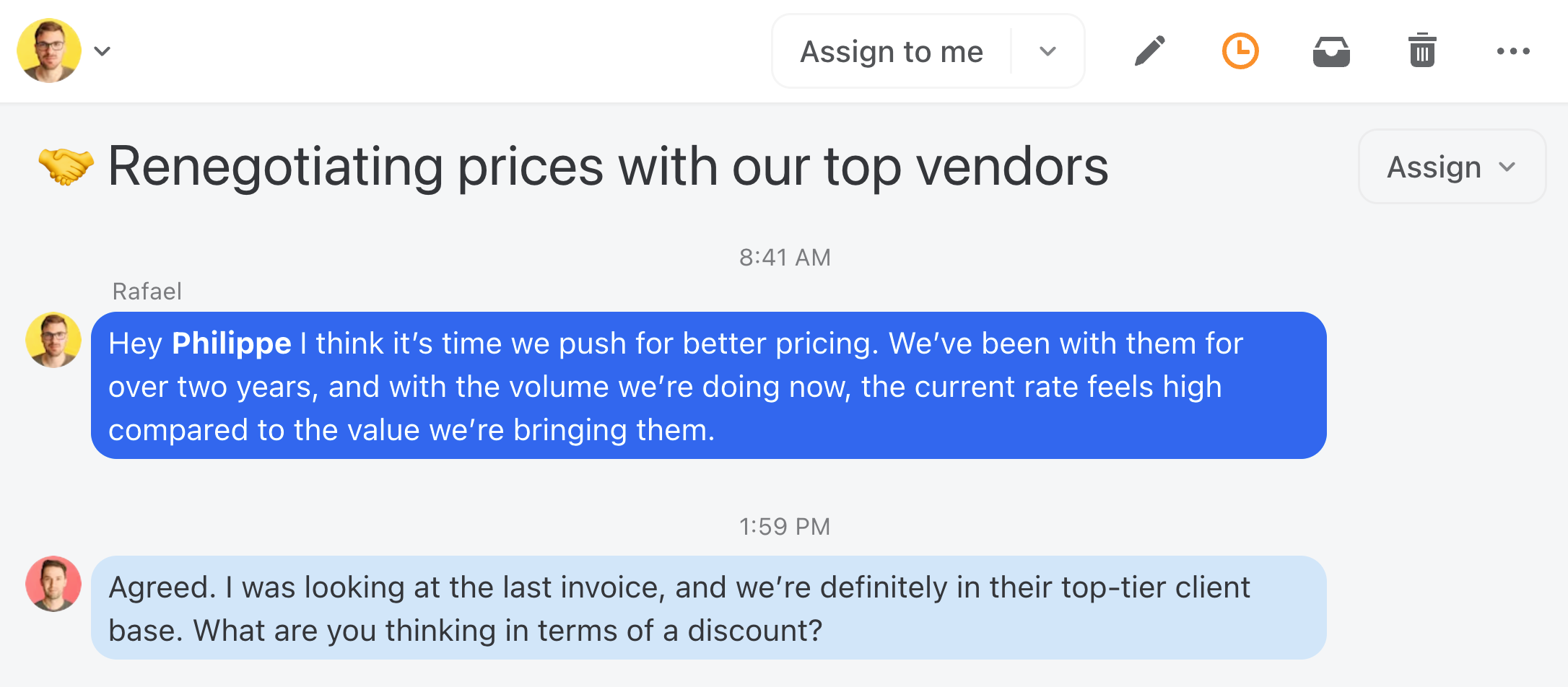
- Create internal conversations for team discussions about complex client requests. This keeps conversations off email threads and in a dedicated space.
- Team members can @mention colleagues, share context, and make decisions—all without the client seeing a thing.
Step 4: Add Your Other Channels (SMS, WhatsApp, Social)
Missive isn't just for email. Connect your SMS lines, WhatsApp Business, and social media accounts so that every client touchpoint feeds into the same workspace. Your team can respond to a WhatsApp message and follow up over email—all from the same conversation thread.
Step 5: Set Up Contact Cards for Clients
- Save contact details (like phone numbers, email addresses, and notes) in Missive for easy reference.
- Add relevant labels like "VIP Customer" or "Maintenance Plan."

Step 6: Create Response Time Rules (SLAs)
- Use Missive's rules to set up automatic reminders for response times based on the urgency of a request. For example:
- Urgent requests: Respond within 2 hours.
- Routine inquiries: Respond within 1 business day.

Step 7: Build Your Canned Response Library
- Create templates for frequently asked questions, appointment confirmations, or follow-up emails.
- Examples:
- "Thank you for reaching out! A team member will contact you shortly."
- "Your request has been scheduled for [date]. If you have any questions, please let us know."
Your Day-to-Day Workflow: A Practical Walkthrough
With your configuration in place, here's how to handle client requests effectively:
When a New Request Comes In
Once a request arrives:
- Assign it to the appropriate team member directly in Missive.
- Include additional notes or files (e.g., a previous service history).
- Use labels like "Urgent," "Follow-Up Required," or "Pending Approval" to keep requests organized.
Pro tip: You can also create rules to automatically label conversations based on keywords. Read more here.
Tracking Progress Across Your Team
Team members can:
- Use internal chat to discuss requests or clarify details.
- Update the status of the request using shared labels like
Closing the Loop (And Keeping Records)
Once the service is completed:
- Send the invoice directly from Missive.
- Use a canned response for thank-you emails or service confirmations.
- Archive the conversation for future reference.
- Merge all messages related to the service into a single conversation.
Siloed vs. Centralized Communication
Still on the fence? Here's how a siloed approach compares to a centralized system like Missive:
| Feature | Siloed Communication | Centralized (Missive) |
|---|---|---|
| Visibility | Limited to account holder | Full team transparency |
| Collaboration | Forwarding/CCing required | Internal chat on threads |
| Organization | Manual folders | Shared labels and rules |
| Accountability | Unclear ownership | Assigned conversations with SLAs |
| Multi-channel | Separate apps per channel | Email, SMS, social in one place |
Best Practices by Role
For Business Owners and Managers
- Periodically review SLAs and adjust rules as needed.
- Provide feedback on canned responses or communication styles.
- Regularly review open conversations in Team Inboxes to ensure no request is left unassigned.
- Use Missive's analytics to track team performance (e.g., average response times).
- Redirect clients who email you personally to the team inbox—this solves the "CEO bottleneck" problem where only you have context on key accounts.

For Team Members
- Keep all communications within Missive to avoid scattered conversations.
- Mark completed tasks or close conversations promptly to keep the workflow moving.
- Use internal chat for questions instead of side-channel Slack messages or personal texts.
Common Mistakes to Avoid
Teams that rush into centralization without a plan often hit the same pitfalls. Watch out for these:
- Creating too many labels or folders. Start with five or fewer status labels and expand only when you have a clear need. Overcomplicating the system slows adoption.
- Not defining clear assignment rules. If nobody knows who should pick up a new request, it sits untouched. Decide upfront: round-robin, by client, by specialty, or by availability.
- Forgetting to set up SLA reminders. Without automated nudges, response times slip—especially during busy periods.
- Skipping team training on internal chat. If your team doesn't know about Missive's internal comments, they'll default to forwarding emails and CC chains. A 15-minute walkthrough prevents this.
- Trying to migrate everything at once. Start with one team or one inbox. Get the workflow right, then expand to other teams and channels.
Making It Work for Your Business
The key to managing client requests effectively is creating a system that's easy for your team to follow. Start simple, and as your team becomes more comfortable with Missive, refine the workflow to suit your specific needs.
By centralizing communication, assigning conversations clearly, and maintaining accountability, you'll not only handle requests efficiently but also provide a great client experience—earning trust and loyalty along the way.
Frequently Asked Questions
How long does it take to set up a centralized client communication system?
Most teams can get a basic setup running in under an hour. Creating your team inbox, connecting email accounts, and setting up a few labels is straightforward. The more detailed work—canned responses, SLA rules, and multi-channel connections—typically happens over the first week as you refine the workflow to match how your team actually operates.
What happens to our existing email history when we switch to Missive?
When you connect your email accounts to Missive, your existing messages sync over. Your team will have access to past conversations and can pick up where they left off. There's no need to manually export or import anything—Missive pulls in your email history automatically.
Can I centralize channels beyond email (SMS, WhatsApp, social media)?
Yes. Missive supports SMS (via Twilio), WhatsApp Business, Instagram, Facebook Messenger, and more. Every channel feeds into the same shared workspace, so your team can manage all client conversations without switching between apps.
How do I handle clients who keep emailing me personally instead of the team inbox?
This is one of the most common challenges for business owners. In Missive, you can set up a rule to automatically share conversations from your personal inbox with the relevant team. You can also use a canned response to gently redirect clients: "Thanks for reaching out! For the fastest response, please email help@company.com—my team monitors it around the clock."
What if my team resists changing how we handle emails?
Change resistance is normal. The best approach is to start small—have one team or department pilot Missive for a week. Once they experience the reduced back-and-forth and clearer ownership, adoption tends to happen naturally. A quick 15-minute onboarding walkthrough also goes a long way.

November 28, 2024
9 best Help Scout alternatives for 2026
Looking for alternatives to Help Scout? These 9 tools cover shared inboxes, help desk software, and customer communication platforms, with features and pricing to help you choose.
Help Scout is a capable help desk software designed to handle customer communication and support. But as with most tools, it has limitations that send people looking for alternatives.
Here are the most common reasons people look for a Help Scout competitor:
- Limited customization. The self-service knowledge base is less flexible than some competitors, and the integration library is smaller than platforms like Zendesk.
- High cost for what you get. Help Scout’s entry tier is $25/user/month (Standard, billed annually), which can be a lot for small teams or solo operators who don’t need the full help-desk suite.
- Support-only scope. Help Scout is built specifically for customer support ticketing. If your team also needs to handle sales, general team email, or internal collaboration, you’ll need a separate tool.
- Missing email client features. Basics like CC support are limited. For teams that think of their inbox as a regular email client, the restrictions feel awkward.
- Developer gaps. Key API endpoints (like knowledge base article control) are missing. Webhook coverage is limited, and SDK support across languages is inconsistent.
We’ve narrowed down the 9 best Help Scout alternatives for 2026. Some are traditional help desk platforms. Others are more flexible communication tools that can replace Help Scout while doing more. Each section covers what the tool is best for, key features, and pricing.
A note on pricing: prices below reflect annual billing where applicable, which is the standard way these tools are quoted. Monthly billing typically runs 20–40% higher. Pricing in this category has been moving fast; we last verified in April 2026, but spot-check current tiers before making a buying decision.
1. Missive
Best for teams who want real collaboration on customer support plus other channels.
Missive and Help Scout both offer shared inboxes, reply templates, integrations, and analytics. Where they diverge is on scope and collaboration.
Missive isn’t just a support tool; it’s a full collaborative email client that works for customer support, sales, internal team email, and multi-channel communication (email, SMS, WhatsApp, Instagram, Messenger, live chat). You can use one tool for shared inboxes and your personal email, instead of splitting between Help Scout and Gmail.
Key advantages over Help Scout
- Broader channel support. Email, live chat, SMS, WhatsApp, Messenger, Instagram, and more in one place. Help Scout is primarily email + live chat.
- Live drafting. See teammates typing in real time and co-edit replies. Help Scout doesn’t support collaborative replies.
- Internal chat inside conversations. @mention coworkers and discuss replies without leaving the email. Help Scout only supports notes.
- Flexible assignments. Assign to individuals, teams, or multiple people. Help Scout’s assignment model is simpler.
- Advanced rules. Content-aware rules (with AI-powered options) that work across all channels, not just email.
- Multiple aliases per inbox. Manage multiple domains from one account. Help Scout doesn’t support this natively.
- Native apps everywhere. Unified experience across web, macOS, Windows, iOS, Android. Help Scout’s mobile apps have limited feature parity.
Pricing
Missive has no free plan. Every new team gets a 30-day trial with Productive features, then plans start at $14/user/month billed yearly, materially cheaper than Help Scout’s $25/user/month Standard tier.
2. Zendesk
Best for larger teams that need an enterprise help desk platform.
Zendesk is the industry veteran in the customer support space. If you’ve outgrown Help Scout and need more powerful ticketing, reporting, and workflow capabilities, Zendesk is the heavier option.
Why teams pick Zendesk over Help Scout:
- Wide range of channels: email, phone, chatbots, social media, SMS
- Full help desk toolset: ticketing, knowledge base, self-service portal, SLAs
- Detailed analytics and customer history
- Large integration marketplace (hundreds more than Help Scout)
- Full REST API coverage across tickets, users, and articles
The tradeoff: Zendesk is complex to set up and maintain. If your team doesn’t need its depth, you’ll pay for features you never use. If you’re not sure you need full ticketing at all, our ticketing system vs shared inbox comparison walks through the decision.
Pricing
Support Team (email-only ticketing) starts at $19/agent/month billed annually. Suite Team, the plan that actually compares to shared inbox tools with multichannel support, knowledge base, and chat, starts at $55/agent/month. Zendesk consistently pushes buyers toward Suite, so $55 is the more honest comparison number for most teams.
3. HubSpot
Best for teams already using HubSpot for sales and marketing.
HubSpot’s Service Hub is a solid help desk tool if you’re already using HubSpot for CRM, marketing, or sales. The integration with customer data across the HubSpot suite is the main reason to pick it.
Key features:
- Ticketing system with automated routing
- Live chat and chatbot builder
- Customer portal with self-service knowledge base
- Native CRM integration
- Analytics tied to broader HubSpot customer data
If you’re not already in the HubSpot ecosystem, adopting their support tool alone is overkill. The value is in the integration with the rest of the platform.
On the developer side: HubSpot has a capable API but lacks publicly accessible knowledge base endpoints, and webhook coverage doesn’t include article changes or portal interactions.
Pricing
Starts around $30/user/month on Starter Service Hub. A free tier covers basic functionality. Pricing changes frequently; verify current tiers on their site.
4. Zoho Desk
Best for teams that want a configurable help desk at a competitive price.
Zoho Desk is part of the broader Zoho suite. It covers the full help desk feature set (ticketing, knowledge base, live chat) with deep customization options, and it’s price-competitive with Help Scout while often offering more features per dollar.
Key features:
- Ticketing with tagging, prioritization, and rule-based routing
- Multichannel support (email, chat, social, phone)
- Integration with the wider Zoho suite (CRM, Projects, Campaigns)
- High configurability for teams with specific workflow needs
Developer note: Zoho Desk offers broad REST APIs for tickets, users, and automations, but documentation on knowledge base endpoints is limited and SDK coverage varies by language.
Pricing
Standard starts at $14/user/month billed annually, or $20/user/month billed monthly.
5. HelpCrunch
Best for teams that want AI-forward customer service.
HelpCrunch is a more AI-forward alternative to Help Scout, combining customer service and engagement in one platform.
Key features:
- Omnichannel inbox. Manage chat, email, and messenger conversations in one place.
- AI agents. Automate replies to repetitive queries using AI trained on your documentation and customer data.
- Campaigns and triggers. Send automated behavior-based messages for engagement and retention.
- Knowledge base. Create help articles that also train your AI agents.
Pricing
Basic starts at $12/user/month billed annually (or $15/user/month billed monthly) with AI features included. No free plan, but all tiers include a full-featured free trial.
6. Freshdesk
Best for small businesses wanting a polished help desk with generous free tier.
Freshdesk is a help desk for small businesses with a strong free tier and a clean interface.
Key features:
- Multi-channel support. Email, phone, chat, and social media from one inbox.
- Automation. Workflow automation to handle repetitive routing and assignment.
- Collaboration. Teams can work together on support tickets with assignments, comments, and resolution tracking.
- Developer API. Covers most core objects, though webhooks are limited to ticket events and don’t cover knowledge base article automations.
Pricing
Growth starts at $15/agent/month billed annually (or $29 billed monthly). A free plan covers basic functionality. If you’re looking at Freshdesk Omni (their multichannel product), Growth is $29/agent/month billed annually.
7. Front
Best for larger teams willing to pay for enterprise polish.
Front is a customer communication platform that combines channels into one inbox. It’s less traditional than Help Scout (no out-of-the-box knowledge base) and more focused on team collaboration around messaging.
Key features:
- Multichannel support. Email, live chat, social media, SMS.
- Team collaboration. Real-time collaboration and commenting inside conversations.
- Customizable inboxes. Tailored views for different teams or workflows.
- Automation. Rules and macros for common support workflows.
- Developer features. REST API for contacts, inboxes, and messages, though knowledge base management is read-only and webhook coverage excludes bulk actions.
Pricing
Starter starts at $25/seat/month billed annually, capped at 10 seats and single-channel. Higher tiers (Growth, Scale, Premier) unlock more seats, channels, and enterprise features.
8. Helpwise
Best for small teams wanting a lightweight shared inbox.
Helpwise is a focused shared inbox tool that handles the basics well without the complexity of a full help desk.
Key features:
- Shared inbox. Multiple people work the same email address.
- Collaboration. Built-in commenting on conversations.
- Email management. Assignments, prioritization, and response tracking.
If you want a minimal setup and simple interface, Helpwise is straightforward. If you need developer customization or deep automation, it’s too limited.
Pricing
Standard starts at $15/user/month. Premium is $25/user/month and Advanced is $50/user/month.
9. Hiver
Best for teams that want to keep working inside Gmail.
Hiver is a Chrome extension that adds help desk features on top of Gmail. You keep the interface your team already knows while getting assignments, tagging, and automation.
Key features:
- Familiar interface. Lives inside Gmail, no separate app to learn.
- Multi-channel coverage. Email, chatbots, and internal email threads. Feature depth is limited compared to dedicated help desks.
- Low customization. Minimal API capabilities, limited webhook and automation options, no external SDK.
Good for small Gmail-based teams that want something simple. Not the right pick if you need deep customization.
Pricing
Hiver recently restructured: there’s now a free forever plan, with Growth starting at $25/user/month billed annually ($35 monthly), Pro at $45/user/month annual ($55 monthly), and Elite at $75/user/month annual ($95 monthly). AI features are a separate $20/user/month add-on on top of the seat price.
Conclusion
Help Scout is a well-established customer support tool. But there are plenty of alternatives that offer similar or better capabilities, often at a lower price, with more flexibility, or with broader channel support.
The right Help Scout alternative for your team depends on what you actually need. For teams who want real collaboration across email, SMS, and chat, Missive is the clearest fit. For enterprise support operations, Zendesk. For Gmail-native teams wanting something light, Hiver. For AI-forward workflows, HelpCrunch.
Try the top two or three candidates with your real workflow. The best tool on paper is usually not the best tool in practice.
FAQ
Is Help Scout a CRM tool?
No. Help Scout is a customer support platform, not a CRM. It integrates with many CRM tools so customer data can flow in and out, but the product itself is focused on ticketing and support conversations.
What is Help Scout used for?
Help Scout is used by customer support teams to manage email, live chat, and knowledge base content in one platform with collaboration features for team members.
Is Help Scout free?
Partly. Help Scout has a free plan for up to 5 users with one inbox, capped at 100 contacts a month, after which outgoing replies stop until the next cycle. Paid pricing starts at $25/user/month for Standard, with a 15-day trial.
What’s the cheapest Help Scout alternative?
Freshdesk and Hiver have free tiers, so they are the cheapest way to start. Missive does not. Every new team gets a 30-day trial with Productive features and no credit card instead, which tells you more than three seats will. On paid plans, HelpCrunch ($12/mo annual with AI), Zoho Desk ($14/mo annual), Missive ($14/mo annual), Freshdesk ($15/mo annual), and Helpwise ($15/mo) are all meaningfully cheaper than Help Scout’s $25/mo Standard tier.
Which Help Scout alternative has the most features?
Zendesk has the deepest feature set, especially for larger organizations. But feature depth isn’t always an advantage: more features mean more configuration, more learning curve, and more unused capabilities you’re paying for. For most small and mid-sized teams, Missive or Freshdesk offers a better balance.
Which alternative works best for small teams?
Freshdesk and Hiver both have free tiers, and Hiver’s covers unlimited users, so they are the cheapest places to start. Missive has no free plan, but its 30-day trial covers up to 25 people and the full Productive feature set. The right choice depends on how much collaboration and multi-channel support you need.
Are these prices billed monthly or annually?
Annually, unless noted otherwise. Monthly billing typically costs 20–40% more on most of these tools. Annual is the standard way these platforms quote pricing, but verify your specific plan’s terms before purchasing.

November 21, 2024
Email Delegation for Assistants, Leaders, and More.
Today's email delegation requires strategic thinking, careful prioritization, and the right tools to make it all work seamlessly.
The role of executive support has evolved a lot. Whether you're a Chief of Staff, Executive Assistant, or Team Lead, managing someone else's communication is no longer just about forwarding emails to/from a Gmail account and sending basic responses.
Today's email delegation requires strategic thinking, careful prioritization, and the right tools to make it all work seamlessly.
With Missive, email delegation is easy and secure — whether you're coming years of mailing through Gmail, Outlook, or or Apple Mail. You decide to whom and what to delegate, the type of access, and actions permitted.
Modern Email Delegation
Gone are the days of sharing passwords to a Gmail account or setting up complicated email forwarding rules for an shared mailbox. Modern email delegation is about creating efficient workflows that grant access while maintaining security and accountability.
Here's what that looks like in practice:
Executive Assistants
- Managing multiple executive inboxes
- Managing multiple shared email addresses (i.e. Google Groups)
- Drafting responses for review
- Triaging urgent emails
- Deleting emails that aren't relevant
- Coordinating cross-department communication
- Maintaining relationship management through timely responses
Chiefs of Staff
- Overseeing strategic communications
- Delegating between executive team members
- Handling sensitive information with discretion
- Aligning communication with company objectives
Team Leads
- Delegating customer inquiries
- Managing shared department inboxes
- Coordinating project communications
- Training new team members
- Maintaining communication standards
3 Missive Configurations for Email Delegation
Missive offers powerful workflows designed for modern email delegation (whether you have Gmail accounts, Outlook accounts, or IMAP accounts):
Out-of-the-Box Delegation (aka @mentions)
Once you've added all your email addresses to Missive, basic delegation requires no setup. Team members can delegate by mentioning @coworkers in the chat bar to collaborate and grant access to specific threads. No more forwarding endless email threads—everything stays in Missive for easy tracking and reference.

Other settings, such as sharing email aliases, can be used to allow a team member to send emails from another team member's address. With this configuration, a team member can reply on your behalf but won't have access to all incoming emails unless they're being shared.
You will always have access to all emails sent by a delegated user.
Full Delegation with Team Inboxes
For roles that need full access to another’s inbox, such as an executive assistant needing a CEO’s inbox, Missive offers a Team Inbox solution. Connecting an email account (like a Google Workspace email) to a Team Inbox allows all communications to be managed in one centralized space. This makes it easy to stay organized and adapt as your organization grows. Simply add new members to the Team, and they’ll instantly gain access to the shared emails.
With team inboxes, there’s no need to mix shared emails with personal inboxes, and multiple team members can work together seamlessly, which is especially helpful for remote teams.

Assistants can be granted members of the team, and owners can be observers, these don't get notified of new emails, but they can keep an eye on everything at all times. You can customize who is an observer or member in the admin console.

The assistant can reply as the owner of the email account (ceo@acme.com). Also, a custom signature can be created.

Assistants can also triage emails by creating color-coded shared labels.


Triage-only access
Similar to the case above, all email arrives in a Team Inbox but through a shared email address.
The big difference is the shared email addresses nature. In this configuration, the assistant can see all incoming emails but cannot reply as the recipient (ceo@acme.com), only as themself (assistant@acme.com).
Automated, Privacy-First Delegation
If an account contains private messages, Missive allows you to set up rules to filter these from the assistant’s view. For example, family, friends, or finance-related emails will not be delegated, ensuring personal information stays private. This setup balances delegation with privacy, providing peace of mind while maintaining workflow efficiency.
In this case, the owner imports a private account. Here, email sharing is done automatically through rules. This configuration of delegation is essential when the content of some emails is private and can’t be seen by the assistant.
The owner (ceo@acme.com) can create rules to delegate only some emails with the assistant (assistant@acme.com) and keep the rest private.
In the next example, a rule is set to keep all family/friends/finance related emails from going to the assistant's inbox.

Actions such as removing a conversation from the owner's inbox can also be achieved with rules. For instance, when the assistant labels an email as "Non-essential", the rule will close the conversation, removing it from the owner's inbox, keeping it tidy.

Creating a Delegation System That Works
The key to successful email delegation isn't just about tools – it's about creating a system that works for both the delegate and the owner. Here's how to build one:
1. Clear Access Levels
Different roles require different levels of access. Consider creating tiers:
- Full access for trusted executive assistants
- Filtered access for department managers
- Specific thread access for project coordinators
2. Communication Rules
Establish clear guidelines for:
- Which emails need executive review
- Standard response templates
- Urgency levels and response times
- Internal communication protocols
- Signature and formatting standards
- VIP email addresses
3. Privacy Protocols
Set up boundaries for:
- Personal vs. professional communication
- Confidential information handling
- Internal sensitive matters
- Financial or legal correspondence
Best Practices for Modern Email Delegation
For Assistants
Mastering Triage:
- Create clear labeling systems
- Establish urgent vs. important criteria
- Document recurring patterns
Communication Management:
- Draft responses in your executive's voice
- Maintain relationship continuity
- Track important conversations
- Manage calendar integration
- Keep contextual notes
For Executives
Delegation Success:
- Provide clear preferences and guidelines
- Establish regular review times
- Give feedback on responses
- Share context for important relationships
- Trust your delegate's judgment
For Teams
Collaborative Efficiency:
- Set up shared response canned responses
- Create Team Inbox protocols
- Establish assignment rules
- Maintain consistent communication standards
- Track team performance metrics
Making It Work for You
The key to successful email delegation is finding the right balance between:
- Access and privacy
- Efficiency and accuracy
- Speed and thoughtfulness
- Automation and personal touch
- Standardization and flexibility
Remember, effective email delegation isn't just about managing messages – it's about facilitating communication that moves your organization forward.
Whether you're new to delegating emails or looking to improve your existing system, the most important thing is creating a framework that works for your specific situation. Start with delegation basics , refine as you go, and always keep security and efficiency in balance.

October 26, 2024
5 Missive features you gotta know
Five underused Missive features that quietly save the most time: merging threads, a custom sidebar, inline canned responses, the command bar, and custom thread names.
Five Missive features that quietly save the most time once you actually use them: merging email threads, customizing your sidebar, inserting canned responses inline with #shortname, the command bar (Cmd/Ctrl+K), and renaming threads so they make sense at a glance. Most people know Missive has these. Fewer people build them into their daily workflow.
When I started my career, my first experience with team email was chaotic. Multiple inboxes, scattered conversations, constant back-and-forth about who was handling what. It was a nightmare.
At my last job, we used Missive, and it was night and day compared to my previous experience. But it wasn’t until I discovered some of the hidden features that things really clicked for me.
Over the past few years I’ve used Missive daily, and for the last year I’ve been helping Missive customers uncover the hidden gems. Today I want to share the five features that transformed how I handle communication. These aren’t the flashy ones, they’re the practical, everyday tools that make a real difference.
1. Merging email threads
You know when someone starts a new email thread about something you’re already discussing in another thread? This used to drive me crazy. In Missive, you just drag one conversation onto the other and they merge into a single thread. Everything stays in order, nothing gets lost, and suddenly all your context is in one place.
Where this shines:
- A customer replies to an old email instead of the original thread for the same issue
- Multiple customers reporting the same issue
- Getting quotes from different suppliers
- Project discussions that branch off and need to be reconnected
Pro tip: You can’t undo a merge, but you can move messages out of a merged conversation into new private or shared ones.
2. Your sidebar, your rules
Customizing your sidebar might not sound revolutionary at first, but trust me: it’s like finally organizing your desk after years of chaos.
What makes it special:
- Move your most-used mailboxes to the top
- Hide the stuff you rarely touch
- Group things however they make sense to YOU
- Create separate sections for different projects or clients
How different teams use this:
Support teams:
- Support Team Inbox at the top
- Urgent issues section with labels
- Team chat of the Support team
- Archived mailbox hidden but accessible
Sales teams:
- Hot lead labels front and center
- Separate sections for each pipeline stage
- Quick access to Sales team room
- “Follow-up” label pinned
Project managers:
- Project-specific inboxes grouped
- Client communication sections
- Team room easily accessible
- Deadline-sensitive items labels
Pro tip: You can also create whole new sections. Just drag an item on top of the +More button in the sidebar.
3. Type # and save hours
This feature is genuinely powerful: inserting canned responses inline. Do you know what I mean?
Type a hashtag followed by your response name, and boom, your full message appears right where you’re typing. No more copying and pasting, no more digging through templates.
My team’s favorite uses:
- #hi: Personalized welcome messages for new email requests
- #followup: “Thanks for reaching out”
- #lmka: “Let me know if you need anything else, I’d be happy to help”
- #meet: Inserts a link with my Calendly availability
- #thanks: Thank-you messages with next steps
Power user tips:
- Create variations of common responses (formal vs. casual)
- Include variables for personalization
- Set up team-wide responses for consistency
- Use short, memorable hashtags for the ones you use most
- Create responses in multiple languages
4. The command bar (Ctrl/Cmd + K)
If you learn one keyboard shortcut in Missive, make it this one. Press Cmd+K on Mac (or Ctrl+K on Windows) and you’ve got instant access to pretty much everything.
Things you can do from the command bar:
- Create new emails, events, or tasks
- Access settings and preferences
- Switch between 1:1 rooms
- Search for specific messages
- Manage rules and labels
- Open contact books
- Set a status
- And much more
If I time-track myself for a week with and without using the command bar, the difference is about 3 minutes saved each day just from reducing mouse usage and menu navigation. Compound that over a year and it adds up fast.
5. Custom thread names that actually make sense
This last one is simple but brilliant. You can rename email threads to whatever you want.
Smart ways to use this:
- Add project phase indicators (“Brand Design - Phase 2 Feedback”)
- Include priority levels (“URGENT: Server Issue Resolution”)
- Add dates for time-sensitive stuff (“Q4 Planning - Due Oct 30”)
- Tag conversations by department (“HR: New Hire Onboarding - Sarah”)
Putting it all together: power user workflows
The real magic happens when you combine some of these features.
Handling an inbound request from big leads:
- Pin your “Big Leads” label to the sidebar
- Merge all email communication and Calendly invites into one thread
- Use the command bar for quick navigation between your other tasks
For support teams, try this workflow:
- Merge support requests from the same customer
- Rename threads with issue types and status
- Use canned responses for common solutions
- Organize the sidebar by priority levels
The impact on your daily work
Depending on your use case, after implementing these features across your team:
- Email response time drops by a few minutes per day
- Context switching goes down
- Team coordination improves
Getting started
Don’t try to implement everything at once. Start with the feature that addresses your biggest pain point:
- Drowning in split conversations? Start with merging
- Spending too much time on repeated responses? Focus on inline canned responses
- Can’t find anything? Organize the sidebar
- Lost in endless threads? Start renaming conversations
Give them a shot. Start with one, get comfortable, then move on to the next. You might be surprised at how much time you save. For more on how Missive fits into team email workflows, see our guide to shared inboxes.

October 1, 2024
A Decade of Lazy Marketing
A look back at the marketing efforts that fueled Missive's growth over the past 10 years.
When talking about Missive, I often dropped this bomb:
— We never did any marketing.
Well, looking back, it’s a lie. Or let’s just say that it’s an understatement.
Or maybe I was being lazy and not recollecting the many small things we did.
Now that the Missive team is growing fast (read more), I realized, you must tell your team the complete story to equip them with success.
I’m writing this for our future Head of marketing. It’s a list of all of the things we did marketing-wise for the last ten-ish years. As you can see, not so much.
To me it's a testament that, yes, if you build something that people like, they will find you.
Now, imagine with a marketing team...
Note: We got our first customer on Jul. 20, 2016 and we are now at ~$500k USD MRR eight years later.

Everything we did marketing-wise
1. First homepage, at this point Missive was free to use beta. 2015

2. We have a Blog we updated sporadically. 2015 - 2024
3. Multiple ProductHunt launches. 2015-2023

4. A Brief History of Email Apps. - A failed attempt at creating valuable content. Was fun to do, but was a miserable failure. 2015

5. Twitter - Hello Word 2015

6. Email cold outreach to a few people we admired to get feedback and validate the product. No more than 50 emails total were sent. 2015

7. Second homepage and the release of our paid plans. 2016

8. Twitter - I monitored conversations about competitors, email clients, etc. and mentioned Missive in replies. 2016-2023

9. Nailed basic SEO vitals. 2016-2024

10. Open sourced EmojiMart component, now used by big startups (e.g. Figma!). It's a big driver of traffic and backlinks. 2016-2024

11. Attending the Inbox Awesome conference in NYC, the conference was for email marketers, not our target audience. Here is a picture of me on a panel about how to make people open and read your email newsletters. I had 0 clue what I was doing. I attended two years in a row because we like the title "Inbox Awesome" 🤣. 2016-2017

12. Getting both our desktop and mobile javascript apps featured on the App Store and writing about it. This established us as a legitimate player in the email client space. 2017

13. Published VS competitor landing pages, to this day, these are our most valuable content. 2016-2024

14. Developed integrations with popular SaaS (Asana, Salesforce, Aircall, etc.). This created nice co-marketing opportunities like being featured in their app/integration store. 2019-2023

15. Third homepage (current one). 2020

16. We deprecated a really popular feature, read tracking, we explained our reasoning in a blog post. This was an important decision, it helped defined our company culture and product direction. It mostly created churn for solo-user customers.
17. We hired consultants to do SEO + write content. We did with two firms, both times the firm owners were paid Missive users. In both instances we paid $10k/month and the experiment went on for around six months. Six months is not a lot in the SEO world, but each time, both we and the consultant learned that writing good content on an app like Missive is really hard and can't be done by pay-to-hire-content-writers. 2022 & 2024
18. We ditched Google analytics, for privacy reasons, read more. I'm still not so sure about this one, it does feel like we did some privacy-posturing. Now, this might be a potential friction for our future marketing team. We have no plan to re-visit this at the moment.
19. We created a homemade affiliate program. 2022 - 2024

20. MRR milestone blog posts + Hacker news traffic 2021-2024


21. We created many case studies to showcase how Missive is used by people in different industries. Those were pushed on LinkedIn and X.2020-2023

22. We sent a total of forty newsletters, all were a summary of our progress pushing out the content of our changelog. 2016-2024

23. We offer weekly webinars potential customers can attend to learn more about the product and each webinar offers a dedicated Q&A at the end. Those webinars have been a great success, specially for people coming from other competitors looking for a validation that the switch to Missive is a good decision. 2020 - 2024

24. We attended our first trade show in an industry where we find some of our bigger customers, logistic companies. I wrote an article about our experience. 2024

25. We got serious with G2 and other review sites and started earning multiple customer reviews and earning multiple badges. 2024

26. All co-founders did couple of podcasts & interviews over the years. (1, 2, 3, 4, 5, 6, 7, 8, ...) 2016 - 2024
27. I developed our product metric pipeline with Segment and Mixpanel. This will be useful for the future marketing team. 2024

This list is really a testament of how small our team was and how focused on the product we were. We were lucky enough those small initiatives created enough traction to where we are today. Having said that, reading it again, it shows unequivocally how amateurish our marketing efforts were.
It's time to bring expertise and structure, our marketing efforts should be as good as the quality of our product. And thus, we are looking for a Head of Marketing. If you are interested, please reach out (email).

June 11, 2024
Missive’s First Trade Show
Our journey to learning the ropes of trade shows and connecting with the right people in the logistics industry.
The time and energy invested in our product metrics pipeline allowed us to answer questions like which industries are extracting the most value out of Missive.

Starting with metrics
After crunching our numbers (organization size, core functionalities usage, ease of onboarding), the answer was:
- Logistics/Transportation (mostly brokers & carriers)
- Travel/Property management (luxury travel agencies, tour operators)
- Finance/Legal (accountants, law firms)
- Retail (various sectors)
- Manufacturing (various sectors)
With this insight, our next question was: where can we meet as many people from these industries in person? Our first instinct was to attend industry-specific trade shows.
With that in mind, three weeks ago, we identified FreightWaves Future of Supply Chain in Atlanta as the biggest short-term opportunity. We contacted the organizers and negotiated an interesting package:
- A 7-minute demo on the live stage
- A 6x6 booth
- A 10-minute interview on "What the Truck?!?" radio show
Organization
Once confirmed, we had two weeks to organize the whole trip. Two team members would go: Janie (COO) and myself (CEO). The first thing I did was to make noise about our attendance. I posted on LinkedIn, X (formerly Twitter), and the Hampton founders community. My angle was to be transparent about us having zero experience and going there to learn as much as possible.
Instantly, people started to reach out privately to give tips on how we should approach this to get as much ROI as possible. I want to personally thank two people. Vic Cherubini, who proactively reached out, organized his thoughts around trade shows before our call, and shared valuable insights:

I also want to thank Maxime Villemure, an ex-pro poker player turned logistics entrepreneur, who reached out on X and proposed a call to teach me everything about 3PL/Logistics and his industry.

With these personal coaching sessions and Janie’s firsthand experience with trade shows, we understood the need to reach out to as many people as possible before the show.
- Contacted our existing customers in the industry
- Make noise on LinkedIn/X
- Cold outreach to attendees
The first two were easy. The last was harder as we did not have a list of attendees. However, the Future of Supply Chain website had logos of all the businesses attending. We took screenshots, then used ChatGPT-4o to identify the domain names related to all logos. We then passed that domain list to Hunter.io and got a list of possible email addresses to reach out to.
Janie then proceeded to message people on LinkedIn or cold-reach them via email about our presence at the event.
Execution
All in all, we successfully scheduled two demos through these messages. Not bad, but not great. The good news is the conference wasn’t huge, so all attendees saw our booth, making pre-booking meetings less important.
Vic provided excellent tips for our booth, but we ended up having no time to implement most of them. We kept things simple. Arnaud quickly created a video that we looped on the TV:
<figure> <div class="video-container"> <iframe src="https://www.youtube-nocookie.com/embed//5Z6S7w2_rk0?quality=high&modestbranding=1&showinfo=0&rel=0&theme=light&autoplay=0" frameborder="0" allow="accelerometer; clipboard-write; encrypted-media; gyroscope; picture-in-picture" allowfullscreen></iframe> </div></figure>
I used my laptop to demo the product directly to attendees. All in all, we did 33 demos at the booth. I did a good job with the demo on the main stage, both highlighting the pain of brokers dealing with a massive volume of emails and the solutions Missive has to offer (team inboxes, AI, rules & automation, custom integrations and analytics).

Many people also discovered the product while listening to the radio interview I did live on the What the truck?!? Radio show.

We mostly encountered three types of leads:
- Potential customers (brokers)
- Potential industry-specific integrations (TMS)
- Content/marketing partnerships (industry influencers, founders)
- Big shots (investors, VPs of large logistics businesses)
We scanned their badges and took screenshots of the person to remember post-event who and what. Janie also took notes in the lead retrieval app. Janie spent our airport transit day following-up with everyone we talked to or showed interest.

From our conversations, I assume we can hope to convert at least 5 organizations, all having need for 50 seats each, to Missive.
Conclusion
We have yet to assess the ROI of this trip to Atlanta, but just as an experience it was an absolute eye-opener and I came away wanting to invest way more resources into attending industry specific trade shows.
One quote from Paul Graham I absolutely abide by is “action produces information”, and we absolutely did with this first trade show.

May 17, 2024
All-hands Team Memo • May 2024
A small window into our vision, challenges, strategies, and roadmap. Written by our CEO.
At Missive, we're not fans of meetings. However, we’ve just started doing all-hands, few times a year, to keep in sync.
The idea is, prior to each, I send a written memo about our vision, challenges, strategies, and roadmap – a snapshot of our current status.
After writing the first one, I decided why not share it with our customers. Here it is, our second memo.
👋 Hello team,
It has been 51 days since our first all-hands; that timespan is 14% of the year. Time flies by incredibly fast, looking back it’s a constant reminder of how time-constrained we are. For this second memo I plan to share updates on various subjects, list the things we’ve achieved, then go over things we have planned for the next few weeks.
On Missive + Tasks
Arnaud and Etienne have been working on scoping the upcoming task improvements.
Our goal is to integrate conversations and tasks in a natural way to improve visibility and accountability. As you can imagine, this requires a few core changes to ensure simplicity and ease of use. Let's dive in!
Currently, in Missive, you can assign and close a conversation. This is useful for customer support, where you don’t need to be descriptive about what needs to be done. The act of assigning a customer question is good enough, your colleague will reply to the customer and then close the conversation.
When you need to be more descriptive about the work that needs to be accomplished, Missive offers the ability to create tasks within conversations, each of which can be assigned to a colleague. For instance, you might create a task for your assistant to export a specific PDF report and attach it to one of your drafts.
Having two different mechanisms (assigned conversations and tasks) to keep track of what needs to be done creates complexity. Ultimately, whether it's an assigned conversation or an assigned task, the key is to have tools to plan your day and know what you and your colleagues need to focus on.
This upcoming update will thus not only focus on bringing a My tasks view but also bridge the gap between assigned conversations and tasks. So both can be managed using the same tools (My tasks, Calendars, Due date, etc.)

On the technical side of things, Rafael started brainstorming and scoping the architecture and database changes required for these new functionalities. It has been decided that Denys will be responsible for building the first prototypes of those changes on the backend, and Etienne will lead the front-end.
On SOC 2
Our SOC 2 Type 1 audit started last Tuesday, May 14th. We should receive our SOC 2 Type 1 certification pretty soon.

Going through the different SOC 2 controls was a really interesting and beneficial experience in terms of battle-proofing our different security and privacy processes.
Getting this certification will streamline the onboarding process for larger customers. Instead of filling out custom security questionnaires for each customer, our certification letter will likely serve as a replacement.
The SOC 2 certification will also enhance the credibility of Missive for customers of all sizes, not just the larger ones.
On Product Metrics
It took us more than eight years to include product metrics in Missive, but we finally did it. For most of our history, we were completely blind to how people were using Missive or how our initiatives were impacting users, apart from our direct conversations with customers.
As we scale the team and become less involved in every customer conversation, it is crucial to build a flexible metric dashboard. The workflow is built using Segment for data ingestion and Mixpanel for visualization.

My next step is to build a workflow for Luis and Janie to help them follow up with potential customers. The data in Mixpanel will allow them to reach out with relevant information based on product usage, such as:
- Have they created rules?
- Have they created labels?
- What are their use cases?
- Have they connected email accounts?
- Have they had any failed payments?
If you don’t have access to Mixpanel, just ask, and I will invite you.
On Price Increase
On April 15, we released a yearly subscription option, increased the price of all our plans, and removed some plan limitations. This price increase had several goals:
- Decrease the gap between the price of Missive and our competitors.
- Increase the incentive for organizations to subscribe to the new yearly subscription.
- Auto-filter solo users who were churning at a high rate due to a lack of value in the collaborative features central to the Missive experience.
Here are the results of the price increase on our MRR:

We can observe the immediate 10% price increase for all seats, followed by many organizations removing seats they had added to lock in the legacy pricing. We also see numerous organizations switching their subscriptions from monthly to yearly in the following days. This bump and slump in the MRR is expected as more organizations switch to the yearly plan and receive a 20% discount.

Interestingly, before the price increase, the Starter plan was the least popular option among our users. The six-month history limit and the small price difference between the Starter and Productive plans led most new users to choose the Productive plan.

Since April 15, the Starter plan has become the most popular. This is great because it leaves room for those organizations to eventually upgrade to the Productive plan for features like rules and integrations.
On Affiliates
Following the price increase, we also increased the rewards affiliates can get when referring customers to us. Interested to learn more about our affiliate program? I recently wrote a blog post about it here.

On Webinars and Customer Interviews
Luis has taken over the duty of doing webinars. He is still doing the bi-weekly team inbox webinar. He also created one specifically tailored for users on the Productive plan about the rules and integrations.

Luis is also conducting user interviews using the JTBD (jobs to be done) framework. The results of all interviews he made so far can be consulted on Notion.

These interviews, along with our product metrics, will help us better understand our customers and how they use Missive. The ultimate goal is to learn to speak their language, allowing us to better tailor our marketing and sales initiatives.
On Support
Philippe Langlois is doing a great job with support, the number of support messages has stayed relatively the same but the first reply time and handle time has been constantly decreasing over the last few weeks.

Philippe also started to systematically reply to all customers having had a successful interaction with him to get a potential review at Trustpilot, G2 and others. We can clearly see when he started doing this:

On Marketing
For the past few months, we collaborated with a marketing agency to produce content and structure our marketing efforts. However, both parties agreed that we had reached the full potential of this partnership and decided to end it. Moving forward, we will bring all marketing efforts in-house.
I have a strong bias towards action over strategizing, which made it challenging for me to maximize this partnership. Paul Graham’s quote, "If you're not sure what to do as an entrepreneur, do anything. Action produces information," resonates strongly with me.
As an organization, we can't rely on a perfectly fine-tuned recipe for marketing, development, product, etc., because the ingredients are never exactly the same. We need to figure things out ourselves, fail, adapt, and eventually win.
There are no shortcuts; we need to do the hard work ourselves.
On Development
We are now five months in our experiment of scaling up the team with senior developers having years of experience with Ruby/Rails. In those 5 months we have made a lot of progress into not making Missive so dependent on one man, Rafael.
- Implement CI on GitHub (specs and code formatter).
- Created and deployed monitoring system for developers access to production server.
- 1Password secrets to ease development and improve production security posture.
- Automatic deployment from GitHub to multiple Heroku apps to ultimately let devs other than Raf deploy to production.
- Better GitHub integration in Missive.
- Production DB backup monitoring.
- Updated to the latest Rails version.
- Updated to Ruby 3.3.
- Automated user data exports to reduce manual operations requirements.
- Greg, Denys and Louis-Michel all got familiar with part of the code base only Rafael was familiar with.
Louis-Michel and Denys have each started working on features that are extremely high on our Canny board, so we are quite excited about the next few months.
On The New Office
We just moved to our new office in Quebec city. For Etienne, Rafael and myself, it’s nothing new as it’s the same office where the first line of codes for Missive were coded in 2015 in what was the now defunct co-working space, Abri.co.


Keep all in mind that 36% of our staff is not located in Quebec, so we will stay predominantly a remote first culture. Conversations should happen online (text, video) most of the time.
Rails World + Offsite

We were extremely happy to have secured six tickets to attend the next Rails World in Toronto next September. We will take advantage of the conference to fly everyone to Quebec city a few days before the conference. It will be the first time the whole company will meet in person!
See more information about Rails Word in our Notion.
Customer Field Trip
End of May Janie and I will fly to New-York for 3 days to meet our best customers from the Big Apple. This will be a first for me as I’ve rarely met customers in real life apart from the few we have in Quebec city! I will probably also go to the bay area and LA soon to do the same. Why? From every business-oriented person I talked to, it is an absolute must to meet your best customers in person:
- You show them that you care. You make them fans for life.
- You gather real honest feedback you would never have got from just an email or phone call.
- You can work on their pain and expand their use of your product.
- They can help us expand our network and share insights on how to sell to their industry.
Trade shows and Conferences
On June 4th and 5th, Janie and I will be attending our first trade show, the Future of Supply Chain. This event focuses on transportation and logistics businesses, which are key customer segments for us. These businesses typically have a large number of user seats and are heavy users of our assignment, chat, and task features.
We will have a small booth, and I will be giving a 7-minute demonstration of Missive on the main stage.

We aim to connect with potential big customers and hopefully secure new business. This will be a valuable learning experience for us and help us define what we need going forward to improve go to market strategies.

Next, we plan to participate in more events within the logistics and transportation industries. Additionally, we will explore opportunities in the travel and hospitality industry, where we also have a strong customer base.

May 2, 2024
We coded an affiliate program from scratch!
Two years in, it’s time to assess if it was successful.
At Missive, we were blessed with eight years of organic growth. As a small team of developers with limited resources, we never invested much in marketing.
One of the few initiatives we did, was quite “cliché” for developer entrepreneurs… we coded an affiliate system from scratch. Two years in, it’s time to assess if it was successful.
Why an affiliate program?
Our customers have always been extremely enthusiastic about Missive, so naturally, developing an affiliate program made sense. This would allow us to delegate our marketing to our customers while they could benefit from their efforts by reducing their monthly invoices. A developer’s dream!
Why build it from scratch?
Missive is a collaborative email client that deals with sensitive customer data, which we take very seriously. It was always out of the question to insert third-party scripts into our app for privacy and security reasons. That meant no easy product metrics, no easy marketing attribution, and most importantly in this case, not being able to create an affiliate program using an off-the-shelf solution.

Building it ourselves also meant we could have more control on the affiliate experience. For instance, every organization owner can automatically open its affiliate dashboard from Missive and see their balance and potential gain.

On rewards
We pay a monthly reward for each seat in a referred organization that upgrades to a paid plan, and do so for up to 5 months. If a seat cancels, let’s say, after two months, the total reward will be limited to only those two months. This way every referral is always profitable.
- Up to $25 per Starter user referred.
- Up to $50 per Productive user referred.
- Up to $75 per Business user referred.
Rewards are either credited directly to customer invoices or paid out in cash, once balances exceed $250. We use PayPal for payouts up to $5,000 and do bank wire transfers for larger sums.

To this date we have paid or credited more than $115,000 to our affiliates. The lion’s share of the payouts was given to just two affiliates, where the biggest one earned more than $60,000 in cash payouts. Our best affiliate was an existing Missive customer who runs a digital advertising business.
On affiliates doing paid advertising
We initially let affiliates do paid advertising with no limitation. Some did so on our brand keyword, “Missive”. I believe the bulk of the $115,000 we paid out was earned this way. We recently changed our mind on this, it is now against our program terms to advertise on search that include our brand “Missive” keyword. The advertising effort of affiliates should be focused on people not already familiar with Missive.

On customers referring other customers
Only around 15% of the total earnings were paid to 55 customers via credits applied to their invoices. Few customers referred others through the program, and thus few received credits on their invoices. Most of our customers, when doing word of mouth, don’t even bother using our affiliate program.
Final takeaways
First, if we want the affiliate program to be a significant part of our new business we need to better market it. The program itself is a product.
Second, we should increase the value of the rewards, especially given we now prevent our affiliates from doing advertising on customers already familiar with Missive.
Starting today, the rewards for referred users subscribing to our latest plans will be increased to:
- Up to $60 per Starter user referred. + 240% increase
- Up to $100 per Productive user referred. + 200% increase
- Up to $145 per Business user referred. + 193% increase
With these new rewards I believe our customer base will have more incentive to share their affiliate link. It will also become more profitable for professional affiliates or influencers.
If you want to try it yourself, just create a Missive account, then from the app open your settings and select the Rewards option!